
Flowfile 0.20: Change Tracking, Cloud Delta Merges, KPI Tiles
0.19.1 and 0.20.0: a Catalog Reader that returns only the rows that changed since its last run, upsert and change feeds on Delta tables in S3, KPI tiles, and query tabs in the SQL editor.
TL;DR. Catalog tables can record their changes, so a reader asks for the rows inserted, updated or deleted since its last run instead of the whole table. The same merge modes and change feeds now work on Delta tables at an S3 or Azure path. Dashboards get KPI tiles, the SQL editor gets query tabs, and the group-by, pivot and unpivot drawers share a new column picker.
Everything in 0.19.1 and 0.20.0. The notebook overhaul before them is in the 0.19 notes.
A nightly flow that reads an orders table to refresh a report usually only needs the rows that changed since last night. Until now the Catalog Reader had one answer: the whole table, every run. 0.19.1 gives it three more.
Change tracking
Tick Track changes on a Catalog Writer and every write after it records its row-level changes alongside the data. Underneath it is Delta Lake’s change data feed, a table property; Flowfile turns it on, remembers the version it was turned on at, and keeps a cursor per consumer.
The Catalog Reader gets a Read selector: Full table, Changes since last run, Changes since version, Changes since time. Every change mode adds three columns to the table’s own: _change_type (insert, update_postimage, delete), _commit_version and _commit_timestamp. An updated row shows up once, with its new values; tick Include row values from before each update to get the update_preimage rows too. A window with nothing in it returns an empty frame with the full schema, not an error, so a flow that fires during a quiet hour processes zero rows and stays green.
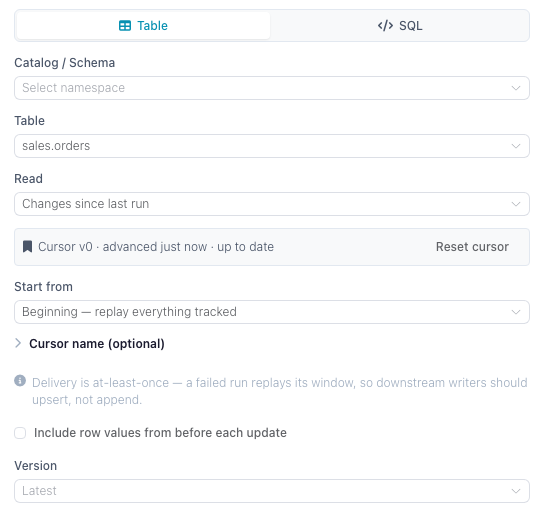
Changes since last run is the mode that keeps a cursor: the last Delta commit version this consumer fully processed. It moves only after a full flow run in which the reader and everything downstream of it completed. Previewing a node, running a single node or cancelling never advances it, and a failure anywhere downstream leaves it where it was, so the next run replays the same window. That makes delivery at-least-once: a run that writes and then dies before committing will deliver its window again. Make the downstream write an upsert on a key, not an append.
By default a cursor belongs to the node in the flow it lives in, so two flows reading the same table each see every change. Give the reader a Cursor name to share one position across flows instead. Start from decides what the first run does: Now (the default) initialises the cursor at the current version and reads nothing, Beginning replays everything recorded since tracking was enabled. The reader’s settings and the table’s detail page list the cursors with how far behind they are, with Reset and Delete.
Tracking is per table, off by default and enable-only: nothing in the UI turns it back off, because the changes a table stops recording are gone. The version it was turned on at is the floor for every read; history before it cannot be replayed. It is refused on virtual tables, legacy Parquet tables and SCD2 tables, which already keep their history in valid_from and valid_to. Overwrite is not offered with Track changes: an overwrite of a tracked table produces a feed of every row deleted and every row inserted, which is rarely what a consumer wants.
One more guard: a vacuum that would drop Delta history a cursor still points into is refused, with the cursors at risk listed and a Vacuum anyway button if you accept the loss.
From Python it’s track_changes=True on the write and changes_since on the read:
import flowfile as ff

schema = ff.default_schema()

day1 = ff.from_dict({"order_id": [1, 2], "status": ["new", "new"]})
ff.write_catalog_table(
    day1, "orders_changes", schema=schema,
    write_mode="upsert", merge_keys=["order_id"], track_changes=True,
)

day2 = ff.from_dict({"order_id": [2, 3], "status": ["shipped", "new"]})
ff.write_catalog_table(
    day2, "orders_changes", schema=schema,
    write_mode="upsert", merge_keys=["order_id"], track_changes=True,
)

changes = ff.read_catalog_table(
    "orders_changes", schema=schema,
    changes_since="last_run", changes_consumer="order-feed", changes_start="beginning",
)
The feed holds order 2 as update_postimage and order 3 as insert. Order 1 is absent: the second write never touched it. changes_since also takes an int for a version or an ISO-8601 string for a time.
This release adds a catalog schema migration (two columns on the tables table and a cursor table). The automatic backup before every migration covers it.
Delta tables in S3 and Azure: merge modes and change feeds
0.20.0 brings the catalog’s Delta primitives to a bare object-storage path. Write to cloud provider in Delta format offered overwrite and append; it now offers the catalog writer’s set: Overwrite, Error if exists, Append, Upsert, Update and Delete, with Key columns for the three merge modes, Partition by when the write creates the table, and the same Track changes flag. Upsert and Update add any source column the table doesn’t have yet. When the path points at an existing table, the drawer shows its current version and partition columns.
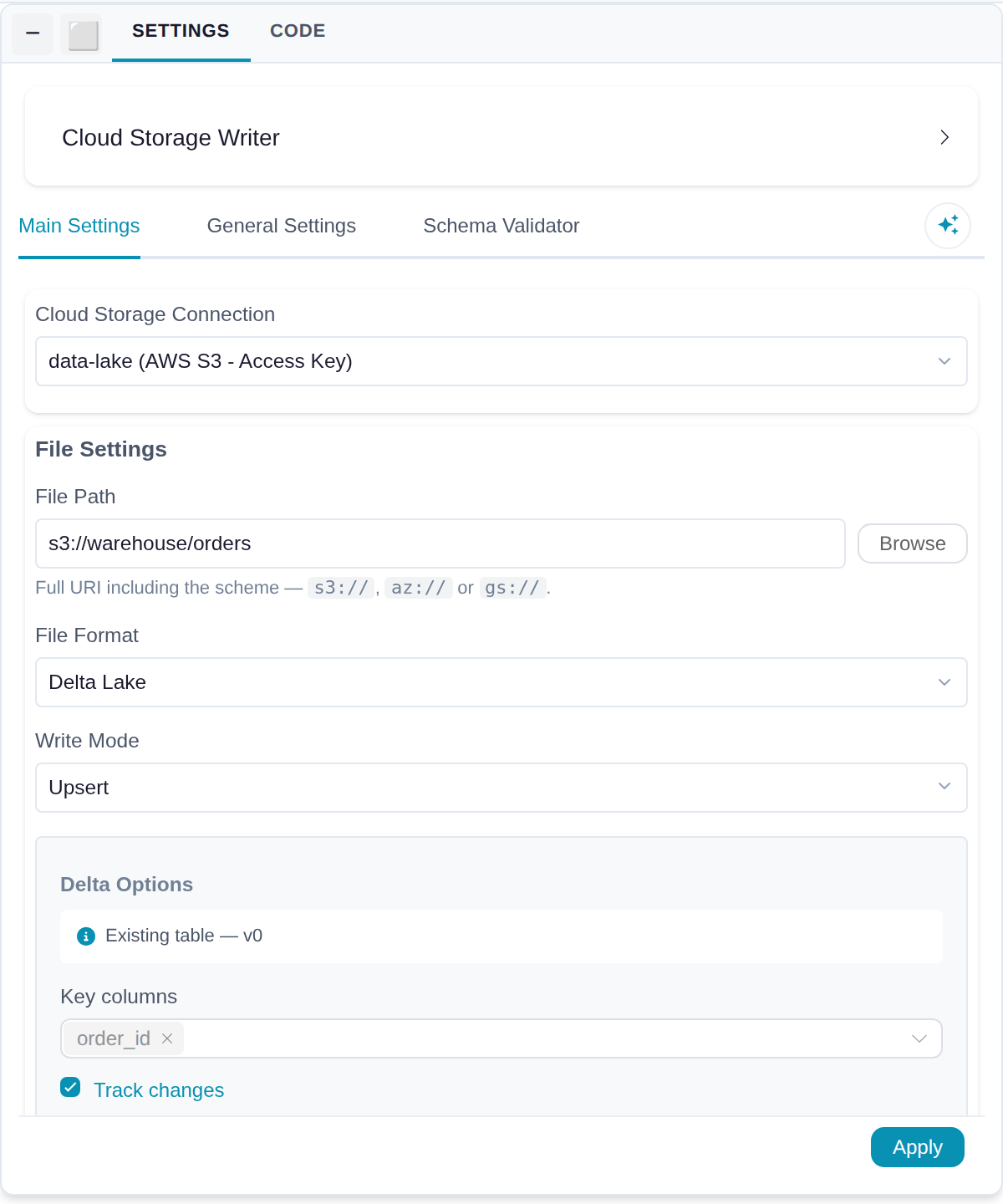
Read from cloud provider gets the Read selector too, with Changes since version and Changes since time. There is no Changes since last run: a path on S3 has nowhere to store a cursor. To process each change once, remember the highest _commit_version a run returned and pass it in as an integer flow parameter next time:
flowfile run flow orders_sync.yaml --param since_version=41The drawer also lists the table’s recent commits when you pick a Version for time travel. Merge modes and change tracking work on S3 and Azure Data Lake Storage; on gs:// paths the drawer disables them. In Python, write_delta and write_to_cloud_storage take write_mode, merge_keys and track_changes, and scan_delta takes changes_since.
Cloud connections
A pass over the cloud nodes and the connection form, mostly in the direction of saying what will happen before it happens.
No connection is now an explicit option in the reader and writer: run on the credentials of the machine running Flowfile, the AWS default credential chain for s3:// and the provider’s environment credentials for az:// and gs://. On a multi-user Docker server it’s disabled, local paths are refused, and only an administrator can own a connection that authenticates as the server itself (AWS CLI, IAM Role, Managed Identity, Application Default Credentials).
AWS CLI connections get a Profile field. Earlier versions used the connection name as the profile name; after upgrading, an existing AWS CLI connection uses the default credential chain until you set the profile. Access-key connections take an optional session token for STS credentials. Verify SSL is on by default and can be turned off for an S3 or ADLS endpoint with a self-signed certificate, and a custom endpoint works with any authentication method, so an AWS CLI profile can point at MinIO. An empty path or one without a scheme is flagged in the drawer and fails before anything is read or written.
Under the hood, S3 and Azure key credentials no longer travel decrypted inside the lazy query plan core ships to the worker. The plan carries a ciphertext and a credential provider that decrypts it wherever the plan runs. Azure service-principal secrets and GCS keys still go inline; that’s a known gap.
Dashboards: KPI tiles
A fourth tile type next to charts, text and separators: one number. Pick a saved visualization’s data source, a column and an aggregate (sum, average, median, min, max, count, distinct count). Dashboard filters apply; the chart’s own filters don’t. Optionally compare it against a target or the previous period, coloured by whether higher or lower is better. Prefix, suffix, decimals, compact notation and a fixed or auto-fitting number size.
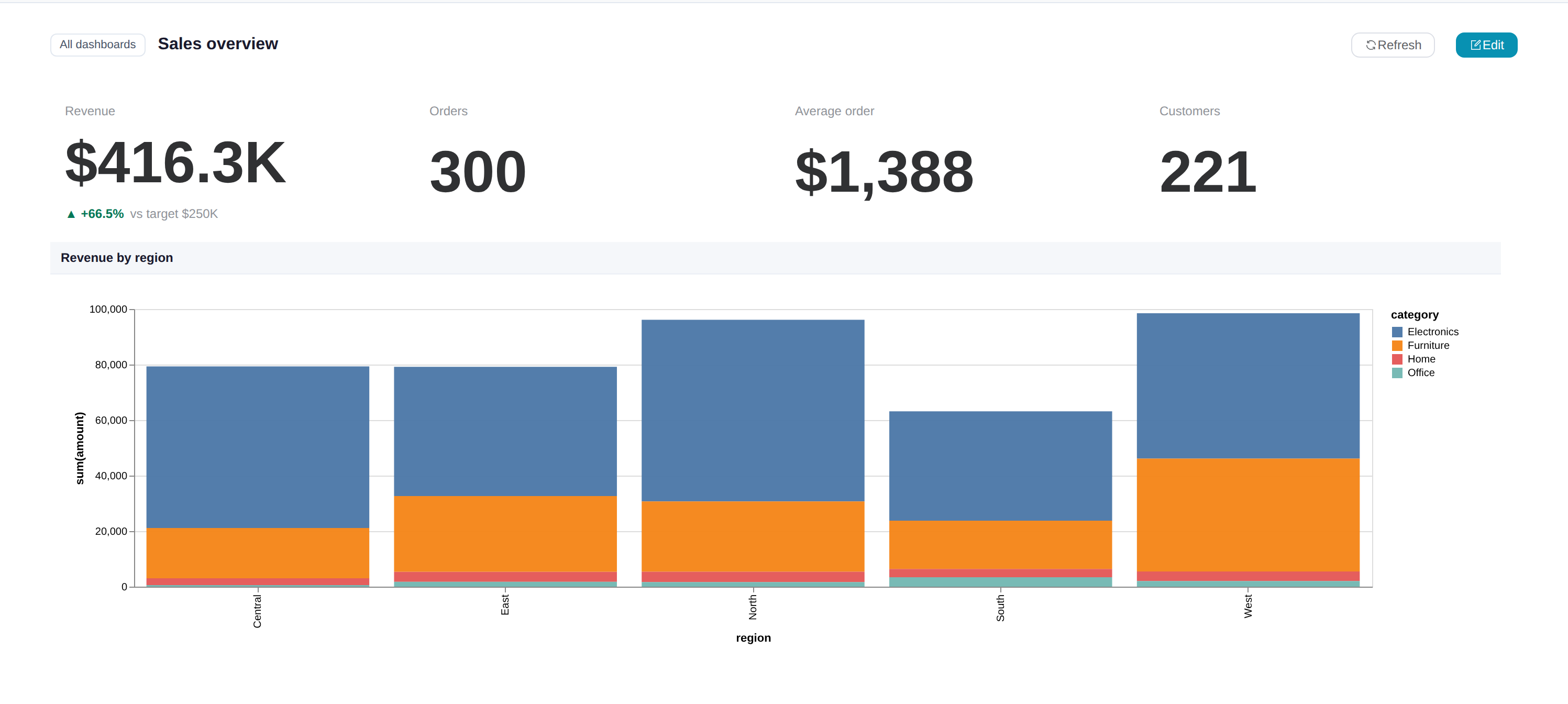
Previous-period comparison uses the dashboard’s date range filter and shifts that window back by its own length, so without a date range filter the tile shows only its value. A KPI tile spawns at a quarter width, four to a row.
SQL editor: tabs and saved queries
The catalog SQL editor has query tabs, and the editor itself resizes (drag the handle, double-click to reset). Tabs are drafts kept in this browser only, and the toolbar says so: “Draft · kept in this browser only” until you save a query as a query virtual table, after which the marker reads “Saved as
” or “edited since saved” and the button becomes Update virtual table. Edit SQL on a table’s detail page reopens its query in the tab already linked to it, so unsaved edits there survive. Results stay in memory when you leave the SQL tab and come back, and undo never crosses tabs.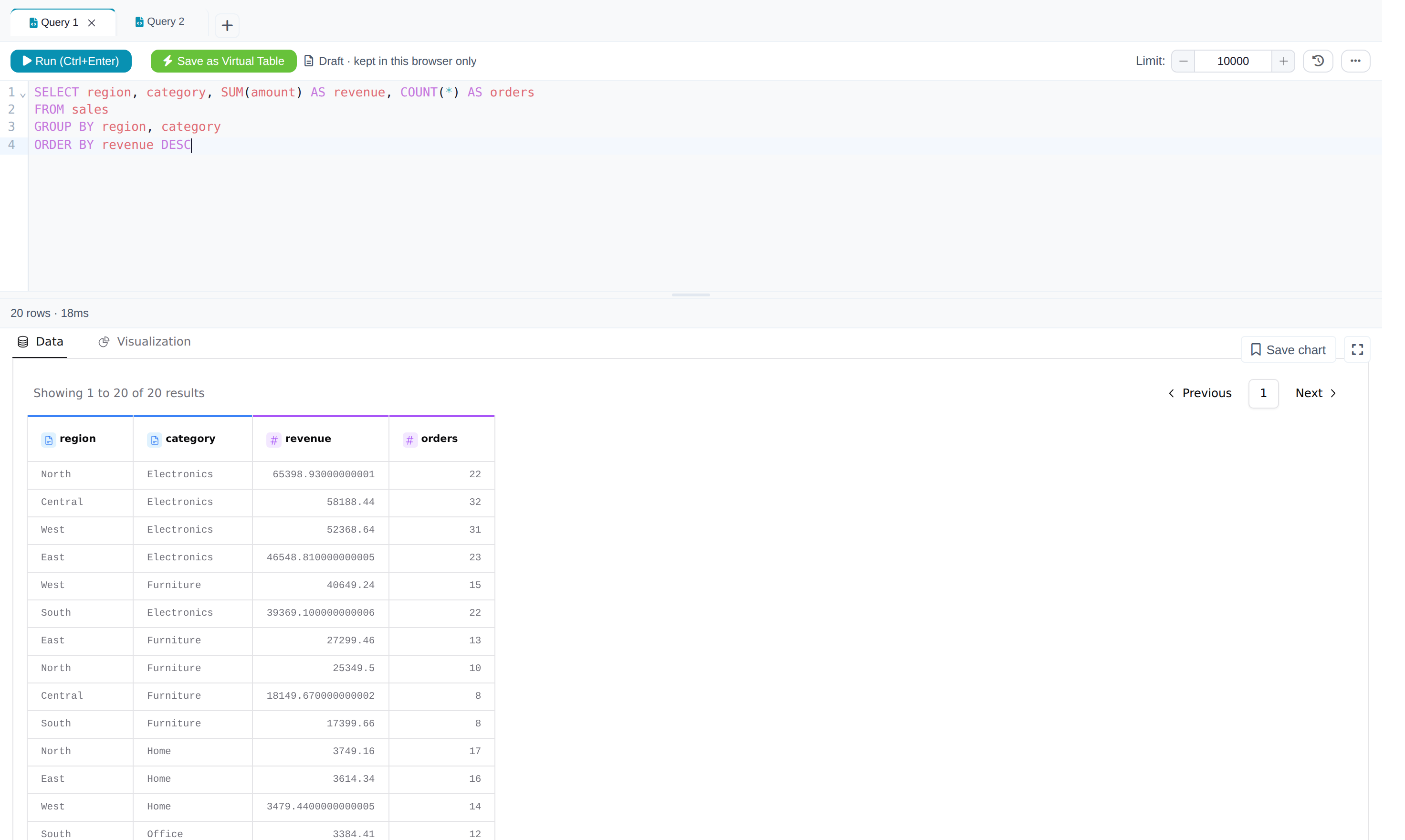
Group by, pivot and unpivot drawers
The three drawers share a new two-pane column picker: a sortable, filterable column table above the settings, each half scrolling in its own box so the settings never drop below the fold on a short drawer. Click, shift-click or cmd-click to select columns, then drag them onto the group-by keys or the aggregations, or use the two buttons. A numeric column defaults to sum, anything else to count; the output name follows the old context-menu convention (amount_sum) and retargets when you change the aggregation unless you typed it yourself. Duplicate output names are flagged in place, and chips on each column show how it’s already used.
Canvas and preview
- Undo/redo rebuilt. One step per gesture, however many nodes and edges it touched, recorded by core, which the canvas reloads from after an undo. Edits open in a settings drawer become the step being undone. A settings save that core refuses keeps the drawer open with your draft and a warning instead of discarding it; Run saves the open drawer first and doesn’t start if that fails.
- Copy and Download CSV in the data preview’s status bar and on notebook tables. Copy puts the selected rows, or the whole result, on the clipboard as tab-separated text that pastes into Excel or Sheets. Capped at 10,000 rows and 100,000 cells; list and struct columns are left out. For a full result, add a Write data node.
- The preview renders at most 1,000 columns and says how many it hid. AG Grid builds a header per column, and a 10,000-column result used to freeze the app.
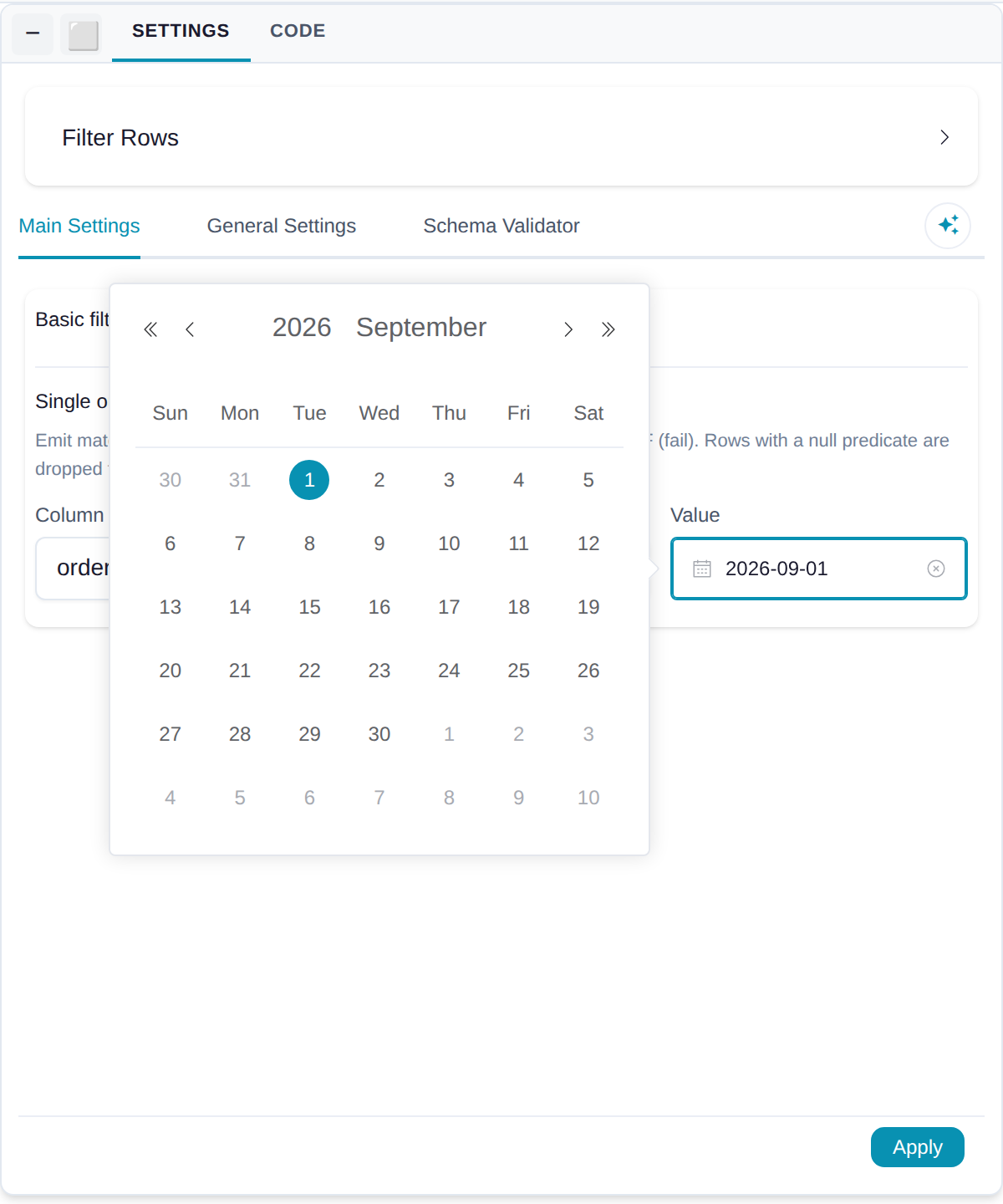
- Date picker in the Filter node for date and datetime columns, instead of a text box. In and Not in still take comma-separated
YYYY-MM-DDvalues. - Read data accepts gzipped CSV, TSV and NDJSON, decompressed on the fly, and Arrow IPC stream files (
.arrows), which have no lazy scan and are read on the worker.read_ipc_streamin Python. - Catalog pages open faster. The catalog screen mounts off one request instead of one per resource, and going back to it within 30 seconds renders what’s already loaded.
- Exported code names catalog tables by schema.
read_catalog_table("sales_data", namespace_full_name="sales.raw")instead ofnamespace_id=3, so a generated script moves between installs where the ids differ. - Fixes. 0.19.1: an event-loop deadlock on the auth database pool; map charts in Graphic Walker load their stylesheet locally instead of from a CDN; the Tauri content security policy is enforced in dev so violations show up before a release. 0.20.0: a crash in the cloud writer when a session token was empty, node settings not syncing when the panel was minimised, a palette drop over a floating panel landing hidden underneath it, and a notebook tab rename that closed the tab on Backspace.

pip install flowfile, or the desktop app. Full notes on GitHub for 0.19.1 and 0.20.0.
Next: 0.21 — every node from Python, and a node that explodes a bill of materials.