
Which Tableau are you trying to replace?
An honest look at open-source Tableau alternatives — and why the right answer depends on which Tableau you mean.
An honest look at open-source Tableau alternatives — and why the answer depends on which Tableau you mean.
My first data job ran on Tableau and Alteryx. Tableau taught me something I still believe: showing someone their data beats describing it. So when people land on Flowfile while searching for a “Tableau alternative,” I’d rather give them a real answer than a pitch.
The trouble is that the question is ambiguous. Tableau is at least two products wearing one name, and the right alternative depends on which one you’re trying to leave.
Tableau is two products
Tableau Desktop is the famous one. Drag fields onto shelves, get a chart, build a dashboard. It’s what people picture when they say “Tableau,” and after two decades of refinement it’s genuinely good at it.
Tableau Prep is the other one. It’s a visual data preparation tool: you build a pipeline of steps — clean, join, pivot, aggregate — and you can inspect the data after each one. It comes bundled with the Creator license, which runs $75 per user per month, billed annually. And if you want your flows to run on a schedule, that’s the Data Management add-on, on top.
Most people searching for a Tableau alternative mean Desktop. Some mean Prep. Those need completely different answers, so let’s take them one at a time.
If you mean Desktop, I’m probably not your answer
If what you want is dashboards — the BI layer, the thing executives open on Monday morning — the open-source route runs through Apache Superset or Metabase. Visualization is their whole job, and they’re good at it.
Flowfile has charts and dashboards too. You can explore a pipeline’s output, save charts, add filters and text tiles, and pin it all to a dashboard that lives in the catalog next to your flows. For the common case — you built something and want to see what came out — it’s enough, and I use it that way daily. But I won’t claim it replaces a tool whose entire reason for existing is visualization.
Yes, I built Flowfile and just told you to go look at Superset. The rest of this post is for the people still here.
If you mean Prep, now we’re talking
Flowfile works the same way Tableau Prep does: a visual pipeline where every step is a node, and you can see exactly what your data looks like after each one. If you’ve built Prep flows, the canvas will feel familiar within minutes. The differences are in what’s underneath, and in what comes out the other end.
The first difference is the boring one: it’s free and open source. MIT license, no seats, no add-ons. You can pip install flowfile, run it in Docker, install the desktop app, or try it in the browser at demo.flowfile.org without installing anything. It runs on Linux too, which Prep Builder doesn’t.
Under the hood it runs on Polars. Every step compiles into one lazy query that gets optimized before any data is touched, and it handles datasets bigger than memory. You don’t need to care about any of that to use it — it’s just why the preview comes back fast.
Scheduling comes with it: cron schedules, run history, logs, no separate purchase. The fine print is that schedules fire while Flowfile is up. On a Docker deployment that’s effectively always; on a laptop it means leaving it running, or starting the small standalone scheduler.
It also reads from more places than Prep — files and databases, but also REST APIs, cloud storage (S3, ADLS, GCS), Kafka, and Google Analytics. And a flow doesn’t have to end in a file. You can publish one as an authenticated HTTP API, which is a sentence I couldn’t have written about any visual prep tool I’ve used.
But the difference I care most about is what happens when you want to leave. Your flow isn’t a hostage.
A Prep flow is a .tfl file — under the hood, a zip of JSON that nothing except Tableau Prep can actually run. The logic you build there stays there. A Flowfile flow exports as code. Here’s what the generator produces for a small pipeline that reads a CSV, filters it, and aggregates (trimmed of a few reader options):
import polars as pl

def run_etl_pipeline():
    """
    ETL Pipeline: Monthly sales cleanup
    Generated from Flowfile
    """
    df_1 = pl.scan_csv("/data/sales_2026.csv")
    df_2 = df_1.filter(pl.col("status") == "completed")
    df_3 = df_2.group_by(["region"]).agg([
        pl.col("revenue").sum().alias("total_revenue"),
    ])
    return df_3
That’s plain Polars. It runs on any machine with Python — in your Airflow DAG, in a colleague’s code review — with no Flowfile installed. If you ever outgrow the tool, or just stop liking me, you take the logic and go.
One honest note, because this is where most tools oversell: the conversion to plain Polars covers most of what a typical flow does. Where Polars alone doesn’t reach — database connections, REST calls — the script falls back on Flowfile’s own modules, so it needs the flowfile package installed to run. And a couple of nodes, like the embedded Python script, don’t export at all; the generator tells you so up front rather than handing you a script with holes in it.
The part a feature list misses
All of that reads like a feature list, and feature lists undersell the thing I actually like most: it’s one system. The flow, its schedule, the API endpoint it serves, and the dashboard built on its output all live in the same tool, a tab apart.
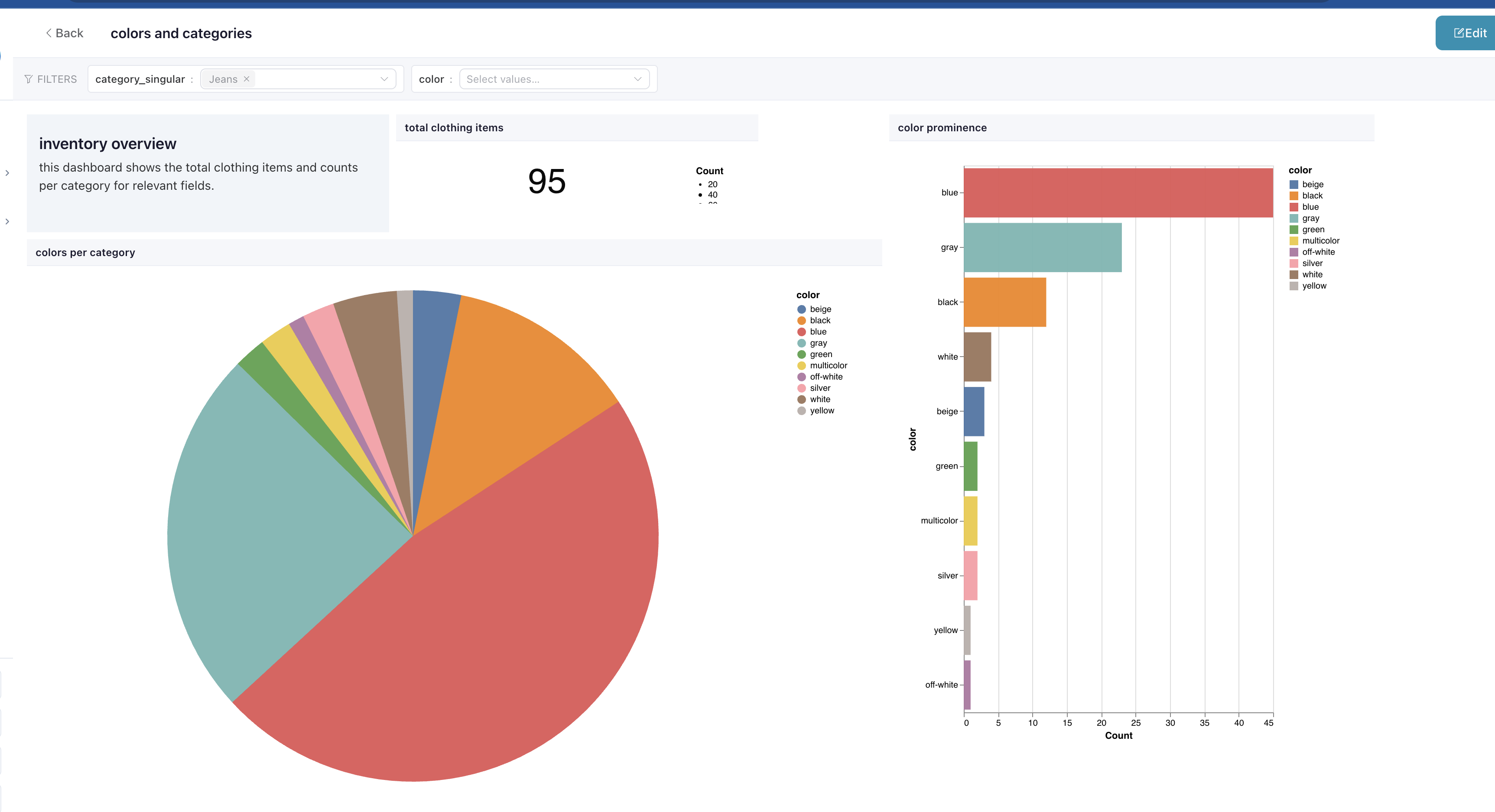 A dashboard in current Flowfile: filters across the top, a text tile, a counter, two charts — fed by a flow sitting one tab over.
In the Tableau world, that loop is assembled from parts: Prep Builder for the flow, the Data Management add-on to schedule it, Server or Cloud to host the result, Desktop to chart it. Every piece is good. The seams are where the afternoons go. In Flowfile, when a number on a dashboard looks wrong, I don’t trace it across applications — I open the flow that feeds it and inspect the data after every step until I find the lie.
I still mean what I said about Superset. But good-enough dashboards at zero distance from the pipeline have turned out to be worth more than I expected.
Where Tableau still wins
If your company lives in Tableau Server or Tableau Cloud, Prep’s integration is the actual product: flows publish as governed data sources, permissions carry over, lineage shows up in Catalog, and Hyper extracts feed straight into the dashboards everyone already uses. Flowfile writes files, databases, and its own catalog — it doesn’t plug into Tableau’s governance layer, and I have no plans to fake it.
Tableau also comes with an enterprise support contract, a training ecosystem, and a community measured in the hundreds of thousands. If those things matter to your organization, they’re worth paying for. That’s what the money is for.
The one question to ask
So before comparing feature tables, ask which Tableau you’re actually trying to replace. If it’s the charts, look at Superset or Metabase — or stay on Desktop, it’s good software. If it’s the flows, you want a visual pipeline tool that’s free, runs anywhere, schedules itself, and writes code you can keep.
That’s the one I built. You can try it in the browser right now, no install, at demo.flowfile.org, or pip install flowfile and open one of your own messy CSVs. The source is on GitHub — and if you run into one of those export gaps, the issue tracker is right there.
Related reads: What you can do with Flowfile for a tour of the everyday jobs it covers, and Alteryx alternatives in 2026: a field guide if you’re shopping the whole landscape rather than just the Tableau corner.
Frequently asked questions
- Is Flowfile a Tableau replacement?
- It depends which Tableau you mean. Flowfile is a visual data preparation tool — the same paradigm as Tableau Prep, not Tableau Desktop. If you want dashboards, Apache Superset or Metabase are better fits. If you want to replace the flow-building side, Flowfile is a strong match.
- Can I migrate my Tableau Prep flows to Flowfile?
- There's no automated converter — the .tfl format is proprietary and nothing outside Tableau Prep can run it. But the concepts map directly: every Prep step has a Flowfile equivalent, and the visual canvas will feel familiar within minutes. Rebuilding a typical flow takes an hour or two and doubles as an audit of the original logic.
- Does Flowfile have scheduling without a paid add-on?
- Yes. Cron scheduling, run history, and per-run logs are all built in at no extra cost. In Tableau Prep, scheduling requires the Data Management add-on on top of the Creator license.
- What happens to my pipeline logic if I stop using Flowfile?
- Flowfile exports flows as plain Polars Python scripts. The core transform logic — reads, filters, joins, aggregations — runs on any machine with Python installed, no Flowfile dependency. A Tableau Prep .tfl file can only run inside Tableau Prep.
- Does Flowfile integrate with Tableau Server or Tableau Cloud?
- No. Flowfile writes to files, databases, and its own catalog. It does not plug into Tableau's governance layer — no Hyper extracts, no governed data sources, no Catalog lineage. If your organization is deeply invested in Tableau Server or Cloud, that integration is a real argument for staying on Prep.