
Flowfile 0.22: The Canvas Notebook
0.22.0: the Code panel has a Notebook mode that shows a flow as Python cells. Edit a cell, run it, and the canvas changes, without the server executing a line of Python.
Flowfile 0.22.0 is one feature, the canvas notebook, and the things around it that make it work.
Press Code in the designer, pick Notebook, and the open flow is Python cells, one per statement. Edit a cell, run it, and the nodes it describes are on the canvas. Add a node on the canvas, and its cell shows up in the notebook. The same graph, edited from either side.
The canvas notebook
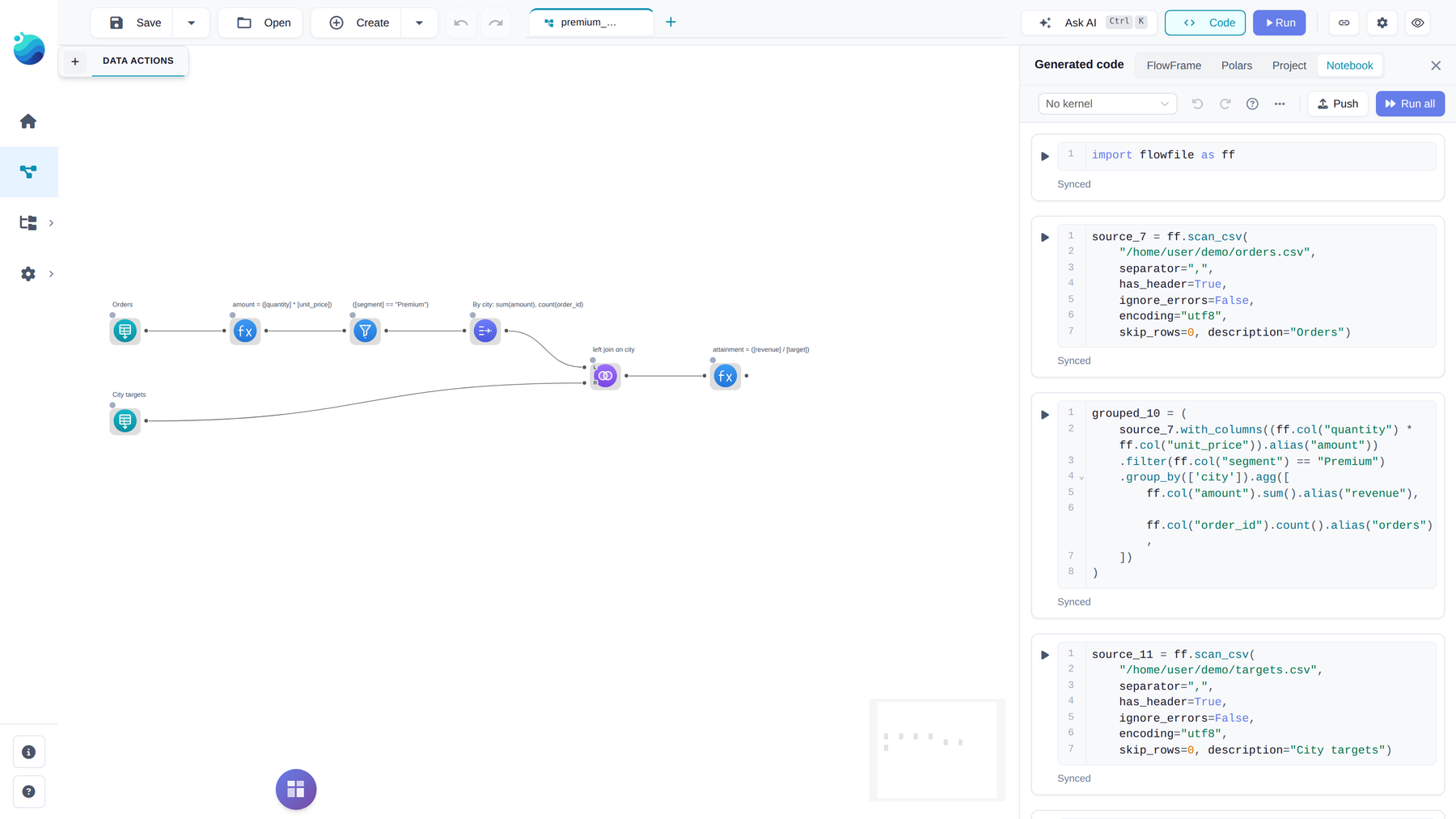
Ctrl/Cmd+G opens the Code panel as a pane beside the canvas, with four modes: FlowFrame, Polars, Project and Notebook. The canvas narrows to make room, dragging the pane’s left edge resizes it, and it remembers its width and the last mode you used. A double-click on an empty spot of the canvas closes it.
The first cells hold the imports and the flow parameters, then one cell per statement in the order the flow runs. A statement is every node that chains together, so a formula feeding a filter feeding a group-by is one cell: grouped_10 = source_7.with_columns(...).filter(...).group_by(...). The cells are the FlowFrame export, split: fluent FlowFrame calls for the built-in transforms, and the native node classes (ff.Gate, ff.RunFlow, @ff.python_script, custom nodes) for the rest. Dropping, connecting or saving a node on the canvas updates the cells within a couple of seconds; a cell you edited keeps your text. Each cell carries a marker, Synced, Edited or Sync failed, that compares it with the canvas.
Run (Shift+Enter) on a node cell first syncs the notebook to the canvas when the two differ, then runs that cell’s node and everything it depends on, honouring gates, and shows up to 100 rows: the preview the canvas shows, nothing else. Add a cell, type a sort, run it:
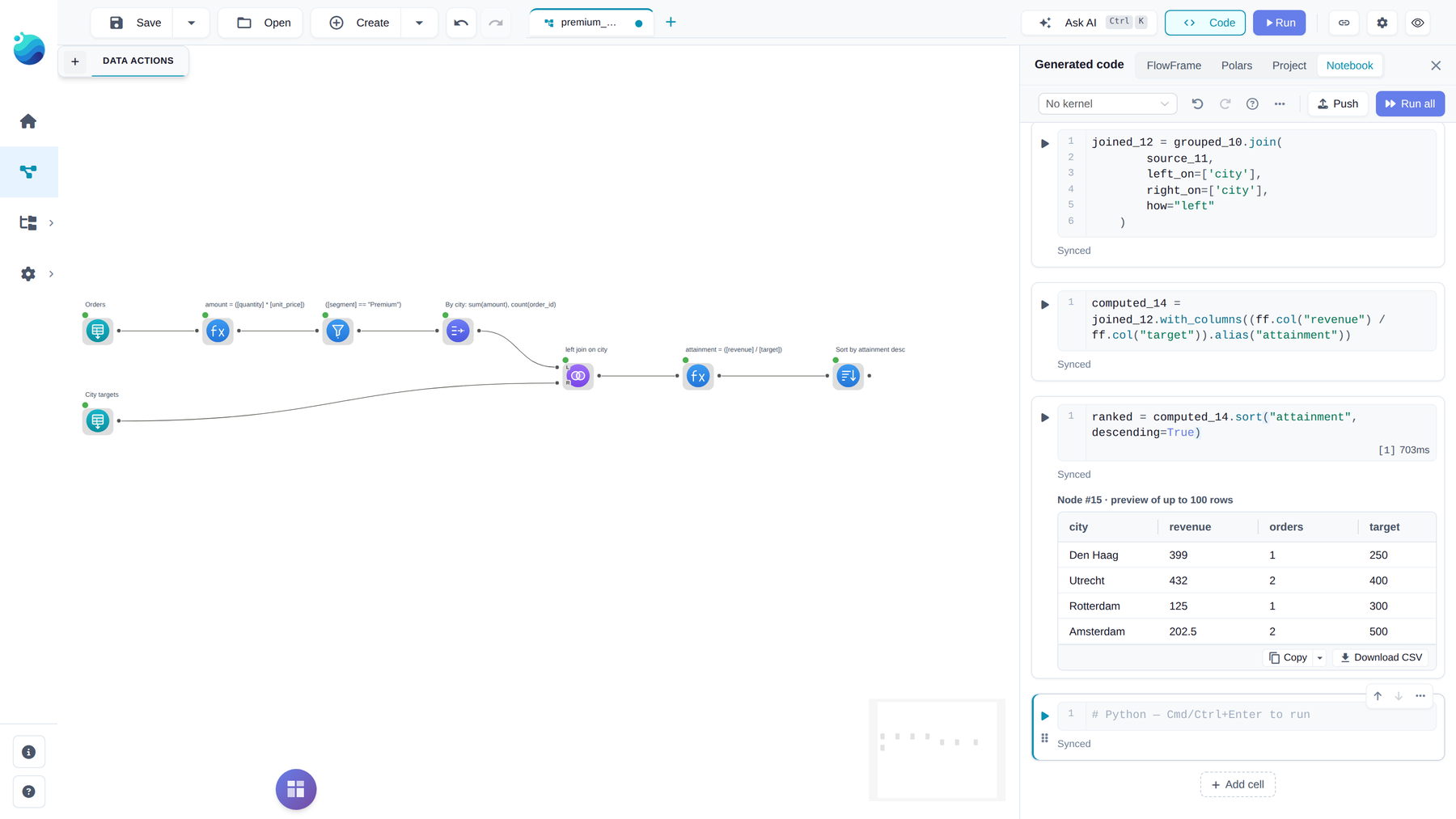
The Sort node is on the canvas, labelled, wired below the formula, and the cell shows its rows. Run all syncs and runs the whole flow, as the Run button in the header does. Push only syncs: it writes the cells onto the canvas and runs nothing. All three apply the result as one step that Undo reverts, and the id, position, description and cached results of every node the edit does not touch stay as they were. A lowercase name you assign in a cell becomes that node’s reference, which is also the variable name in exported code and the name a downstream Python Script node reads it by.
A node the notebook has no code form for becomes a placeholder, enriched = ff.canvas_node(7, joined), which adopts the canvas node with its current settings and keeps the variable bound so the cells below it keep working. The comment on its first line says why: not configured yet, a REST reader with a key in its headers (move it to a secret), Explore Data, which is interactive only.
No Python runs on the server
This is the part worth explaining. A cell looks like Python and is edited like Python, but with No kernel picked nothing in it is executed. The server parses each cell with ast.parse and walks it. Every name, attribute, call and subscript is looked up in an allowlist by the exact type of the value it applies to: source_7.filter(...) on a FlowFrame is on the list and places a Filter node. A print, a for loop, import os, a lambda: not on the list, and the sync stops at that line with the reason.
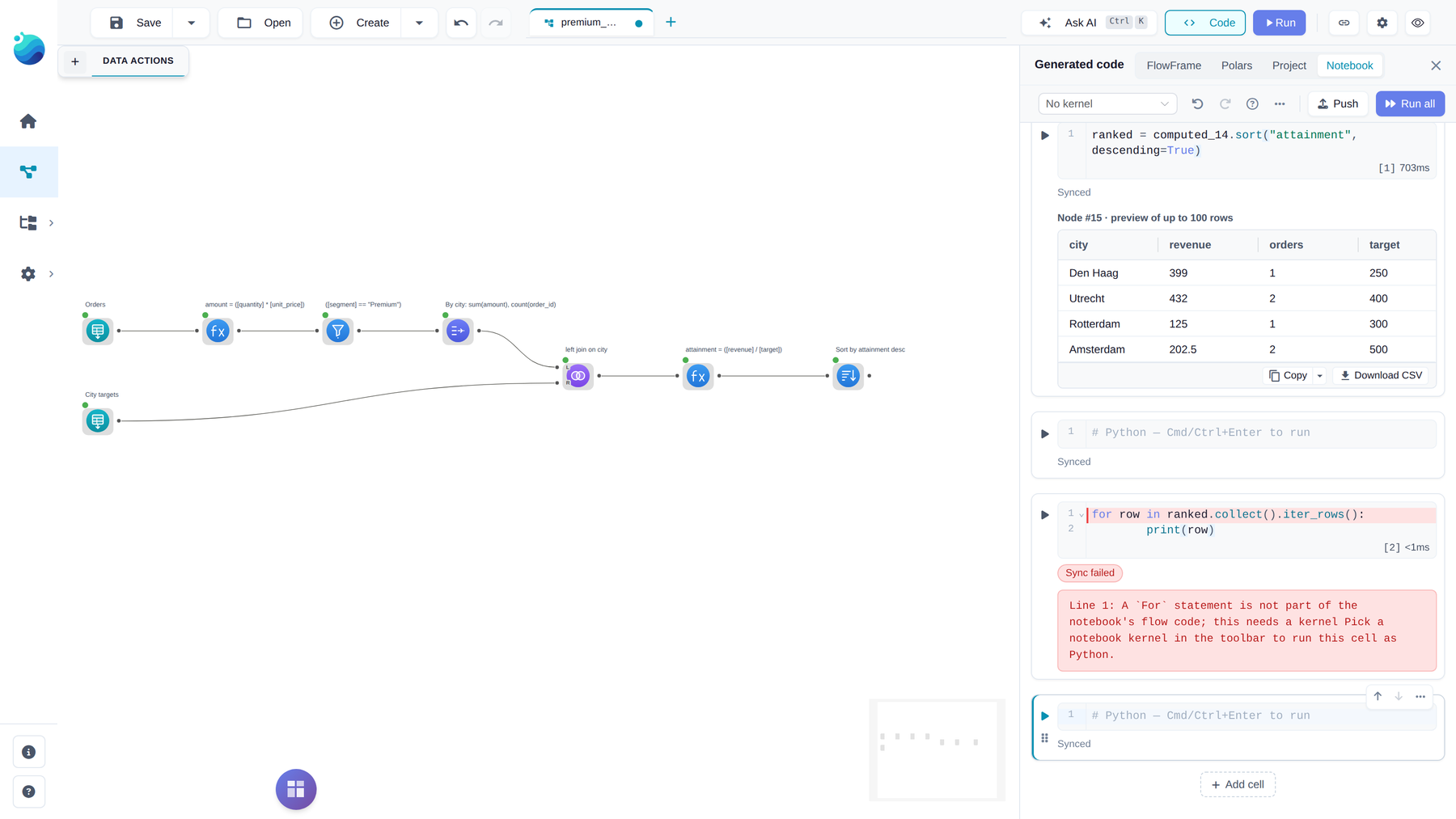
So a sync builds nodes and runs none. It opens no connection, reads nothing beyond the file header or catalog schema the canvas already reads to show columns, and nothing a cell holds reaches exec, eval or compile; a test in the repo checks that over the whole notebook package. That is why the notebook works for every user in every deployment, Docker included, with no kernel and no Python session. In a multi-user Docker deployment syncing is admin-only, because the catalog lookups a cell can reach do not check each user’s access; other users keep editable cells and get a banner instead of a push.
Running on a kernel
In the desktop app and a plain pip install flowfile, the kernel picker in the notebook toolbar turns the same cells into real Python. Pick a kernel with the flowfile package installed (Create notebook kernel… in the picker opens the form with it filled in), and loops, print, other imports and display(frame) work as in a script. Every canvas node is bound to its variable when the session opens, so a cell can use filtered_2 without running anything first. Run never changes the canvas. Push runs every cell again in a fresh session and applies what they build, with the same review as without a kernel.
The kernel never touches your machine. Files, catalog tables, saved flows and custom node sources reach it through the app, a cloud or database source always runs in the app, and stored secrets never reach the kernel in any form. This holds for every kernel, not only notebook ones: a kernel holds no copy of the catalog database, writes only to /shared and /catalog_tables and mounts no other host folder, and a cell that tries to open the database itself stops with a message naming the ff functions to use instead.
Limits: the kernel’s flowfile has to be the app’s version, so recreate the notebook kernel after an update. Docker deployments keep the notebook without a kernel. On Apple Silicon the lite kernel cannot install flowfile yet, because polars-grouper publishes no aarch64 Linux wheel.
The FlowFrame export rebuilds the flow
The cells are the FlowFrame export, so that export is the same code. A gate is ff.Gate(...) read through .then and .otherwise, a Python Script node ff.PythonScript(cells=...), a custom node ff.custom_nodes.<key>(...), and a node’s description its description= argument. Running the exported script rebuilds the flow as well as computing it. The Project export writes its pipeline the same way. The Polars export is a different target: a gate is a real if block over the function’s parameters, and a Python Script node refuses it, since there is no Polars to write.
Joins have one keyword for the same reason. A canvas join keeps the right join keys after the other right columns; Polars’ coalesce=False puts them elsewhere. join(..., keep_right_keys=True) keeps them where the canvas does, so such a join renders as one native join node instead of a Polars Code node.
Python API
Most of these are things the notebook needs and scripts get for free:
ff.polars_code(code, *inputs)places a Polars Code node; with no inputs it is a source whose code builds its own frame.ff.kernelslists the kernels defined in the Kernel Manager, by id, without Docker running. AKernelInfoworks askernel=on a Python Script node..node_referenceon any frame or native node, settable, under the designer’s rule for names.@ff.python_scripton a function with noreturnis a script: its body is the notebook as written, reading inputs and publishing outputs throughflowfile_ctxitself.description=on every reader: files, database, REST, Kafka, catalog, cloud storage.- A ten-chapter tutorial: one city sales report from supermarket invoices, grown chapter by chapter into a registered flow with a child flow, a gate, a SQL step, a custom node and a schedule. Each chapter is a runnable script, and the output shown on each page is checked against the script by the docs test suite.
Everything else
- A multi-value IN or NOT IN in the Filter node on an integer, 64-bit float, string, categorical, date or microsecond-datetime column is one
[col] in (a, b, c)expression. Other dtypes get a chain of=joined by|on purpose:is_indoes not cast its members the way a comparison does, so a Float32 column would miss0.1. - In a Docker deployment, saving, deleting and test-running a node in the Node Designer need an admin account. The saved file is one
.pyshared by the whole install, and it runs on the server once the node is placed. Placing installed nodes is open to everyone, and on the desktop the default user is an admin. - FastAPI 0.142 with a Starlette security floor, in the app and in the kernel image.
- Telemetry, where you opted in, has two notebook events: notebook opened and notebook pushed. No code, names, paths or data.
pip install flowfile, or the desktop app. Full notes on GitHub for 0.22.0.