
Flowfile 0.21: Every Node from Python, Explode Hierarchy
0.21.0 and 0.21.1: gates, subflows, kernel scripts, custom nodes and SQL queries get Python classes, so a whole canvas flow can be a script, and a new node explodes a bill of materials to every level.
Two things in 0.21.0 and one node in 0.21.1. The two releases before them are in the 0.20 notes.
The Python API has always covered the nodes that read like a dataframe method: read, filter, join, group_by, write. The nodes that don’t (a gate, a subflow call, a Python Script notebook, a custom node) had to be placed on the canvas. 0.21.0 gives each one a class, so a flow with all of them in it can be written in a script and still open on the canvas as the same graph.
Native node classes
ff.Gate, ff.FlowInput / to_flow_output, ff.RunFlow, ff.custom_node / ff.CustomNode, @ff.python_script / ff.PythonScript, ff.sql, and a generic ff.Node that places any built-in node type from its name and a settings dict. Each call adds one node to the same FlowGraph the fluent methods build; every failure raises NativeNodeError and the half-built node is removed again.
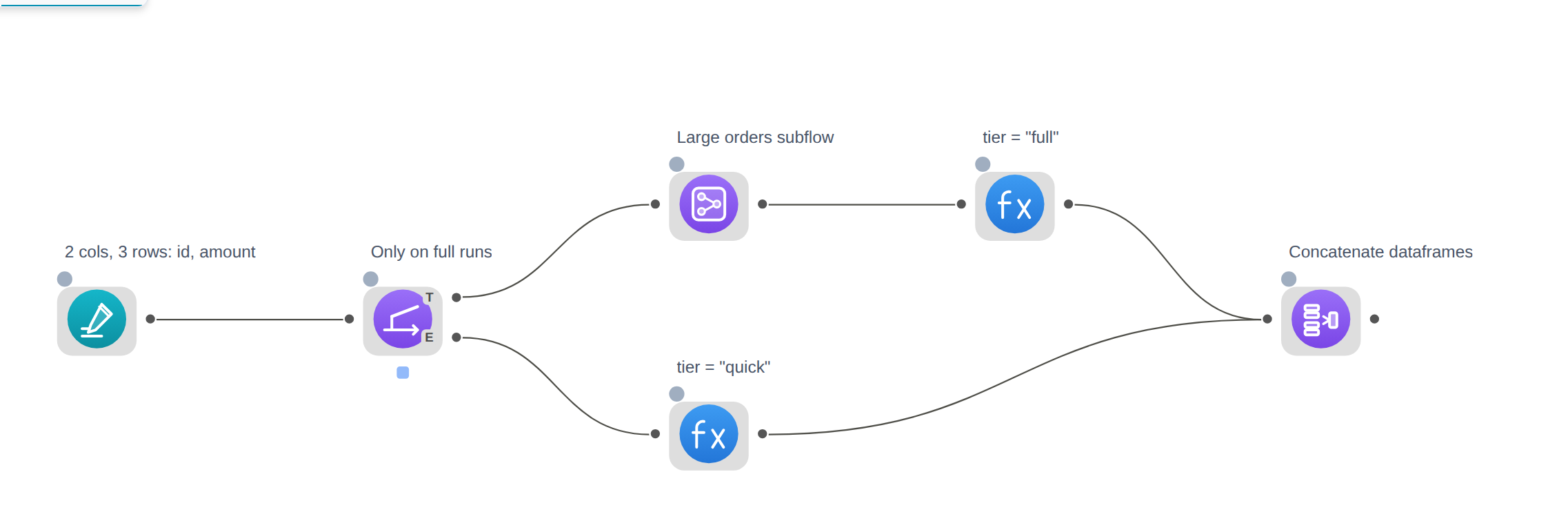
A gate on a flow parameter:
import flowfile as ff

orders = ff.from_dict({"id": [1, 2, 3], "amount": [120.0, 40.0, 900.0]})
flow = orders.flow_graph
ff.add_flow_parameter(flow, ff.Parameter("mode", default="full", type="enum", enum_values=["full", "quick"]))

gate = ff.Gate(orders, parameter="mode", operator="equals", value="full")
full = gate.then.with_columns(ff.lit("full").alias("tier"))
quick = gate.otherwise.with_columns(ff.lit("quick").alias("tier"))
combined = ff.concat([full, quick], how="diagonal_relaxed")

ff.set_flow_parameter(flow, "mode", "quick")
run = flow.run_graph()
.then and .otherwise are the two exits. In the run the dead side is skipped, not failed, exactly as on the canvas, and ff.concat with diagonal_relaxed places the union node that brings the sides back together, which runs as long as one input survived. A formula gate takes an expression instead, ff.Gate(orders, ff.col("amount") > 500), optionally probing a control frame wired to the gate’s bottom pip.
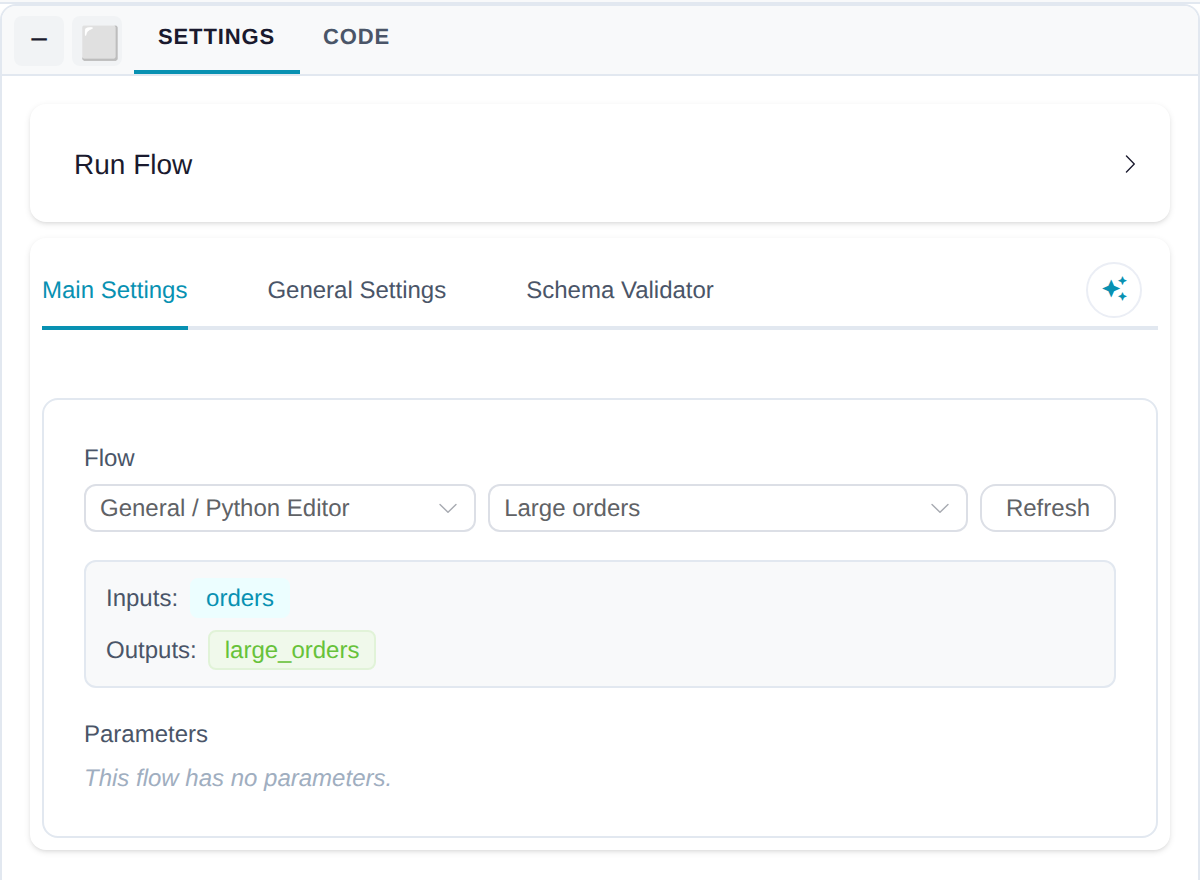
A subflow is a child graph with Flow Input and Flow Output nodes, registered in the catalog, then called with one keyword per input:
large_orders = ff.FlowOutput("large_orders")
child = ff.create_flow_graph()
incoming = ff.FlowInput("orders", schema={"id": ff.Int64, "amount": ff.Float64}, flow_graph=child)
incoming.filter(ff.col("amount") > 100).to_flow_output(large_orders)
large_orders_flow = ff.register_flow(child, name="Large orders")

parent_orders = ff.from_dict({"id": [1, 2, 3], "amount": [120.0, 40.0, 900.0]})
run_child = ff.RunFlow(large_orders_flow, orders=parent_orders)
large = run_child.get_output(large_orders).collect()
register_flow writes the YAML and the catalog row when it’s called, and re-running the script rewrites the same registration in place. RunFlow also takes params, and iterate=True with a param_frame runs the child once per row, as the node does. Flows already in the catalog are reached the way kernels reach tables: ff.get_catalog("Demo").get_schema("sales").get_flow("Clean orders").
A function becomes a Python Script node. Decorate it, and its parameters are the node’s inputs, its body the notebook, its return what the node publishes:
import polars as pl
import flowfile as ff

@ff.python_script(kernel="docs-kernel", returns={"month": ff.Int64, "revenue_forecast": ff.Float64})
def forecast(monthly: pl.LazyFrame) -> pl.DataFrame:
    """Revenue trend: a least-squares line through monthly revenue, extended three months."""
    import numpy as np

    df = monthly.collect()

    # %% [markdown]
    # ## Fit
    # One slope for the whole period; good enough for a demo, not for a quarter close.

    # %%
    slope, intercept = np.polyfit(df["month"], df["revenue"], deg=1)
    ahead = np.arange(df["month"].max() + 1, df["month"].max() + 4)

    # %% Forecast
    return pl.DataFrame({"month": ahead, "revenue_forecast": slope * ahead + intercept})


history = {"month": [1, 2, 3, 4, 5, 6], "revenue": [100.0, 110.0, 120.0, 130.0, 140.0, 150.0]}
sales_forecast = forecast(ff.from_dict(history))     # places the node
local_check = forecast.fn(pl.LazyFrame(history))     # the plain function, no kernel
The body is split into cells at the # %% markers PyCharm, VS Code and Spyder already run cell by cell, with # %% [markdown] becoming a note. The markers are comments, so forecast.fn is still an ordinary function that runs locally on Polars frames. returns declares the output columns so downstream nodes know their schema before anything runs. The node stores only the cells; a saved flow opens in the designer as an ordinary Python Script notebook.
Custom nodes built with node_designer are placed with their settings as keyword arguments, flat: trim = ff.custom_node(TrimNode), then trim(orders, upper=True). An installed node is found by its key, ff.custom_nodes.trim_text(orders). A setting can also be a flow parameter, stored as ${upper_case} and read when the node runs.
SQL queries place a SQL Query node. frame.sql("SELECT ... FROM self") mirrors pl.LazyFrame.sql; ff.sql(query, orders=a, regions=b) names several frames, stored as a WITH orders AS (SELECT * FROM input_1), ... header the designer shows as part of the query. Polars SQL dialect, a single SELECT or WITH. The FlowFrame export writes the node back as ff.sql(...).
Flow parameters are values. ff.Parameter("min_amount", default=100, type="integer"), declared with add_flow_parameter, goes straight into an expression: ff.col("amount") >= min_amount becomes a native Filter node storing ${min_amount}, the same thing the canvas stores. A parameter in a column-name position (ff.col(p), a join key, a select) raises, because parameters are substituted as text at run time and a column name is not text.
Deferred frames
Most nodes predict their schema in-process, so building a chain never reads data. Some can’t: a subflow runs with the parent, a kernel script runs in a container, an external source reads another system. Their outputs are deferred: a typed, zero-row placeholder with the predicted columns. Operations on it build nodes as usual and stay deferred. A writer below it is placed but doesn’t write until the flow runs. collect() on a deferred frame runs that frame’s lineage only, with run_graph(node_ids=...), and returns the real output; a frame on a gate’s dead side collects to zero rows with its columns.
Building a kernel node needs neither Docker nor a running kernel. Collecting it does. And pivot below a deferred frame raises at build, because its columns come from the pivot column’s values and the placeholder has none; collect the input first.
Explode hierarchy (0.21.1)
A bill of materials says one assembly contains some components, each with a quantity. A chart of accounts says one account rolls up into another. Both are parent → child tables, and both have the same awkward question: how many screws does one bike need in total, counting the ones inside the frame and the ones in each of the two wheels? In SQL that’s WITH RECURSIVE. The new node takes a parent column, a child column and an optional quantity column, and links every item to everything below it at any depth, multiplying quantities along each route and adding them across routes.
Five BOM lines:
| assembly | component | qty |
|---|---|---|
| bike | frame | 1 |
| bike | wheel | 2 |
| bike | screw | 10 |
| frame | screw | 6 |
| wheel | screw | 2 |
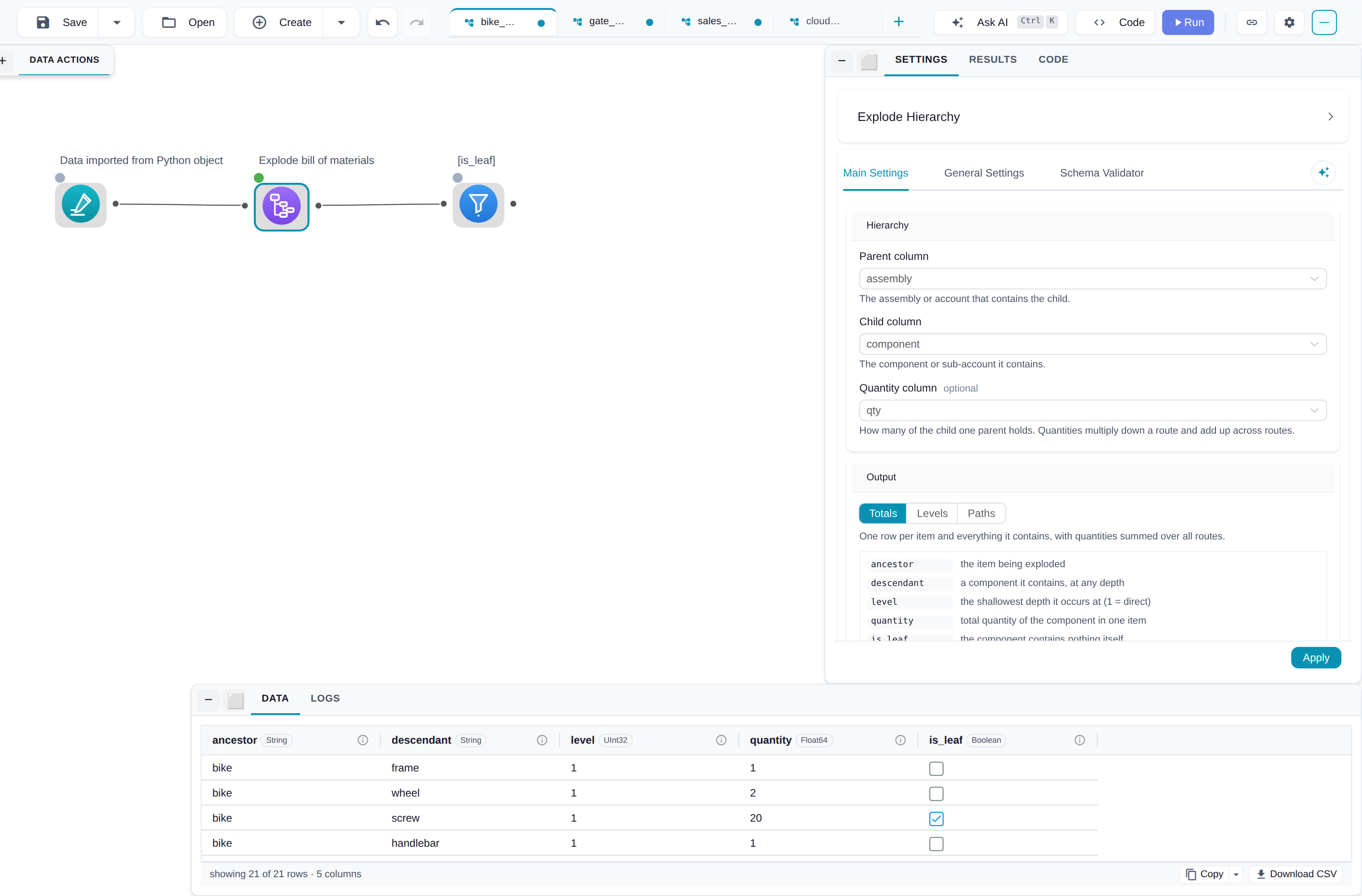
With Top-level items only on, the Totals output is:
| ancestor | descendant | level | quantity | is_leaf |
|---|---|---|---|---|
| bike | frame | 1 | 1 | false |
| bike | wheel | 1 | 2 | false |
| bike | screw | 1 | 20 | true |
Twenty screws: 10 on the bike, 6 in the frame, 2 in each of two wheels. The Levels output splits that by depth (10 at level 1, 10 at level 2), and Paths gives one row per route, depth-first, with the path as a list, which is the order of an indented bill of materials. is_leaf marks parts with no children of their own, so a Filter on it, a Join to the production plan and a Group by make a purchase requirements list. The docs walk through that one, a cost roll-up, where-used and a general-ledger roll-up.
In Python:
parts = bom.explode_hierarchy("assembly", "component", quantity="qty", top_level_only=True)with output_detail="levels" or "paths", include_self=True for a level-0 row per item (what a GL roll-up needs so each account counts its own postings), and max_depth. A cycle in the input raises when the result is collected, not when the method is called. The node exports to plain Polars with the polars_grouper helper package, like the graph solver, and isn’t in the browser build. It also raises the Polars floor: Flowfile now requires Polars 1.39 or newer, because the plugin that implements it does.
Everything else
Faceted Graphic Walker charts now fit inside their dashboard tile instead of overflowing it.
pip install flowfile, or the desktop app. Full notes on GitHub for 0.21.0 and 0.21.1.