
Subflows: Run a Flow Inside a Flow as One Node
Flowfile subflows let you save a flow with a typed input/output/parameter interface and call it as a single node in another flow — run it once, or once per row of a driver table.
You build the same six nodes in every flow. Trim the whitespace, standardize the country codes, drop the test accounts, coerce the date column. It’s not hard — that’s the problem. It’s just tedious enough to copy-paste and just fiddly enough that the copies drift, and three months later you have four slightly different definitions of “clean customer data” and no idea which one is right.
Subflows (0.12.8) give you the missing option: save that cleaning sequence once as a flow with a typed interface, then drop it into any other flow as a single node. Fix a bug in one place and every caller gets the fix. It’s a function, built on a canvas.
The interface: three nodes
A regular flow reads from files and writes to files. A flow you want to call needs an interface instead — somewhere the caller’s data comes in, somewhere the results go out. Two nodes declare that:
- Flow Input stands in for data the caller will supply. It’s a source node, so the child flow still runs on its own — you give it a few sample rows and build against them — but at call time the parent’s real data replaces the sample.
- Flow Output marks a result. Each Flow Output node becomes one of the child’s return values, named.
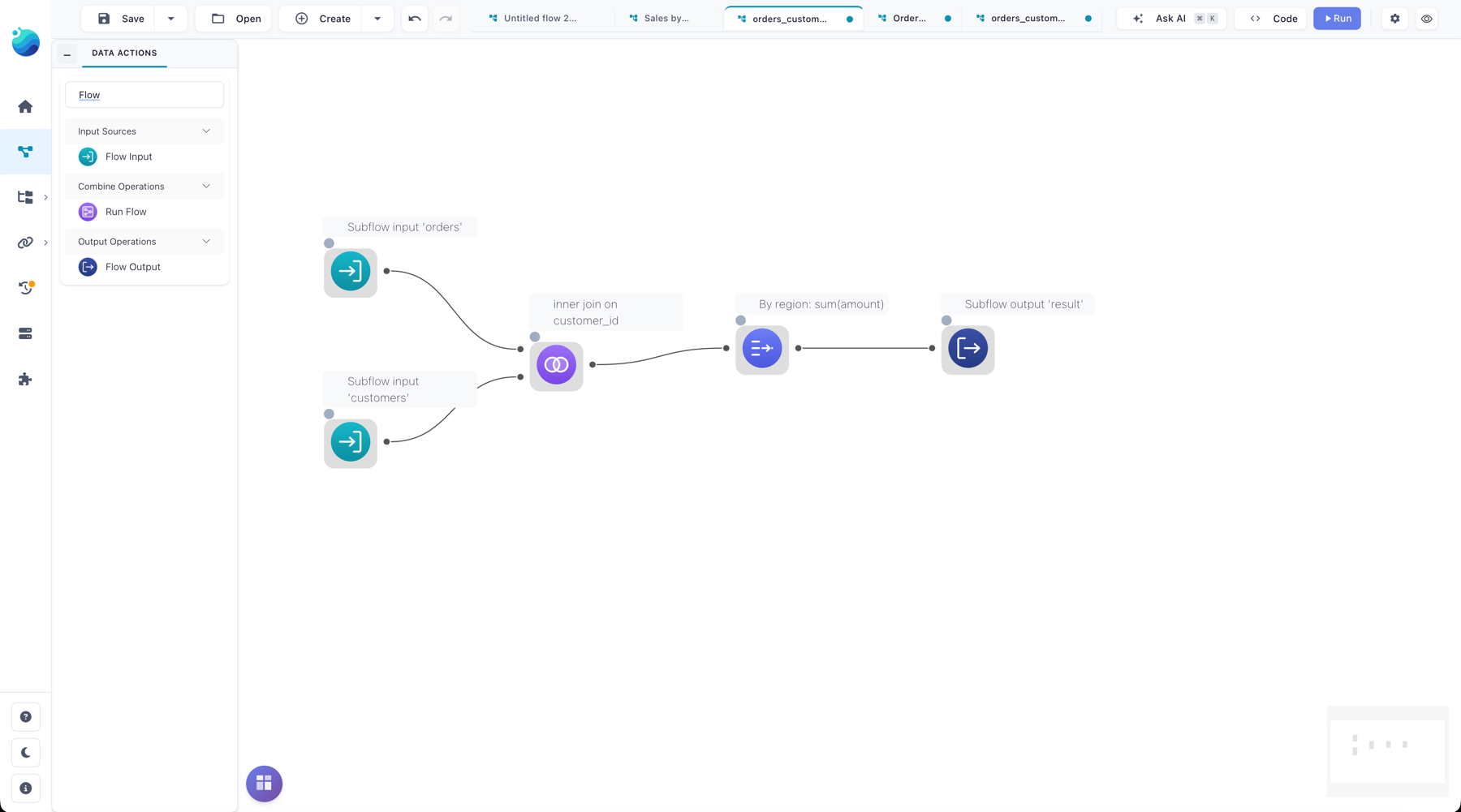
The third node does the calling. Run Flow picks a saved flow from the catalog and grows to fit its interface: one input handle per Flow Input, one output handle per Flow Output, plus a handle for parameters. Wire your data into the inputs, take the outputs onward.
The handles are matched by name, not position. That matters more than it sounds. Rename a column-mapping here, add an output there, and the child’s interface changes — but the wiring in every parent that calls it follows the ports by name. A slot that still exists keeps its edge; one that vanished drops its edge and says so. You’re not re-wiring every caller because you added an output to the child.
Parameters: the knobs a caller turns
Data flows through the inputs. Everything else — a threshold, a region filter, a target table name — is a parameter. A flow declares typed parameters (string, integer, float, boolean, or enum) in a settings panel in the header, and you reference one anywhere in the child’s node settings as ${name}, with autocomplete and highlighting so it’s not a guessing game.
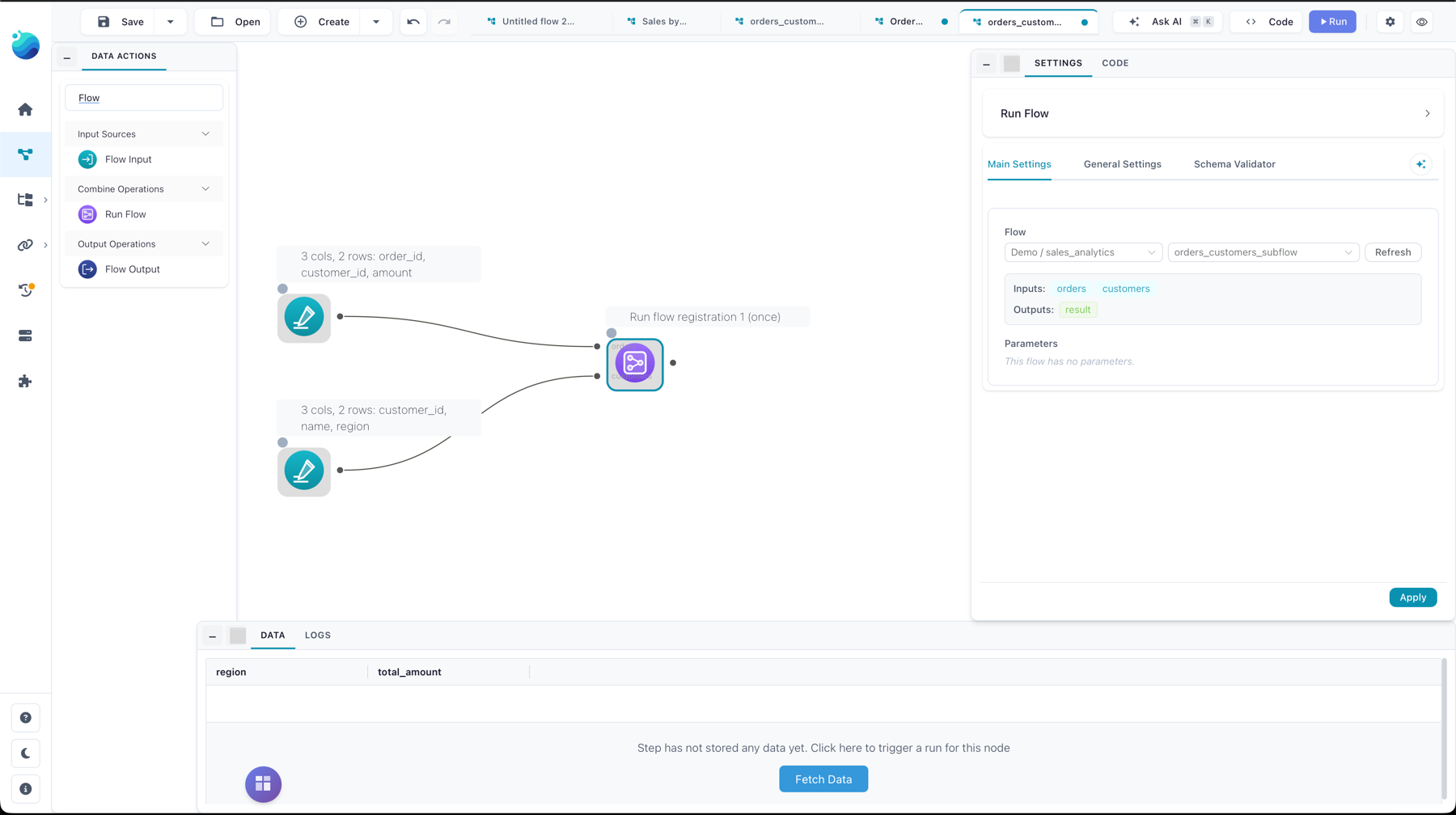
In the Run Flow node, each parameter binds to one of three sources:
- default — leave it; use the value baked into the child.
- constant — type a fixed value here in the parent.
- column — read it from a named column of the parameters table you wire in.
That last one is the hinge for the feature’s most useful trick.
Once, or once per row
By default, Run Flow executes the child once, taking parameter values from the first row it’s given. That’s the common case: one call, one set of settings.
Switch it to iterate and Run Flow runs the child once per row of the parameters table, stacking the outputs into one result. Bind a parameter to a region column with twelve rows and the child runs twelve times, once per region, and the outputs concatenate. Each output row is tagged so you can tell the runs apart — a run_index (1-based) and a param_<name> column for each parameter that varied. It’s a for loop over a table, where the loop body is a whole flow.
Two honest caveats on iterate. If the per-run outputs don’t share a schema, the concatenation fills the gaps with nulls rather than erroring — convenient, but worth knowing. And it’s capped at 1000 rows; a parameters table bigger than that is refused rather than quietly launching a thousand-plus runs.
The guardrails
Calling flows from flows invites a few ways to shoot yourself, so the limits are explicit and enforced, not advisory:
- Nesting is capped at 5 levels deep.
- Iteration is capped at 1000 runs.
- A subflow can’t call itself, directly or through a chain — Flowfile tracks the call chain and stops a cycle with a clear error instead of recursing forever.
- The interface is bounded too: up to 9 data inputs, up to 10 outputs.
Because Run Flow resolves the child through the catalog, subflows are a full-build feature — the browser-only Lite editor has no catalog — and you can only call a flow you own or one that’s been shared with you, not an arbitrary file path.
One more thing that’s a deliberate design choice rather than a limit to grow out of: a subflow always runs in-process, on the parent’s machine, regardless of the worker-offload setting. The child gets a fresh execution, its outputs stay lazy, and only the small parameters table is read eagerly. So if you nest a genuinely heavy flow, know that it runs inside the parent’s process — see Faster Worker Runs for what that offload boundary normally does and why a subflow sits on the near side of it.
It still exports to code
A subflow doesn’t break the export-to-Python story — it extends it. Exporting a flow that calls subflows recurses into each referenced flow and emits it as its own module under subflows/, once per distinct child, with the same cycle guard the runtime uses. Parameters become typed keyword arguments in the generated function signature — a child with a float threshold parameter exports a def run(..., *, threshold: float = ...), returning a dict keyed by its output names. The visual reuse and the code reuse are the same reuse, described twice.
What you get is the thing visual tools usually make you give up to get reuse: a transformation you can see, build against sample data, and still call from a dozen places as one node. Fix it once.
Flowfile is open source (MIT), a single pip install flowfile, desktop app, or Docker — the repository and the subflows guide have the full node reference. Related: Abstraction Is a Zoom Level — a subflow is a whole flow collapsed to a single node — and Direction Stopped Mattering for how the flow and the code stay the same object.