
Flowfile opens Alteryx .yxmd files now
Import an Alteryx .yxmd into Flowfile: 24 tools map to native nodes, formulas translate, and a per-tool report tells you exactly what to finish by hand.
Flowfile opens Alteryx workflows. Create → Import Alteryx workflow, drop a .yxmd, and it comes back as a Flowfile flow with a report of what happened to every tool. It landed in 0.17.0 and it is marked Beta, which means I want your workflows thrown at it.
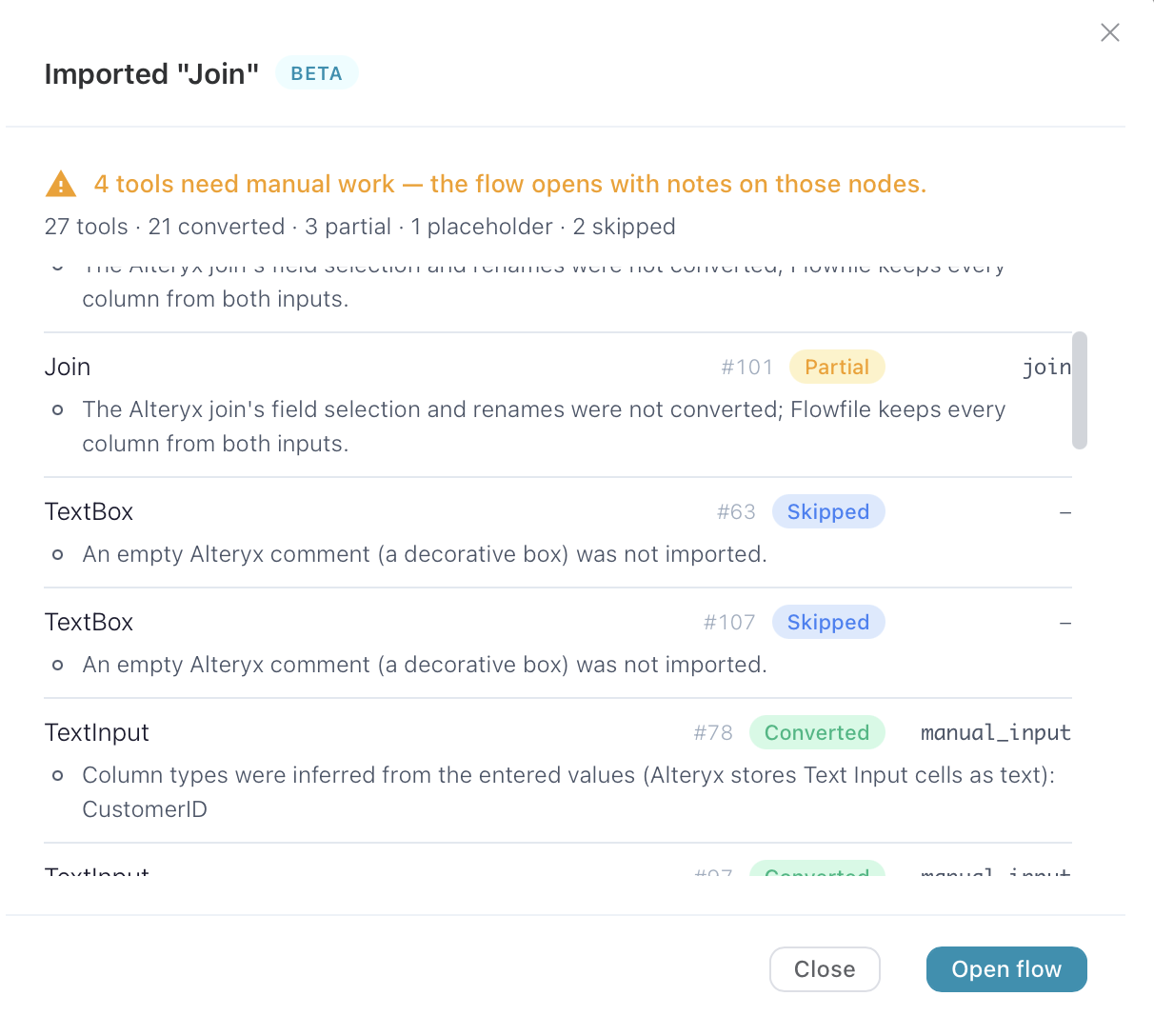
This is a 27-tool workflow. Twenty-one tools came through as native Flowfile nodes with nothing to do. Three are partial, meaning they work but carry a note: the Join’s field selection was not converted, so every column from both sides comes through. One is a placeholder. The two skipped rows are empty Alteryx comment boxes, the coloured bands people use as backgrounds. Four tools to look at, and the flow is already saved and open.
What converts
Twenty-four Alteryx tools have a mapper, plus two macros. In Alteryx terms: Input Data, Output Data, Text Input, Browse, Select, Filter, Formula, Multi-Field Formula, Sort, Summarize, Sample, Unique, Text To Columns, Union, Join, Append Fields, Cross Tab, Transpose, Dynamic Rename, RegEx, Record ID, Running Total, Comment, and the Data Cleansing and Count Records macros. Containers are flattened; their tools come through and the box itself does not.
They land on real Flowfile nodes, not on generated code. A Summarize is a Group By. A Join with the L and R anchors wired becomes an inner join plus two anti-joins. A Transpose is an Unpivot with a rename so the columns are still called Name and Value. Count Records becomes a Record Count node with the column renamed to Count, so whatever referenced it downstream keeps working. Alteryx comments become Flowfile canvas comments in the same spot. Canvas comments did not exist in Flowfile before this; the importer needed them, so now everyone has them.
The test suite includes a real published workflow, a UK Land Registry Price Paid extract: headerless CSV input, Text Input, Dynamic Rename, two Selects, two Filters, a Multi-Field Formula, a RegEx tool and a .yxdb writer. Nine of the ten tools come through. The tenth is the .yxdb writer, which Flowfile cannot write. The test then runs the converted flow on sample rows and checks the surviving rows, the Int32 price, the Date column and the parsed postcode areas against what Alteryx produces.
The five statuses
- Converted. A native node, same behaviour.
- Partial. A native node with a note. Cross Tab is always partial, because Alteryx rewrites the new column names with underscores and Flowfile keeps the raw values. RegEx is always partial, because it becomes generated Polars code and the two regex dialects differ enough to deserve a read.
- Needs review. A Formula node whose expression did not translate. The original is kept as a comment above a harmless stub.
- Placeholder. A tool with no equivalent, or a configuration the importer would have had to guess at.
- Skipped. Empty comment boxes. Nothing else.
Rows that need work sort to the top. The statuses are strict on purpose: a Filter is either converted or a placeholder, never partial, because a filter that lets the wrong rows through is worse than one that is visibly missing. A Summarize with one aggregation the importer does not recognise becomes a placeholder for the whole tool, not a Group By quietly missing a column.
Formulas
Alteryx formulas translate into Flowfile formulas. Sixty-seven functions are mapped, and the translator checks its own output by handing it to the same parser Flowfile runs at execution time. If that parser rejects it, the translation is thrown away and the original kept. Nothing is approximated.
IIF([Amount] > 100, "big", "small")
→ if [Amount] > 100 then "big" else "small" endif

IsEmpty([Name])
→ (is_empty([Name]) or [Name] = "")
   Alteryx's IsEmpty is true for null and "". Flowfile's is null only.

Contains([Name], "A.C")
→ contains(lowercase([Name]), "a[.]c")
   Alteryx searches case-insensitively by default. Flowfile does not.
Where the semantics differ, the translation carries the difference. Where there is no honest equivalent, it says so:
[Status] IN ("a", "b")
   the IN operator has no Flowfile formula equivalent; rewrite it as a
   chain of '=' comparisons joined by 'or'

Round([Amount], 7)
   Round() rounds to the nearest multiple of 7, which has no Flowfile
   equivalent; only literal powers of ten can be converted
A refused formula still gets a node. Its expression is the reason and the original, as comments, above a stub that keeps the column present. Replace the stub and you are done.
Placeholders keep the shape
A placeholder is a Polars Code node that passes its input through unchanged, with the tool’s whole original <Configuration> XML embedded as comments. You can rebuild it without going back to the .yxmd. Every anchor the Alteryx workflow used on that tool points at the placeholder, so the branches downstream still receive data and the graph reads the same as it did in Designer.
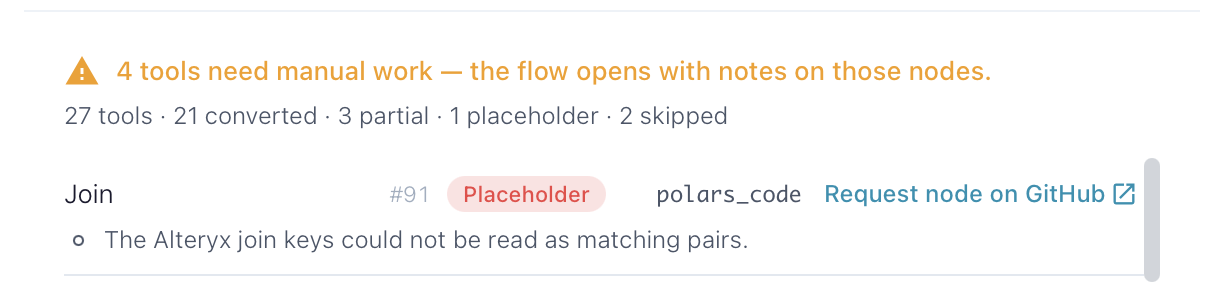
If the placeholder is a tool Alteryx ships, the row has a button. When someone has already opened a request for that tool it reads “Upvote request on GitHub” and takes you there; otherwise it opens a prefilled issue titled [Alteryx node] <ToolName>. Open requests are matched by that title, so everyone who hits the same tool lands on the same issue. That list is how I pick what to map next. Third-party plugins and your own macros get no button, because there is nothing for me to build.
Flowfile’s telemetry is off by default. If you turn it on, an import reports which official Alteryx tools converted and which did not, by class name. The workflow name, macro paths and every tool’s settings stay on your machine; there is a test that imports a fixture called “Quarterly Revenue (confidential).yxmd” and asserts that name appears nowhere in what is sent.
Limitations
Macros are not expanded. Data Cleansing and Count Records map because they ship with Alteryx and their configuration is known; every other macro, including anything you built, is a placeholder. In-DB tools, connectors and database Input Data tools are placeholders, and so is anything spatial or predictive, and .yxdb on either side. Those are the ones I most want to hear about, because the request button is the roadmap.
To try it: a .yxmd is plain XML, already on disk. A .yxzp package is a zip with the .yxmd inside. Flowfile 0.17.4 or later, Create → Import Alteryx workflow, and read the report. If you want the tool-by-tool mapping before you import, or would rather rebuild by hand, the migration walkthrough covers it. For when Flowfile is the right replacement and when it is not, that post still stands.
- Flowfile: github.com/edwardvaneechoud/Flowfile
- Request an Alteryx tool: open requests on GitHub
Frequently asked questions
- Can I open my .yxmd files directly in Flowfile?
- Yes, since Flowfile 0.17.0. Import Alteryx workflow from the Create menu, drop the .yxmd (or .xml, up to 20 MB), and Flowfile converts it into a flow and shows a report per tool. It is marked Beta and needs the full build: desktop app, Docker, or pip install flowfile.
- What happens to Alteryx tools Flowfile cannot convert?
- They become placeholder nodes: a Polars Code node that passes its input through unchanged, with the tool's original Alteryx configuration XML embedded as comments so you can rebuild it without the source file. The rest of the flow stays wired around it. If the tool is one Alteryx ships, the report links to a GitHub issue where you can request or upvote support for it.
- Do Alteryx formulas convert?
- When every function in them has a verified Flowfile equivalent, yes: IF/ELSEIF, IIF, Switch, Contains, IsEmpty, DateTimeAdd, Round and about sixty more. A formula that does not fully translate is kept as a comment inside a Flowfile formula node with the reason, and the node is marked Needs review. Nothing is approximated.
- Does Flowfile expand Alteryx macros?
- No. Two shipped macros, Data Cleansing and Count Records, map onto native Flowfile nodes by filename. Every other macro, including your own, becomes a placeholder. The macro file itself is never opened.