
Git-Backed Projects: Version Your Whole Flowfile Setup
A Flowfile project mirrors your flows, connections, schedules, and catalog metadata into a deterministic, secret-free folder you commit to git — with a version timeline and one-command restore.
A single Flowfile flow already saves as YAML you can diff. But a real setup is more than one flow. It’s the database and cloud connections those flows read through, the schedules that fire them, the notebooks in the catalog, the tables and their metadata. Lose the machine and the flow file alone doesn’t rebuild any of that.
The project feature (0.12.3) versions the whole thing — flows, connections, schedules, notebooks, and catalog metadata — as a folder you commit to git. Your credentials never land in a commit, and rolling back is one command or one click.
The folder is a mirror, not the store
The runtime source of truth stays where it always was: the local SQLite database that backs the catalog. A project doesn’t move your data into git. It projects the database out to a folder, and keeps that folder in sync.
The projection is deterministic. An unchanged database produces byte-identical files — same key order, same formatting, IDs derived from a flow’s stable UUID rather than from anything host- or time-specific, and install-local fields stripped out. That determinism is the whole point: it means a git diff shows the change you actually made and nothing else. No spurious churn from a re-serialization, no noise from a machine-specific ID. The diff is readable because the file is stable.
Sync runs in one direction automatically and the other only on request. Saving a flow, editing a connection, changing a schedule — each quietly re-projects the affected files, and those hooks never raise, so a sync hiccup can’t block the save that triggered it. Pulling files back into the database is the deliberate act: it happens only when you open, restore, or reload a project.
What’s in it, and what’s kept out
The layout is one file per thing:
project.yaml              # the manifest: name, id, the version it was created with
flows/*.flow.yaml         # one per flow
connections/database/     # one per connection — no credentials
connections/cloud/
schedules/*.yaml
notebooks/*.notebook.yaml
secrets.yaml              # names of required secrets, nothing more
namespaces.yaml, tables.yaml, models.yaml, ...   # catalog metadata
.gitignore
Two things are deliberately absent. Materialized table data is never committed — only the metadata that describes a table, never its Parquet. And secret values never touch the folder. A connection’s password projects as a ${secret:NAME} placeholder, not ciphertext — the encrypted form is keyed to your machine and would be useless on another one anyway. secrets.yaml lists the names of the secrets a project needs, so a teammate knows what to fill in, and nothing else.
Two guards keep it that way. A generated .gitignore blocks the obvious hazards — .env, *.key, *.pem, the database files, master_key.txt — and Flowfile re-hardens it every time you open the project. And the commit step is allow-listed: it stages only the files it manages instead of running the equivalent of git add -A, so a stray secret sitting in the folder can’t be swept into history by accident. The honest edge: this protects against Flowfile’s own output and the usual footguns, not against a secret you paste by hand into a flow’s config. There’s no scanner reading your YAML contents for pasted credentials. Keep secrets in secrets.
Timeline, restore, and changes made behind your back
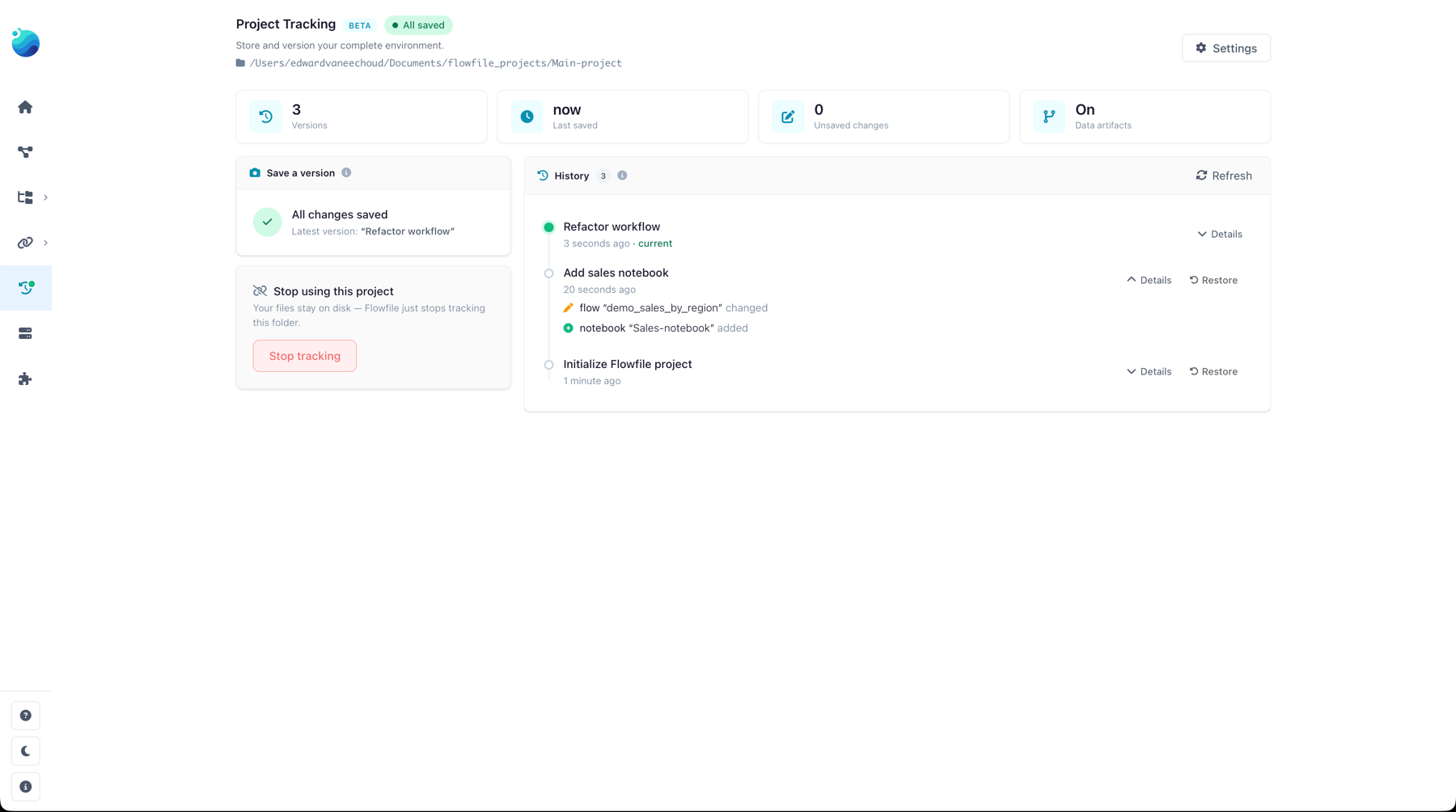
The project view is a version timeline, newest first. Each entry is a commit — message and time — and expanding one shows what that version changed against its parent. Restore any older version and Flowfile previews exactly what it would add and remove first.
Restore is destructive by design: it prunes the database to match the files, so anything created since that version goes away. Two things keep that safe. If you have uncommitted work, restore refuses with a clear error unless you force it — and when you force it, your current state is autosaved into git history first, so there’s always a version to come back to. And restoring itself writes a new “Restored” commit rather than rewriting history, so the timeline only ever grows.
Because the folder is real files, other tools can touch it — a git pull, a teammate’s commit, a hand-edit. Flowfile notices. It compares the current git HEAD against the last version it synced, and if they’ve diverged it shows a “files changed outside Flowfile” banner with a Reload button. Reload pulls the files back into the database (replacing unsaved edits, with the same autosave safety net). Nothing drifts silently.
Headless, for CI
Everything the app does, the CLI does, so a project fits into automation without a UI:
flowfile project init ./my-pipeline      # manifest + .gitignore, git init, first commit
flowfile project open ./my-pipeline      # rebuild the database from the files
flowfile project save "add weekly report"  # re-project and commit
open reports what it imported; save commits and tells you the new short SHA, or that there was nothing to commit. On a fresh machine, unresolved secrets are surfaced by name with the environment variable that would fill each one — FLOWFILE_SECRET_<NAME>. Resolution order is that env var first, then a project-local .env, then any secret already stored on the machine; anything still missing imports as empty and shows up in the app’s refill list. So a CI job can restore a project, inject secrets from its own vault as FLOWFILE_SECRET_*, and run — no interactive step.
Turning it on
In the desktop app and the pip package, projects are always available. In Docker (server mode), they’re off by default and gated behind FLOWFILE_ENABLE_PROJECTS, and installing/managing them is admin-only with each user’s projects confined to their own space. Git itself is optional: if GitPython isn’t present, a project still gets its deterministic, secret-free folder — you just don’t get the version timeline until git is around, at which point Flowfile heals the folder into a repo on the next save.
You can also opt a project out of tracking catalog data artifacts entirely — a single toggle, on by default — if you only want the flow-and-connection definitions under version control and not the catalog table metadata.
What you get is the thing that was missing: your whole pipeline environment as a diffable, reviewable, restorable folder — the definitions and open formats underneath that other tools can read, with your secrets left out of it on purpose.
Flowfile is open source (MIT), single pip install flowfile, no telemetry — the repository has the projects code and the docs. Related: Connections, Secrets, and the Catalog for how connections reference credentials by name, Export a Flow as a Standalone Python Project for versioning the runnable code instead of the definitions, and Why Flowfile Is the Way It Is for the open-formats, no-lock-in stance behind all of this.