
Flowfile vs Airbyte: Connectors or a Transform Canvas?
Airbyte moves data from hundreds of SaaS sources into a warehouse. Flowfile transforms what's already in front of you, visually or in Polars. Here's when each is the right tool.
Airbyte’s pitch is a connector to almost anything — Salesforce, Stripe, HubSpot, a Postgres replica, a Google Ads account — landed in your warehouse on a schedule, with schema drift and incremental syncs handled for you. Flowfile’s pitch is a canvas where you join, clean, and reshape whatever’s already in front of you, and leave with the Polars script if you want it. Both get called “ETL tools.” They solve different halves of the problem, and comparing them head-to-head only makes sense once that’s clear.
What Airbyte actually is
Airbyte is an open-source data movement platform. Point it at a source — a SaaS API, a database, a file store — and a target, usually a warehouse like Snowflake, BigQuery, or Redshift, and it handles the sync: initial load, incremental updates, schema changes on the source side, retries. The connector catalog is the product. Hundreds of pre-built integrations, each one maintained (by Airbyte, the community, or low-code connector builders) so you don’t write pagination and auth-refresh logic for the fortieth SaaS API of your career.
What Airbyte doesn’t try to be is a transform tool. It’s EL, not ETL in the visual-canvas sense — the “T” is someone else’s job, conventionally dbt running SQL models against the warehouse after the raw data lands. There’s no canvas, no live schema preview per step, no drag-and-drop join. You write dbt models or hand-roll SQL, in a separate tool, against tables Airbyte already dropped in place.
What Flowfile actually is
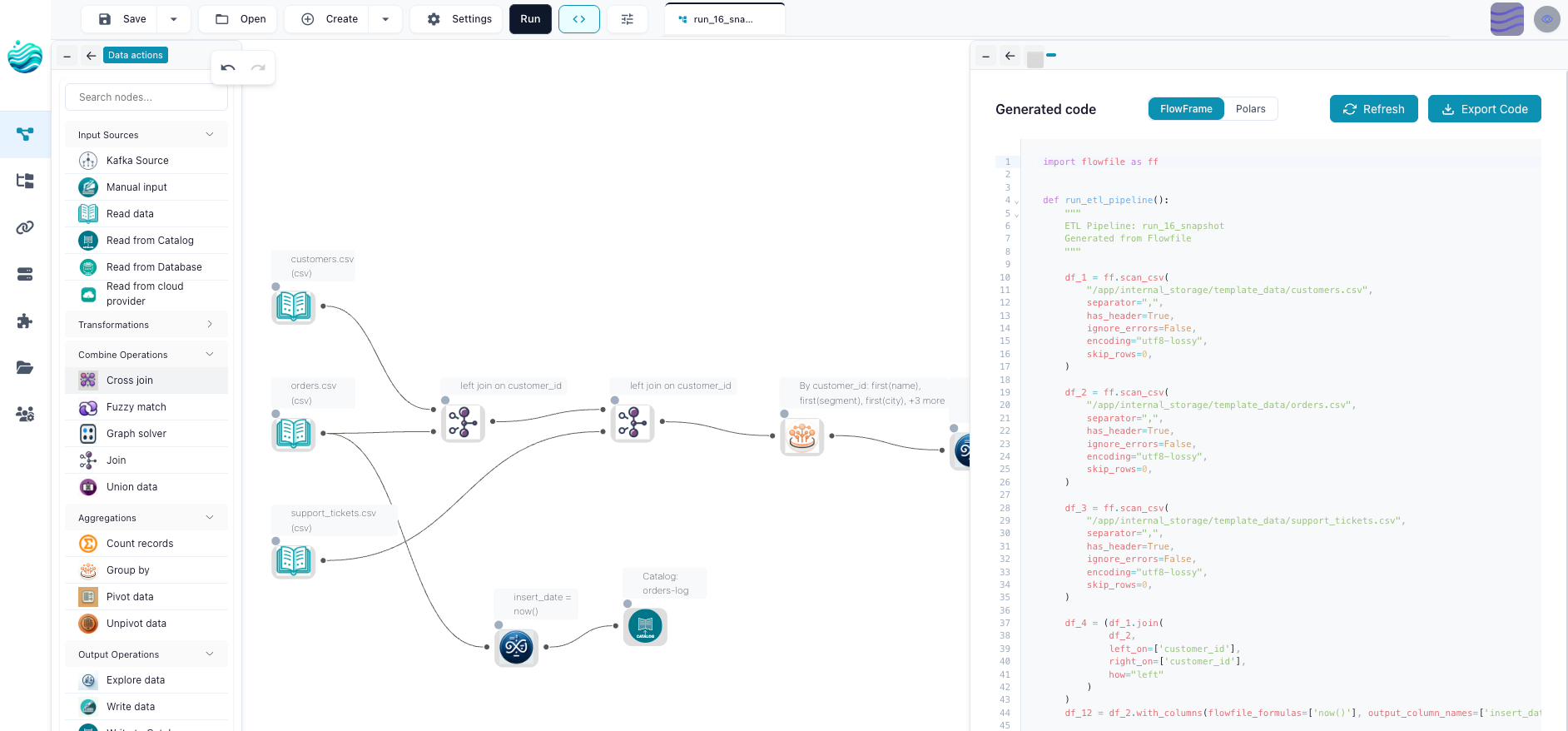
Flowfile is a visual ETL tool and a Polars-compatible Python API, MIT-licensed, running on a single machine. The canvas covers reading, filtering, joining (including fuzzy), grouping, pivoting, and writing, with a live schema and data preview at every node — you see what a step did before you build the next one. The transform and file-I/O core exports as standalone Polars code with no Flowfile dependency, so the pipeline you build visually is also the script you’d have written by hand.
Its source side is narrower than Airbyte’s by design: local files, a generic database reader that speaks Postgres/MySQL/MSSQL/SQLite through one SQL abstraction, an S3 cloud-storage reader, a Kafka consumer for batch-shaped streaming, and a generic REST API reader you configure yourself rather than pick off a shelf. There’s no library of five hundred maintained SaaS connectors. If you need one, you’re writing the auth and pagination logic — or a custom node — same as you would without Flowfile.
The real dividing line
Connector breadth vs. transform depth. Airbyte’s whole reason to exist is the maintained connector catalog — it’s the thing that would cost a data team weeks to build and maintain themselves. Flowfile’s whole reason to exist is the transform canvas — join, clean, reshape, with a code escape hatch at the end. Neither tool is trying to be good at the other’s core job.
Two tools vs. one. Airbyte’s model splits ETL into two systems by default: Airbyte for E and L, dbt for T. That’s a fine division of labor for a data team already running a warehouse and comfortable maintaining SQL models. Flowfile keeps extract, transform, and load in one place, one canvas, one run — closer to what an analyst or a small team wants when spinning up a second orchestration tool isn’t worth it yet.
Scheduled sync engine vs. workshop. Airbyte is built around continuous, incremental syncs at data-team scale — CDC where the source supports it, schema-drift handling, retry logic tuned for hundreds of connectors running unattended. Flowfile has scheduling and run history built in — interval and table-trigger schedules — but it’s a single-machine tool with no CDC framework. It’s the workshop where you build and understand the logic, not the always-on ingestion layer a data platform runs on.
Code story. Airbyte connectors are built with a connector development kit (Python or a low-code builder), but the pipeline you actually run is YAML connector configuration plus separate dbt SQL models — two artifacts, two mental models. Flowfile’s code export is one artifact: the canvas and the Polars script are the same graph, viewed from either side.
Side-by-side
| Criterion | Airbyte | Flowfile |
|---|---|---|
| Core job | Extract + load (EL) | Extract, transform, load (ETL), one canvas |
| Connector catalog | Hundreds of maintained SaaS/DB/file connectors | Local files, generic DB, S3, Kafka, generic REST |
| Transform layer | Thin; typically handed off to dbt | Native — join, filter, group, pivot, fuzzy match, visually or in Polars |
| Incremental sync / CDC | Built into the connector protocol | Not present; scheduling is interval or table-trigger |
| Deployment | Self-hosted (Docker/Kubernetes) or Airbyte Cloud | Single machine — pip install, desktop app, or Docker |
| Code artifact | Connector config (YAML) + dbt SQL models | One graph — canvas and Polars/FlowFrame code, exportable |
| License | Open core, terms have shifted over time — verify current docs | MIT, everything in this table |
| Best at | Getting data out of many sources reliably | Reshaping data that’s already reachable |
Where each one wins
Pick Airbyte when your actual problem is ingestion: a growing list of SaaS tools and databases that all need to land in a warehouse on a schedule, with schema drift and incremental loads handled so nobody’s paged at 2am over a broken sync.
Pick Flowfile when the data is already reachable — files, a database, an S3 bucket, a handful of APIs — and the work is joining, cleaning, and reshaping it, ideally without standing up a warehouse and a second SQL-templating tool to do the transform.
Use both when you’re already running Airbyte to land raw data and want a faster way to explore and transform what just landed, without writing dbt models for every one-off analysis. Point Flowfile’s database or cloud-storage reader at the tables Airbyte fills, and let each tool do the half it’s built for.
What I’d tell a friend choosing today
If the honest answer to “what’s slowing us down” is we don’t have a reliable way to get data out of our SaaS tools, that’s Airbyte’s problem to solve, and it solves it well. If the honest answer is we have the data, we just spend too long wrangling it into shape, that’s a canvas-and-code problem, and that’s what Flowfile is for.
The mistake is treating them as competitors in the same race. They’re not — one owns the pipe, the other owns the workbench at the end of it.
Related reads: Alteryx alternatives in 2026: a field guide for the broader visual-ETL landscape, Flowfile vs KNIME in 2026 for a comparison inside the visual-canvas category, and Connections, Secrets, and the Catalog in Flowfile’s Python API for how Flowfile handles the database and cloud credentials it does support.
Frequently asked questions
- Is Airbyte free to use?
- Airbyte's self-hosted edition can be run for free, and Airbyte Cloud is a separate paid managed service. Airbyte has changed its licensing terms more than once as the company has grown, so check Airbyte's current docs for the specifics on which connectors and features sit where before you plan around it.
- Can Flowfile replace Airbyte for syncing SaaS tools into a warehouse?
- Not for that specific job. Airbyte's value is a maintained library of hundreds of source connectors with incremental sync and schema-drift handling built in. Flowfile has a generic REST API reader and a database reader, not a per-SaaS connector library, and no CDC-based incremental extraction engine. If your core problem is 'get data out of fifteen SaaS tools reliably, on a schedule,' Airbyte is built for exactly that and Flowfile isn't.
- Can Airbyte do the kind of transform work Flowfile does?
- Not natively. Airbyte is an EL tool — extract and load — and its own transform step is thin. The standard pattern is Airbyte lands raw data in a warehouse, then dbt (a separate tool, SQL-based) does the transformation. Flowfile does extract, transform, and load in one canvas, with a live schema and data preview at every node, which is a different shape of tool than a two-step Airbyte-plus-dbt pipeline.
- Can I use Flowfile and Airbyte together?
- Yes, and it's a reasonable pairing. Airbyte lands raw SaaS and database data into your warehouse or lake on a schedule. Flowfile reads those landed tables through its database reader or cloud storage reader and does the joining, cleaning, and reshaping, visually or in Polars, with the option to export that logic as standalone code. Airbyte owns ingestion; Flowfile owns the transform layer downstream of it.