
Export a Flow as a Standalone Python Project
Flowfile exports a visual flow to real Polars — a single script, or a full standalone project with pyproject.toml and a README. A complete script or an honest error, never a half-broken one.
The promise that a visual tool won’t trap you is easy to make and hard to keep. Most keep it by letting you export something — an opaque XML file, a JSON blob, a script studded with proprietary runtime calls. Technically an export; practically still a hostage.
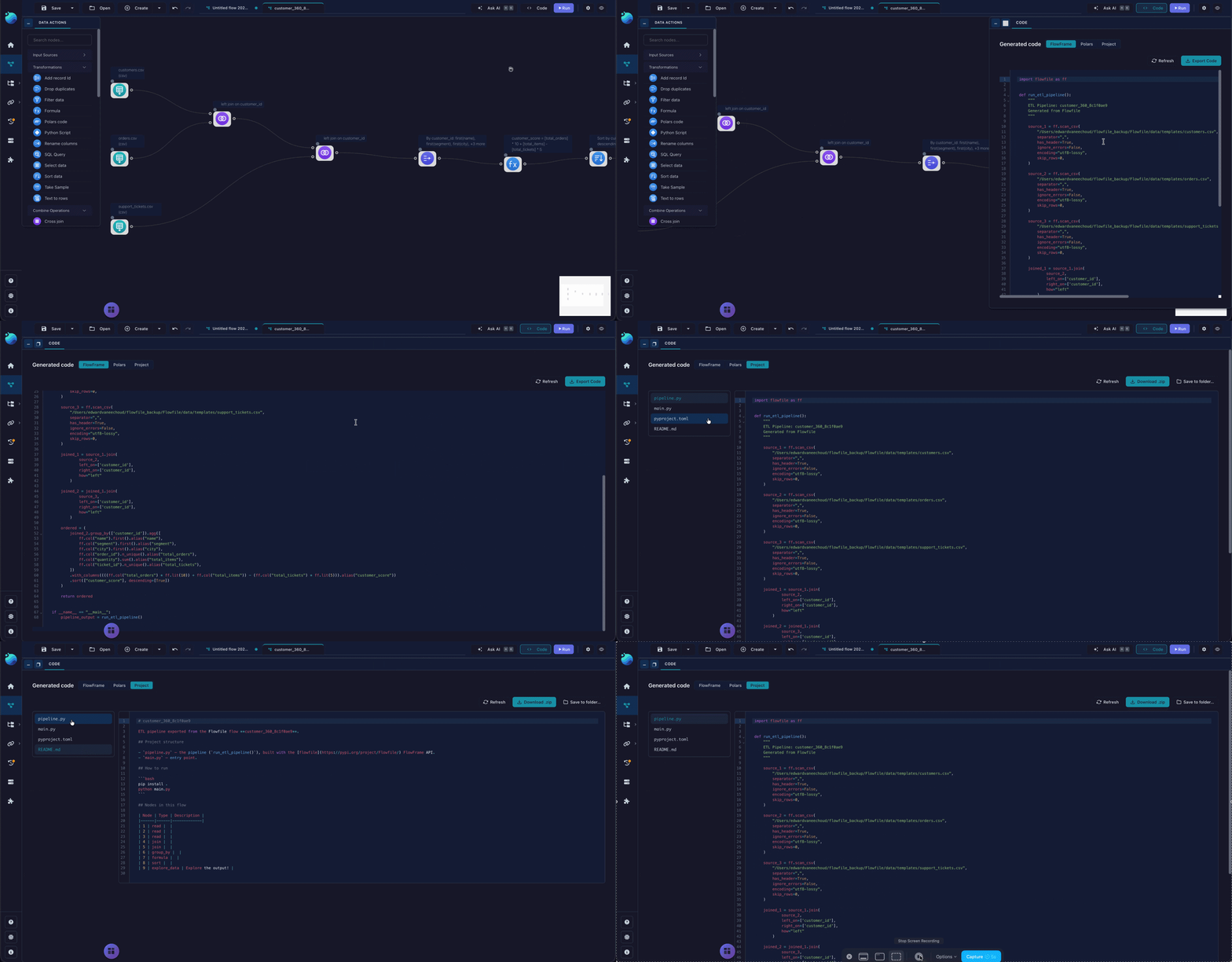
Flowfile’s version is narrower and more useful: the transform-and-file-I/O core of a flow exports to plain Polars you’d have written by hand. Not a serialization of the canvas — the actual pl.scan_parquet(...).filter(...).group_by(...) a Python developer would type. And since 0.12, you can export the whole flow as a standalone project: a folder with a pipeline.py, a pyproject.toml, and a README.md that runs on its own, its dependencies pinned in the manifest — no Flowfile app, no canvas, no server.
Three targets
The code generator has three outputs, each a real function you can call — export_flow_to_polars, export_flow_to_flowframe, export_flow_to_project:
- Polars — the leanest. The transform and file nodes render as plain Polars against a script that imports only
polars. Nothing else. This is the “hand it to someone who’s never heard of Flowfile” target. - FlowFrame — wider. It covers the nodes that wrap services — catalog, cloud storage, Kafka, the ML nodes — as FlowFrame code that imports
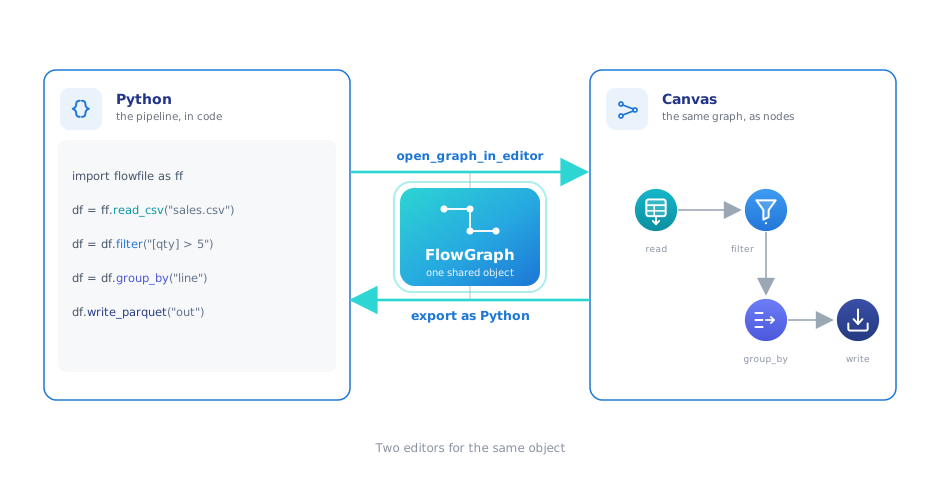
flowfile(an MIT pip package, not a runtime lock) and, crucially, round-trips back into the canvas. Export it, edit the Python, reopen it visually. - Project — the whole flow as a runnable repo.
What the Project target builds
A single script is fine until your flow has a Python Script node in it. That node’s body is arbitrary Python — a scikit-learn call, a bespoke API client — and there’s no honest way to fold it into one linear Polars chain. Before the Project target, a flow containing one couldn’t be exported at all.
The Project export handles it by giving the flow a real structure:
pipeline.py,main.py,pyproject.toml, and aREADME.md— a project you canpip installand run.- One module per Python Script node, emitted verbatim with
# %%cell markers, so your notebook code lands in the export exactly as you wrote it instead of being flattened away. - One module per custom node.
- A local
flowfile_ctxshim, so notebook code that read inputs and published outputs through Flowfile’s context keeps working outside it. The genuinely server-only calls raise a clearNotImplementedErrorin the shim rather than pretending — and they’re listed as warnings in an export manifest, so you see the edges instead of discovering them at runtime.
The Code panel shows every generated file with a per-file preview and its warnings before you commit; download it as a zip or write it straight to a folder.
Cleaner code, because generated code is still read by people
A code generator that emits one intermediate variable per node produces technically-correct Python that no human wants to inherit — df_1 = ...; df_2 = df_1...; df_3 = df_2... for forty lines. The 0.12.5 generator fuses that.
Linear chains of single-use nodes collapse into piped expressions, and named variables survive only where the graph actually branches or merges — which is exactly where a person would have named them too. Nodes that do nothing observable — a select that selects everything, a UI-only preview node — are remapped to their input instead of emitting dead assignments. Joins stopped wrapping themselves in parentheses they didn’t need. And REST API credentials are redacted in the output rather than baked in. The result reads like code, not like a graph transcribed into code.
The boundary, stated exactly
This is the part most tools are slippery about, so here it is flat. There is no partial export. Flowfile does not export the nodes it can and silently drop the ones it can’t. If a single node in the flow can’t be rendered for the target you picked, the entire generation fails with one aggregated error naming what’s wrong. You get a complete script or an honest error — never a script that looks done and is quietly missing a step.
Four tiers decide what happens:
- Dependency-free Polars. The core transforms and file I/O — select, filter, formula, group by, join, sort, unique, pivot, union, and the CSV/Parquet/Excel readers and writers. These export to a script that needs only
polarsinstalled. - Exports, but imports
flowfile. The database reader and writer and the REST API reader emitff.calls. Still portable —flowfileis a pip install, not a ransom note — just not pure-polars. - FlowFrame-only. Catalog reads and writes, cloud-storage I/O, the Kafka source, and the ML train/apply/evaluate nodes export under the FlowFrame target but are rejected under a plain-Polars export.
- No export. The Python Script node, the SQL Query node, the Google Analytics reader, and the API-serving node don’t render to code. A flow that needs one of these in an unsupported target fails the whole export — by design.
So the honest summary is: pick Polars and you get the dependency-free core or a clear rejection; pick FlowFrame and the boundary moves out to cover the service-wrapping nodes; pick Project and you additionally get your Python Script nodes carried across verbatim. In every case the failure mode is the same — a complete artifact or a named error.
The code is portable; the workspace isn’t. Your transforms export to Polars you own outright, but a dashboard or a saved visualization stays a Flowfile object — there’s no portable-BI format to carry it to, because none exists. Which is the honest answer to what people actually mean by “am I locked in?” — can I take my pipeline and run it somewhere else? Yes: it’s a folder with a pyproject.toml in it.
Flowfile is open source (MIT), one pip install flowfile, and stores nothing you can’t read without it — the repository has the code generator and the export docs. Related: Direction Stopped Mattering for how the flow and the code are the same object in both directions, Subflows for how nested flows export as their own modules, and Git-Backed Projects for versioning the flow definitions instead of the generated code.