
Virtual Flow Tables: When a Catalog Entry Is a Pipeline
Most data catalogs know about materialized tables and SQL views. Flowfile adds a third option: a catalog entry that points at a pipeline and resolves lazily. Here's how and why.
TL;DR. Most data catalogs are a map from a name to a file (or a view over files). Flowfile’s catalog supports a third option: a name that points at an entire pipeline and resolves lazily. You query analytics.sales.weekly_summary by name; under the hood, the producing flow runs (or a captured Polars LazyFrame replays). This gives you always-fresh derived tables without the “did you remember to materialise it?” question — and a clean way to compose flows where one pipeline’s output is another’s input without ever writing to disk.
What lives in a data catalog, usually
Open any modern data catalog and you’ll find two kinds of entries:
- Materialised tables. Real data, on disk or in a warehouse. Delta, Iceberg, Parquet, or warehouse-native. Fast to read. Goes stale unless something re-writes it.
- Views. A saved SQL query that resolves against other tables every time you read it. Always fresh. Limited to SQL semantics — joins, filters, aggregates, window functions.
That’s the 95% of the catalog world. Unity, Glue, Polaris, dbt sources, Snowflake’s INFORMATION_SCHEMA — different implementations of the same two concepts.
Flowfile supports both. The first one is covered in Demystifying Delta Lake (materialised tables), the second appears in Flowfile as query-based virtual tables (a saved SQL expression with a name). But Flowfile also has a third category — one most catalogs don’t — and it’s the one this post is about.
The third kind: virtual flow tables
A virtual flow table is a catalog entry whose contents are defined by a flow, not a file and not a SQL query. You register the name analytics.sales.weekly_summary and point it at a flow. When anyone queries that name, Flowfile resolves it by running the flow (or, if optimisation is possible, replaying a captured Polars LazyFrame).
Three catalog entry types, side by side:
| Type | Defined by | Freshness | Read cost | Limits |
|---|---|---|---|---|
| Materialised (Delta) | A file on disk | Stale unless re-written | Fast (direct read) | None |
| Query-based virtual | A SQL expression | Always fresh | Cost of the SQL query | SQL semantics only |
| Virtual flow table | A Flowfile pipeline | Always fresh | Cost of running the flow | None — any pipeline works |
The point of the third row is that it removes SQL as a ceiling. A virtual flow table can join a CSV to a database table, apply a fuzzy match, run a Python transformation, pivot the result, and expose that under a single catalog name. Nothing about “is it a view?” or “is it materialised?” leaks into the caller’s code — they just query the name.
How it’s actually stored
All three entry types share the same local catalog. In the catalog_tables model, a discriminator column decides the behaviour:
class CatalogTable(Base):
    __tablename__ = "catalog_tables"
    # ...
    table_type = Column(String, nullable=False, default="physical")
    file_path = Column(String, nullable=True)                 # NULL for virtual
    producer_registration_id = Column(Integer,                # points at a flow
        ForeignKey("flow_registrations.id"), nullable=True)
    serialized_lazy_frame = Column(LargeBinary, nullable=True)  # for optimised virtuals
    is_optimized = Column(Boolean, default=False)
    sql_query = Column(Text, nullable=True)                   # for query-based virtuals
Physical tables carry a file_path to their Delta files and nothing else. Query-based virtuals carry a sql_query and no producer. Virtual flow tables carry a producer_registration_id (the flow that produces them) and — if the pipeline is eligible — a serialised LazyFrame for fast replay.
One schema, three shapes. The catalog API and the UI handle all three identically from the caller’s perspective: you ask for a table by name, you get a Polars LazyFrame back.
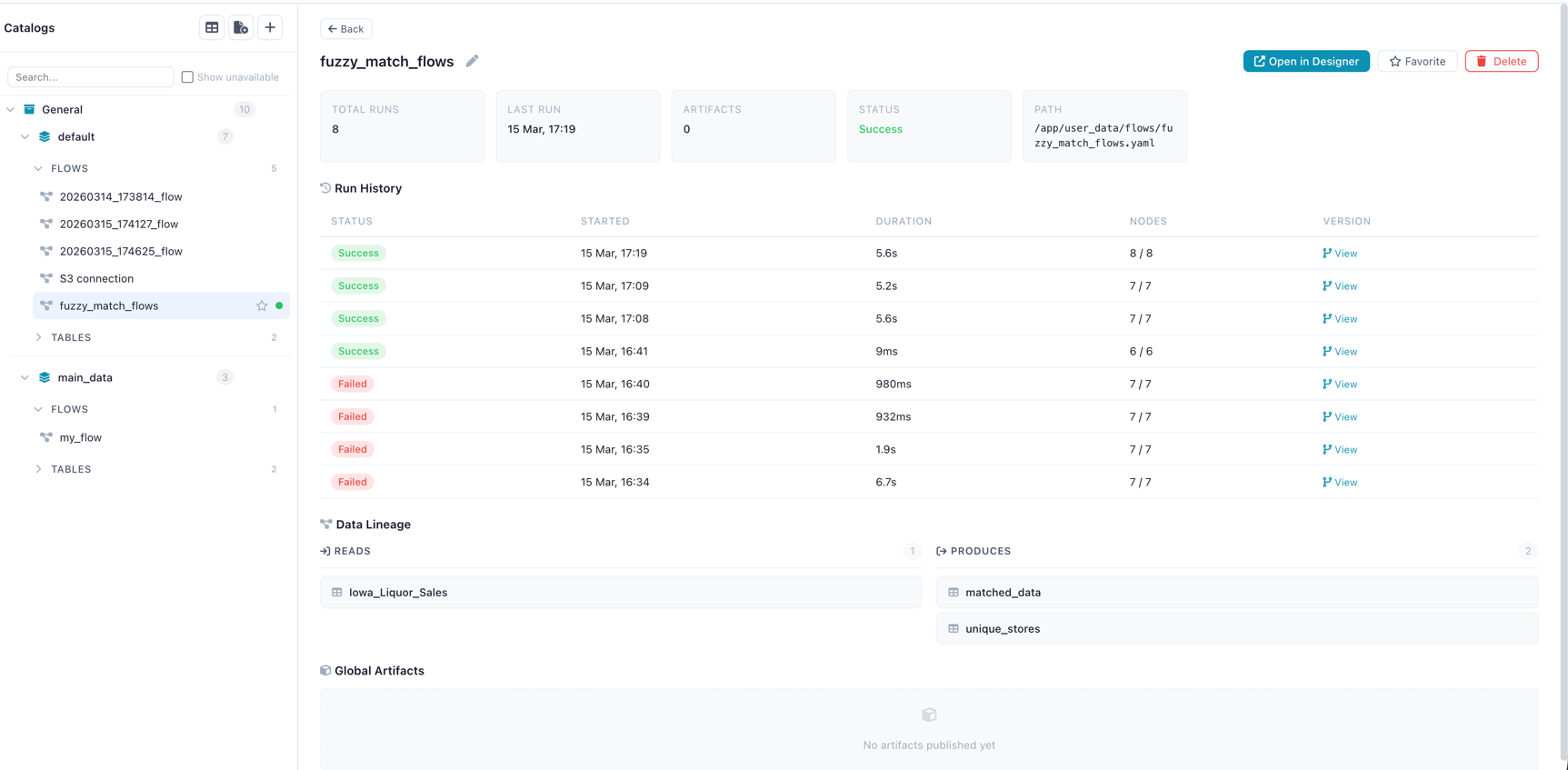
Creating one
The primary surfaces today are the catalog’s HTTP API (POST /catalog/virtual-tables) and a Catalog Writer node inside a flow, set to virtual mode:
# Inside a flow: terminal node set to virtual write mode
_add_catalog_writer(
    graph,
    node_id=3,
    depending_on_id=2,
    table_name="lazy_virtual",
    namespace_id=ns_id,
    write_mode="virtual",   # not "overwrite" — no file gets written
)
That final node registers the flow as the producer of a virtual entry named lazy_virtual. No Parquet file is written. Nothing hits the disk beyond the flow definition and the catalog metadata. The flow is the table.
In the visual canvas, this is a single radio button on the Catalog Writer node: “Materialise” or “Virtual.”
Honest caveat. There isn’t a standalone ff.register_virtual_flow_table(...) Python function yet — the Python-facing entry point is the Catalog Writer node inside a flow, and the HTTP API is what both the node and the UI call under the hood. A direct Python helper is on the roadmap.
What happens when you query one
Resolution has two paths depending on whether the virtual table is optimised:
Non-optimised (general case): Flowfile loads the producer flow, triggers execution via the worker, captures the Catalog Writer node’s output, and returns a Polars LazyFrame reading the result. This is every-node-fair: your Python script nodes run, your database reads run, your fuzzy matches run.
Optimised: When the upstream pipeline can be expressed as a pure Polars LazyFrame (no external I/O that can’t be replayed, no Python script nodes, etc.), Flowfile serialises that LazyFrame into the catalog entry. Resolution becomes: deserialise the plan, execute it. Predicate pushdown and projection pushdown still apply, which matters — a query like SELECT region, sum(spend) FROM lazy_virtual WHERE year = 2026 can skip most of the work at resolution time even though the whole pipeline is notionally “virtual”. In practice this is near-instant.
The resolver logic:
def resolve_virtual_flow_table(self, table_id: int, user_id: int | None = None) -> pl.LazyFrame:
    """Resolve a virtual flow table to a LazyFrame.

    For optimized tables, deserializes the stored LazyFrame directly.
    For query-based virtual tables, delegates to resolve_query_virtual_table.
    For non-optimized tables, triggers flow execution via the worker
    and returns a LazyFrame reading the IPC result.
    """
When to use which
These are the patterns I’ve seen hold up:
- Always materialise when the table is queried frequently and the producing pipeline is expensive. Dashboards, downstream joins, anything hit more than once an hour. Delta versioning +
OPTIMIZE+VACUUMgives you the operational footing. - Use a virtual flow table when the producing pipeline is cheap and you care about freshness more than latency. Dev / staging environments. Cross-team composition (“my flow B reads the output of team A’s flow without team A having to schedule materialisation”). Exploratory work where you’d rather not pay the materialisation cost until you’re sure you want the output.
- Use a query-based virtual table when the transformation really is just a SQL expression over existing catalog tables — no need for the flow machinery, and the SQL is easier to read.
- Combine them. A common pattern: run a flow on a schedule, materialise the output for production readers (
write_mode="overwrite"), and also register a virtual flow table at a second name that resolves against the latest flow run on demand. Production dashboards read the fast materialised copy; engineers debugging yesterday’s data query the virtual table.
Converting a virtual table to materialised
There is no in-place “promote to materialised” command. The pattern is to add a second Catalog Writer to the same flow:
flow_steps...
    → Catalog Writer  (write_mode="virtual",   name="orders_summary_virtual")
    → Catalog Writer  (write_mode="overwrite", name="orders_summary")
Now the same flow serves both readers: virtual for dev, materialised for production. Schedule the flow hourly and both stay within their intended freshness window.
The architectural consequence
Step back for a moment. The reason virtual flow tables are interesting isn’t the implementation detail — it’s that they collapse two things most data platforms keep separate:
- Pipelines (things that produce data)
- Tables (things you can query)
A Flowfile pipeline is a table by the time it’s registered in the catalog. Downstream flows don’t care whether their input was computed just now or read from Delta; they get a LazyFrame either way. This is the same reason Snowflake recently added “dynamic tables” and Databricks pushed “materialised views”: the pipeline/table boundary is artificial for a lot of analytics work, and collapsing it makes the platform simpler to reason about.
Flowfile gets to this without a warehouse bill. The catalog is local. The Delta storage is local. The producer flows run on your machine. “Query the result of another team’s pipeline by name” is a local file-system path with a lazy Polars plan behind it.
Try it
- Install Flowfile — one command, runs locally.
- Create a flow that ends in a Catalog Writer node set to Virtual mode.
- Query the table by name from another flow or the catalog UI.
- Compare resolution times for an optimised vs non-optimised virtual table and feel the pushdown at work.
Related reads: Why Your Data Should Stay on Your Laptop for the local-first case for catalogs, Demystifying Delta Lake for the format powering the materialised side, and Connections, Secrets, and the Catalog in Flowfile’s Python API for the developer-experience angle.
Frequently asked questions
- What is a virtual flow table in Flowfile?
- A catalog entry whose contents are defined by a flow (pipeline) rather than a materialised file on disk. When someone queries it, Flowfile either replays the flow or, if the table is 'optimised', deserialises a stored Polars LazyFrame and executes that. The name exists in the catalog; the data is computed on demand.
- How is this different from a SQL view?
- A SQL view is limited to SQL semantics — you can't, say, call a fuzzy-match node or run a Python script inside it. A virtual flow table can be any Flowfile pipeline: multi-source joins, Polars expressions, sandboxed Python, conditional logic. SQL views are a subset of what virtual flow tables can do. Flowfile also supports query-based virtual tables for the SQL-only case.
- How is it different from a materialised table?
- A materialised table is written to disk as Delta/Parquet once; reads are fast but the data can be stale. A virtual flow table is recomputed on demand, so it's always fresh — at the cost of paying the compute every time you query it. The right choice depends on query frequency, compute cost, and freshness requirements.
- Is there a Python API to register a virtual flow table?
- Not directly. Today, virtual flow tables are created one of two ways: by POSTing to the catalog's HTTP API (
POST /catalog/virtual-tables) or by adding a Catalog Writer node to your flow withwrite_mode="virtual". The visual UI uses the same HTTP endpoints. A dedicated Python function is on the roadmap. - Can I convert a virtual flow table into a materialised one?
- There's no in-place conversion, but the pattern is simple: add a second Catalog Writer node to the same flow pointing at a new table name with
write_mode="overwrite"(materialised). Schedule the flow. Now you have both — the virtual version for dev/ad-hoc queries and the materialised version for production reads. - What does 'optimised' mean for a virtual flow table?
- When Flowfile can capture the upstream pipeline as a pure Polars LazyFrame — no Python script nodes, no external I/O that can't be replayed — it serialises that LazyFrame into the catalog entry. Resolution then skips the full flow execution and just deserialises + executes the plan directly. Predicate pushdown and projection pushdown still apply. Near-instant for most queries.
- Where are virtual flow tables stored?
- In the same Delta-backed local catalog as everything else. The
catalog_tablesrow carries atable_typediscriminator ('physical' vs 'virtual'), a nullablefile_path, and for virtual entries a reference to the producer flow registration plus an optional serialised LazyFrame. Nothing leaves your machine.