
Tools That Teach Get More Important in an AI World, Not Less
AI-generated code is disposable; understanding transfers. Why schema previews, readable exports, and inspectable query plans matter more when the first draft is free.
TL;DR. AI code generation makes solving today’s problem cheap. It does nothing for the question of whether you can fix it next month when the source schema changes or the join condition was subtly wrong. The skill that becomes scarce is reading and evaluating generated code — and the tools that compound that skill while you work, instead of hiding it from you, are the ones worth using.
The cheap-first-draft trap
The most dangerous idea in technology right now is that understanding is optional. That the right prompt replaces the right mental model. That you don’t need to know what a left join does because you can ask for one.
This works until it doesn’t. Then someone has to figure out why the daily report shows 14 million rows instead of 1.4 million. The person who skipped the understanding has nothing to fall back on except another prompt — which generates another plausible answer that may or may not be the right one, with no internal model to check it against.
I’ve watched this happen twice in the last six months on small consulting jobs. Both times the same shape: a working pipeline that someone got AI to assemble, a quiet bug that crept in three weeks later, and a debugging session that turned into a remedial Polars course because the owner didn’t have the framework to read what they’d shipped. The code itself wasn’t bad. It just had no parent.
What durable looks like
Understanding is a different kind of asset than code. Code is disposable — it solves today’s problem with today’s libraries and is obsolete the moment something updates. Understanding is durable: it transfers, it compounds, it gets more useful with every adjacent thing you learn.
This was already true. AI makes it more pronounced because AI shifts where the bottleneck lives. The first draft used to be the hard part. Now the first draft is free, and the bottleneck moves entirely to the person who can:
- Read the generated code and notice the right things.
- Decide whether the approach is right for the data, not just the prompt.
- Debug it when production data exposes the case the model didn’t think of.
- Improve it when the underlying library changes.
The bottleneck has always been thinking. AI doesn’t fix that. It just makes the consequences of skipping it land harder.
What tools that teach look like
Software has a long-running schism between easy and powerful. Easy tools hide things. Powerful tools expose them. Most developer tools settle on one side and call the other one beneath them.
It was always a false trade. A tool can be easy and expose what’s happening, if the layers are designed to be lenses rather than walls. The properties that make a tool teach instead of just work, listed concretely:
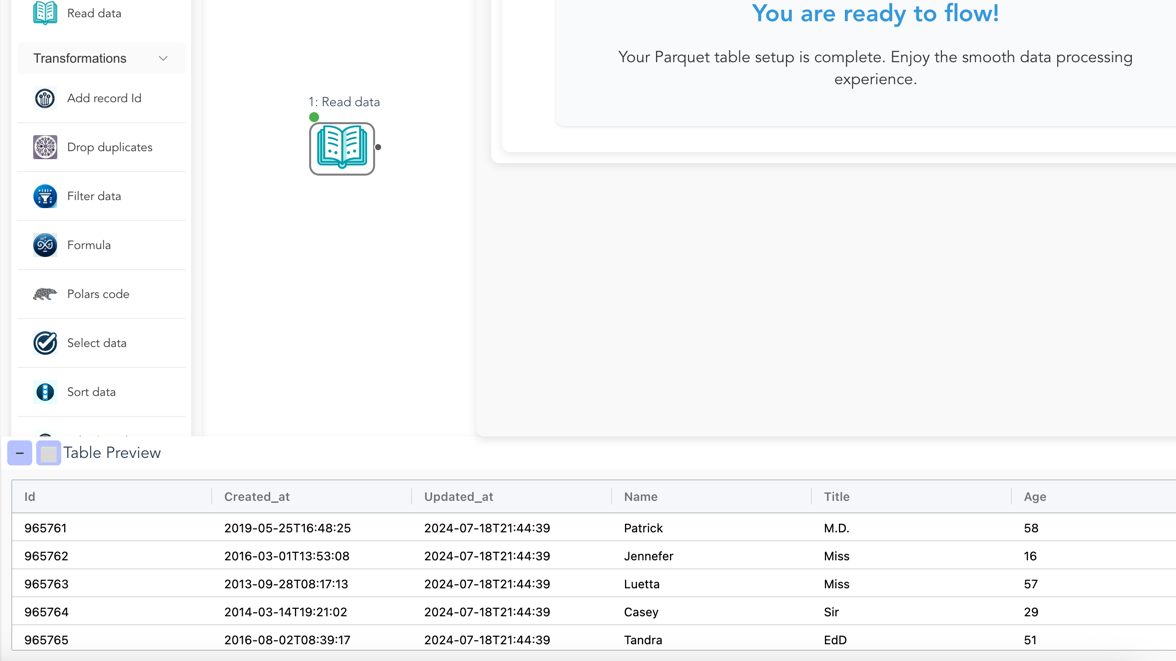
- The schema is visible. Not in a separate Inspect panel three menus deep — visible at every node, updated in real time as you edit the upstream. You learn what a join does because you can see the column count change.
- Errors point at the work, not at the framework. A type mismatch should highlight the node that produced the wrong type, with the actual columns, not throw a 50-line stack trace from an internal Polars module.
- The code under the canvas is the language people actually write. If exporting your flow produces a custom DSL nobody else uses, the tool taught you a dead language. If exporting produces real Polars or real SQL, the tool taught you a transferable one.
- The query plan is inspectable. A learner who can see why an operation is slow learns query planning faster than one who only sees the wall-clock time. Polars has a
.explain(); surfacing it next to the canvas is most of the work. - Wrong is recoverable. Break something, undo, try again. Anxiety is the worst possible learning environment, and production-grade enterprise-critical framing is a near-perfect way to manufacture anxiety in someone trying to learn.
These aren’t features Flowfile invented. They’re properties any tool can have if the team building it cares about the gap between the user got the result and the user understood the result.
What Flowfile bets on
Flowfile is shaped by this view, deliberately. A few specifics:
The schema is updated at every node, before the flow runs. Drag a Filter node onto a Read Parquet, and you see the columns it inherits without having executed anything. Type a comparison against a column that doesn’t exist, and the validator flags it before you click Run. Most “did I do that right?” questions turn into immediate visual feedback instead of a runtime stack trace.
The exported code is plain Polars. Not a wrapper. Not a DSL. The script export_flow_to_polars(flow) produces is exactly the script you’d write if you were writing it by hand — pl.scan_parquet(...).filter(...).group_by(...). If you build a flow visually and read the export, you’ve read a working Polars program. Do that ten times and you’re writing Polars without intending to.
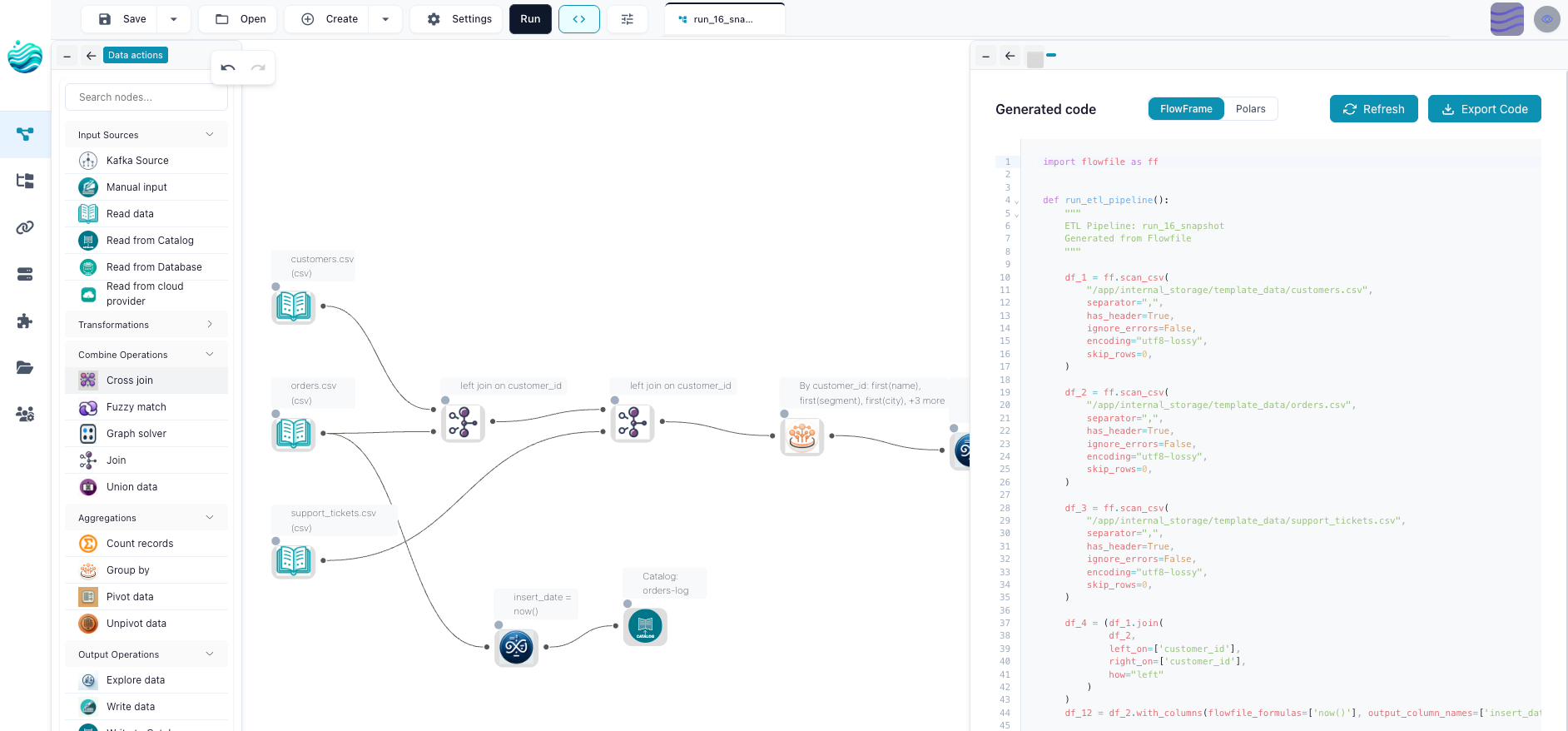
Custom Python nodes use real Pydantic. Real FastAPI patterns. Real Python conventions. Nothing is dumbed down to the point where it stops being useful outside the tool. Drop the canvas someday and everything transfers — the Polars you read, the Pydantic you wrote, the pipeline logic itself — because none of it was ever Flowfile-specific.
Why this gets more important, not less
The pull toward “AI does it for you” tools is going to be enormous over the next few years. They sell well: solve today’s problem in a sentence, get on with your day. Some of them will be genuinely useful. Most of them will quietly create a generation of operators who can ship pipelines they can’t repair.
The counter-bet is tools that solve with you, not for you. They take longer to learn — though usually less long than people fear. They have a higher floor of understanding required. They produce work that the same person can come back to in six months and still recognise.
I think the population of those tools shrinks before it grows. Most of the market chases the easy demo. But the people who care about the durable side will find each other, and the work they produce will hold up better than the work that didn’t pass through a human brain.
The honest limitation
This is a stance, not an architectural feature. A tool can be designed to teach and still be ignored. If you use Flowfile and never look at the exported code, never inspect a schema preview, never read the query plan, you’ll get the result and miss the point. The visual layer being a lens doesn’t help if nobody looks through it.
Most learners do, in my experience. The ones who don’t were going to use whatever was fastest regardless, and that’s not a problem any tool can solve.
The takeaway
The first draft is always free now. The premium goes entirely to the second draft, and the second draft is written by a person who understood the first.
If you’re new to this work — analyst, junior engineer, someone who got pulled into the data side because nobody else volunteered — pick the tools where the layer underneath is visible. That layer is the part you keep.
That’s the bet Flowfile is making. Not anti-AI. Just in favor of humans who still understand what a left join does, because a tool once showed them, visually, with their own data.
Related reads: Learn Python by Building, Not by Reading for the same idea applied to language learning, Catalogs Make Data Easy. Open Formats Keep It Yours. for the easy without lock-in shape, and Three Releases In, Flowfile Stopped Being a Pipeline Tool for where the project is heading.
Frequently asked questions
- Is this an anti-AI post?
- No. AI is a fine first draft. The argument is about what becomes scarce in a world where first drafts are free — and the answer is people who can read, evaluate, debug, and own the second draft. Tools that build that skill while you do the work get more useful, not less.
- Doesn't AI just replace the need to understand?
- It replaces the need to understand until something goes wrong. The first time a generated pipeline silently drops rows, or a join produces ten million extra duplicates, the only way through is to read the code and know what each line is doing. That moment is when 'understanding is optional' falls apart.
- What does 'a tool that teaches' actually mean?
- Concretely: schema visible at every step, type mismatches caught before you run anything, a real-time query plan you can inspect, exported code that's exactly the language you'd otherwise be reading on Stack Overflow, error messages that point at the node not at line 4127 of an internal library. Learning happens as a side effect of the work, not as a separate textbook.
- Where does Flowfile fit in this?
- Flowfile is built on the bet that the visual layer should be a lens on the code, not a wall in front of it. The same transform logic you drag-and-drop to a result also exports as standalone Polars. You see the schema update at every node. The generated code is exactly what you'd write — not a dumbed-down DSL — so the tool is teaching you Polars whether you meant to learn it or not.
- If understanding is so important, why use a visual tool at all?
- Because reading and writing aren't the same skill. Most people can read code well before they can write it confidently, and the canvas plus the schema preview is one of the fastest ways to bridge that gap. You build something visually, you see the code that came out, you change one thing and watch the code change. That's a lab, not a crutch.