
The AI Was the Easy Part: Shipping an Agent for Visual ETL
Flowfile v0.10 ships an AI assistant for the canvas — agent, ghost nodes, Fix-with-AI — plus the guardrails that make it safe: diff previews, undo, BYOK across six providers.
TL;DR. v0.10.0 ships an AI assistant for Flowfile’s visual ETL canvas: chat, an agent that builds flows from a prompt, ghost-node suggestions on empty edges, inline ✨ actions on every node, Fix-with-AI on failed runs, doc generation, and lineage Q&A — all BYOK across Anthropic, OpenAI, Google, Groq, OpenRouter, and Ollama.
Wiring a model up was the quick part. Most of what shipped is the scaffolding that makes an agent safe to point at a canvas you care about — previews before anything applies, one-action undo, recovery when a step fails, rate limits, audit hooks. That’s the part this post is really about.
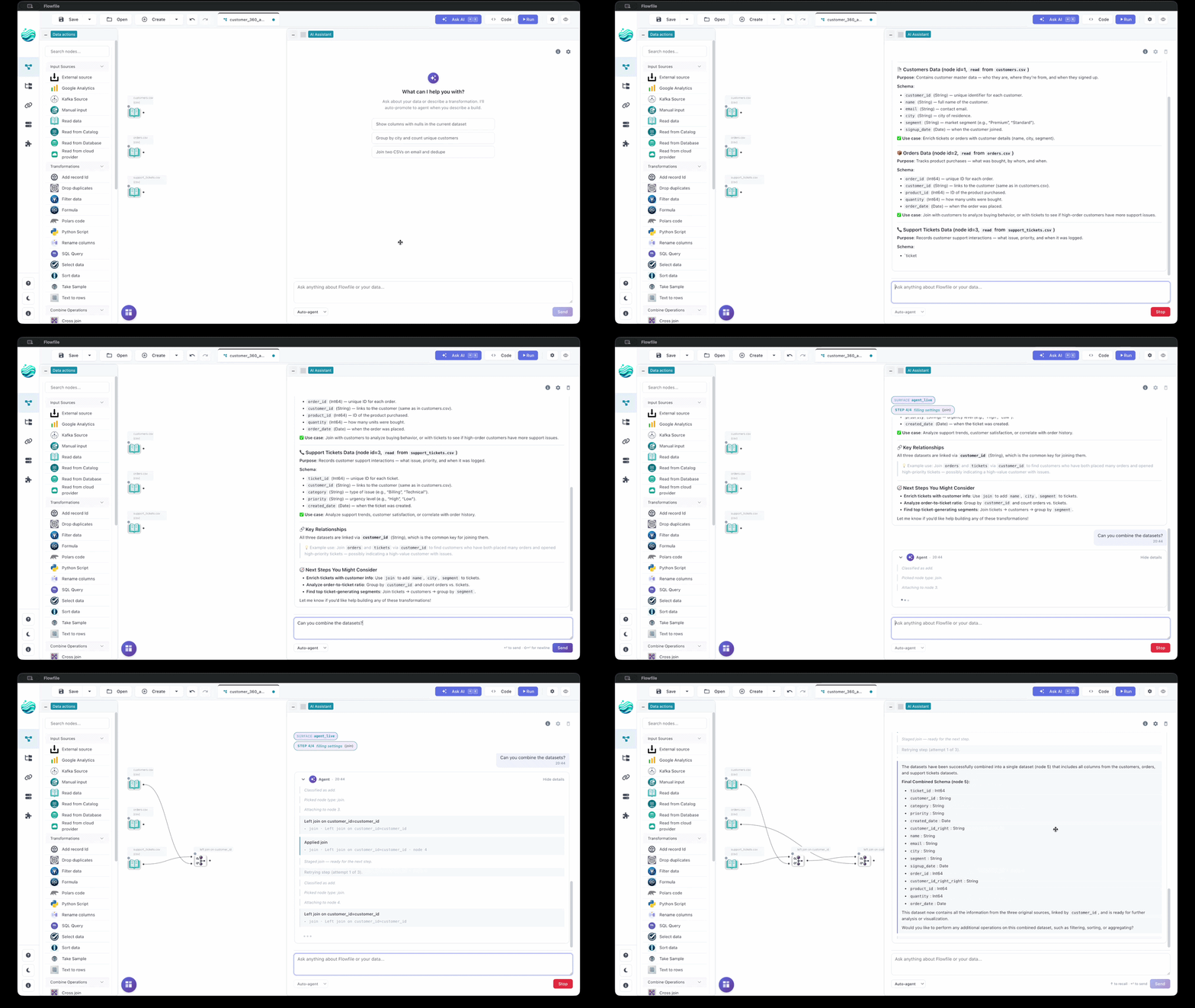
Full docs: Flowfile AI documentation.
Three agent tiers
The assistant has three tiers, mapped to how much it’s allowed to do without your permission:
- Assist — read-only. Chat, the ✨ Explain action, Fix-with-AI on a failed run.
- Copilot — single suggestion, applied immediately. Ghost nodes on empty edges, settings autocomplete that reads your upstream columns.
- Planner — multi-step, with a diff preview. Builds a pipeline from one sentence. One undo per accepted plan.
You can pin the drawer to one tier, or let auto-routing classify each message:

Inline ✨ actions on a node
Every node has an inline ✨ menu. Explain streams a plain-language description of what the node does in context. Add description writes a one-sentence description directly to the node. Regenerate code (on code-bearing nodes only) rewrites the snippet and streams it to the drawer for you to copy.
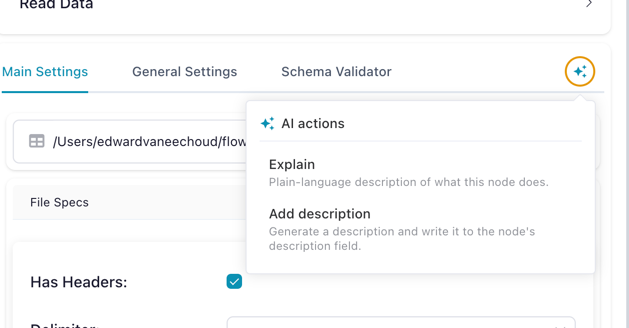
All three are read-only — the model can’t make graph changes through this surface, so the menu is always safe to use on someone else’s flow.
The planner
The planner builds multi-step plans, shows a preview, and applies them atomically.
- Nothing happens until you say so. The planner builds the whole plan in a preview pane next to your flow. You see what it intends before any of it is real.
- It shows its reasoning. If the plan goes wrong halfway, you don’t get an apology — you get a paragraph: “I added a filter on date because you mentioned Q4, then tried to join on customer ID but the columns didn’t line up — here’s why.”
- It recovers from its mistakes. When a step fails, the planner decides whether to fix it, try a different approach, or stop. No blind retries.
- It pauses if you edit the canvas. Manual edits during a run don’t get silently overwritten — you resume or discard.
- One undo per accepted plan. Accept and it applies as one action. Undo reverts the whole plan together.
Three execution modes trade latency for trust:
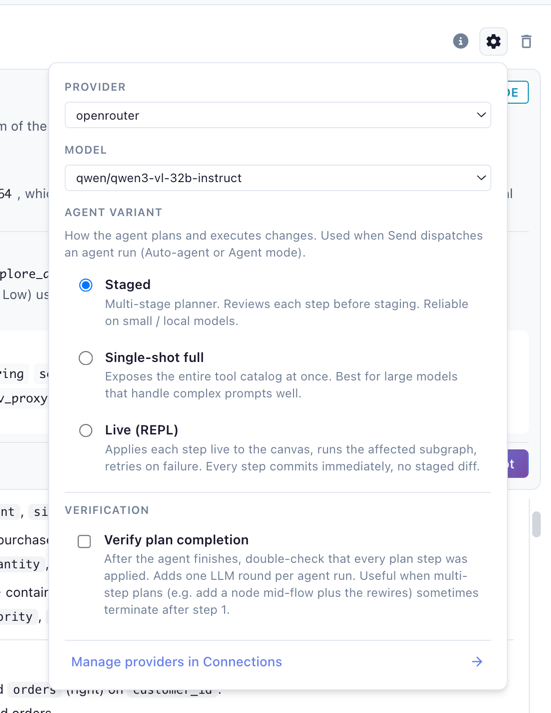
Live applies each step to the canvas and feeds the result back — slowest, most accurate. Staged works well with smaller models: narrow moves, collected proposals, bundled into a diff. Single-shot hands a larger model the full toolkit in one call — best for Sonnet, Opus, or Gemini Pro. An opt-in Verify plan completion pass catches the case where a five-step plan stops after step two.
Staged and Single-shot both route through a diff preview:
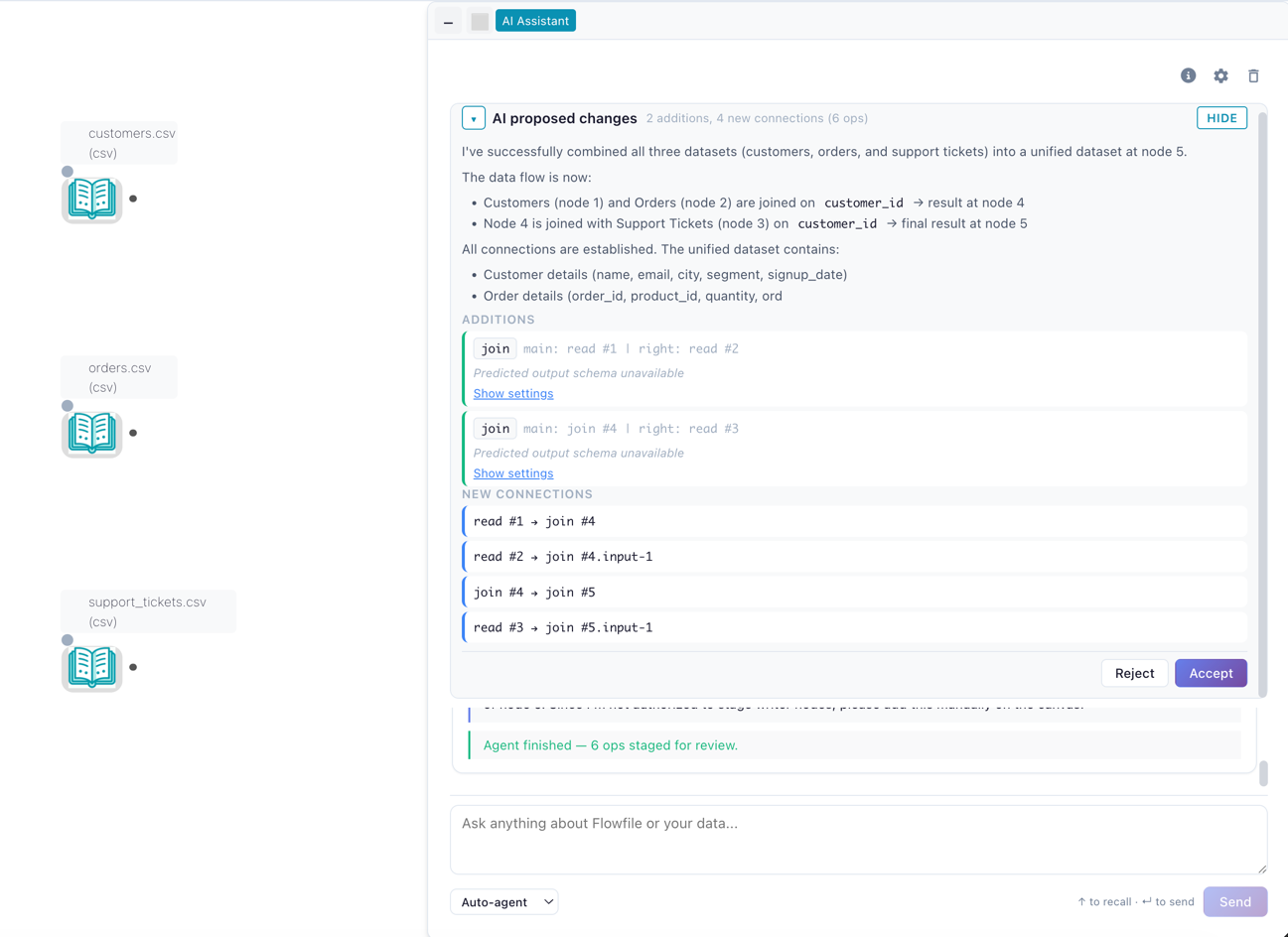
Reject with a note and the note becomes context for the agent’s next attempt.
BYOK
Bring your own provider key — Anthropic, OpenAI, Google, Groq, OpenRouter, or a local Ollama. Keys are encrypted at rest, decrypted only inside the request, and never echoed back to the prompt. A fresh install has no working AI until you paste a key; Ollama covers the local case.
Also under the hood
PII scrubbing and audit hooks on every prompt/completion pair. A per-provider rate-limit scheduler so a chatty surface can’t starve a noisy one. Cost-per-flow metrics per provider / surface / user. SSE streaming with a replay buffer so a dropped connection doesn’t lose tokens. Disk-persisted sessions that survive a process restart.
Also in v0.10
Python flows in the catalog. Python-authored flows now register under a “Python Editor” namespace in the catalog automatically. ff.register_flow_with_catalog(flow, namespace=...) is public if you want explicit control.
import flowfile as ff

df = ff.read_csv("orders.csv").filter(ff.col("status") == "open")

df.write_catalog_table(
    catalog="sales", schema="raw", table="open_orders", mode="virtual",
)
flowfile_formulas → native expressions. with_columns(flowfile_formulas=[...]) without explicit output dtypes now tries to translate the formula strings into native polars expressions. Faster path on success, transparent fallback on failure.
Full release notes: v0.10.0 on GitHub.
What’s next
- Hierarchical planning for larger flows — the planner works well up to ~5 nodes; beyond that the plan gets dense.
- Inline ✨ Regenerate code patching the node in place instead of streaming the snippet to the drawer.
Related reads: Tools That Teach Get More Important in an AI World, Not Less for the philosophical sibling to this post, Why Flowfile Is the Way It Is for the “features fall out of what’s already there” thesis applied to the rest of the platform, and Three Releases In, Flowfile Stopped Being a Pipeline Tool for the catalog work that made this release possible.