
The Two Months Before Flowfile 0.16
Ten releases shipped between mid-July and mid-August and never got a write-up. The catalog learned to keep history, and the canvas learned to warn before a run.
Between July 12 and August 13 I tagged ten Flowfile releases and wrote about none of them. So today two posts go out at once: one about 0.16, and this one, paying off the summer’s debt — v0.13.2 through v0.15.4 in one write-up.
Reading the tags back, most of the work pulls in two directions. The canvas got better at telling you things before you run anything. And the catalog turned from a place you publish to into a place you actually work.
Dimension tables that keep their history
Overwriting a dimension table every night has one ugly property: the table is always right about today and quietly wrong about every yesterday. A value flips, the refresh runs, and whatever last week’s report was built on no longer exists anywhere. Nothing fails, nothing turns red. The number just stops being the number you reported.
The answer that shipped on the first of August: the Catalog Writer’s write mode dropdown has a seventh option now, under overwrite, error-if-exists, append, upsert, update and delete: SCD2 (slowly changing dimension). Pick it and the Key columns field relabels itself to Business key columns.
Every SCD2 write adds four columns alongside your own: sk, valid_from, valid_to, is_current. Validity is half-open, [valid_from, valid_to), and the current version’s valid_to is empty rather than a far-future sentinel, so “true right now” is valid_to IS NULL instead of a comparison against 9999-12-31. If those names collide with columns you already have, a Generated columns section lets you rename all four.
The write itself sorts every input row into new, changed, or unchanged, keyed on the business key. New keys are inserted as version one. Changed keys get their current row end-dated and a new version inserted. Unchanged keys are left completely alone. The close and the insert ride a single Delta MERGE, so a reader never catches the table half-updated. By default every non-key column counts as a change; a Compare columns selector narrows that to the columns you actually track.
Re-running a flow whose dimension didn’t change writes nothing at all. Not a small commit — nothing: the classifier counts zero changed and zero new rows and returns before a merge is ever built, so there’s no Delta commit and the table’s updated_at doesn’t move. The surrogate key is a SHA-256 over the business key plus valid_from, canonicalised so an Int32 42 and an Int64 42 hash the same and an Amsterdam timestamp matches its UTC equivalent. Deterministic, reproducible, and different across versions, because valid_from differs.
From Python it’s the same feature with keyword arguments. This is the tested example from the docs:
import flowfile as ff

day1 = ff.from_dict({"customer_id": [1, 2], "tier": ["free", "pro"]})
ff.write_catalog_table(
    day1, "customers_scd2",
    schema=ff.default_schema(), write_mode="scd2", merge_keys=["customer_id"],
)

day2 = ff.from_dict({"customer_id": [1, 2], "tier": ["pro", "pro"]})
ff.write_catalog_table(
    day2, "customers_scd2",
    schema=ff.default_schema(), write_mode="scd2", merge_keys=["customer_id"],
)

current = ff.read_catalog_table("customers_scd2", schema=ff.default_schema(), scd2_view="active")
history = ff.read_catalog_table("customers_scd2", schema=ff.default_schema(), scd2_view="all")
# current -> 2 rows, history -> 3 rows
Reading it back holds the one genuinely sharp edge. A Catalog Reader pointed at a tracked table grows a History selector, and its default is all records, not active ones. Drop a reader in, leave the selector alone, and you get every version of every key — a join over unfiltered history silently multiplies rows per business key. When a number looks too big, this is the first thing to check. Active records and “active at a point in time” are the other two options. The SQL Editor and flowfile_frame’s SQL context see the raw table too, so there the WHERE valid_to IS NULL is on you.
Most of the guardrails refuse rather than warn:
- A tracked table takes further SCD2 writes or a plain overwrite, nothing else. Append, upsert, update and delete would break the history, so they fail. Writing SCD2 onto an existing plain table fails too; Flowfile never converts a table in place.
- Changing the business key or a generated column name on a later write is refused as drift rather than silently orphaning the versions already there.
- Business keys must be string, integer, boolean, date or datetime, non-null and unique within the batch. Floats have no stable canonical form, so cast upstream.
- An empty input against an existing table is treated as a skip, even with the Input is a full snapshot switch on — an upstream that suddenly produces nothing is far likelier to be broken than to mean everything is gone.
That full-snapshot switch is off by default; turn it on when your source is a complete extract, and business keys absent from the input get end-dated. One operational note: Flowfile’s Delta writes use optimistic concurrency with no locking provider, so don’t point two flows at the same SCD2 table concurrently on an object-storage catalog.
This is one of the two largest changes in the window — 59 files, around 5,300 lines, including some 2,400 lines of tests — and as far as I can tell it’s the first thing in Flowfile that’s dimensional modelling rather than moving data from one place to another.
Warnings before you run
Flow settings has a checkbox reading Warn about invalid node settings, on by default, including for flows saved before it existed.
It flags two things without executing anything: a node whose settings reference a column its input no longer produces, and a Formula or advanced Filter expression that can’t run against its input — the docs’ example is [amount] + "x" on a numeric column. Column checks read the schemas the canvas already predicts; expression checks hand the expression to the same parser execution uses and resolve it against an empty frame. A flagged node gets an amber dot with a hover message naming what’s missing, and the dot clears without a run, because validation re-fires on every settings save, connect, disconnect and node change.
Coverage is deliberately narrow, and the docs say so under an admonition headed “Silence is not a clean bill of health”. Anything downstream of a Python Script or a custom node that must execute once first is never checked, because its input schema isn’t knowable without running, and raw Python and SQL nodes are never checked at all. The omissions that look like bugs aren’t: Select and Dynamic rename skip a missing column and keep running, so warning on them would be noise on a flow that works, and a Join only warns when the missing column is a join key. The rule is that a warning appears exactly when the node would actually fail.
Column statistics in the data preview
Every column header in the result preview picked up a small ⓘ button. Click it and a popover shows the shape of that column: rows, filled, nulls with a percentage, distinct values with their share, and min, max and average where the dtype supports them, plus at most one badge from Empty, All null, Constant, or Unique key.
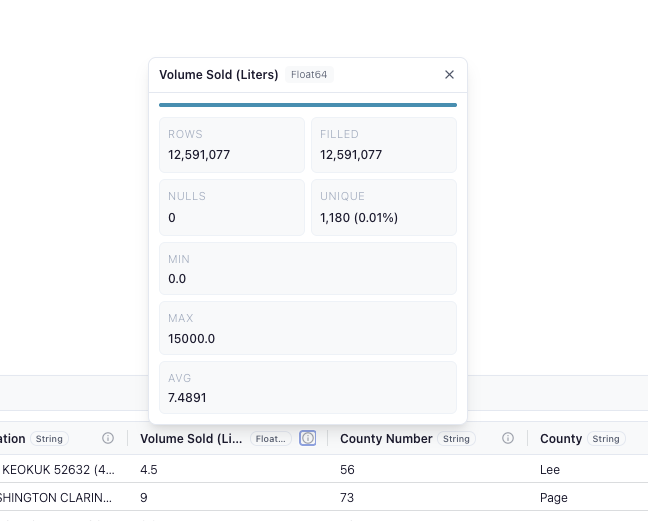
Behind it is one bounded aggregate over the result the last run already produced, computed on demand and cached, so repeat clicks are free. No flow run is triggered and the node is never re-executed — though for a locally cached result the aggregate still evaluates the upstream plan in the worker, and the popover says so while it’s loading. When it can’t answer, it says why instead of computing anyway: the node hasn’t run yet, the result is still computing, or you’re in Performance mode, which is defined by computing nothing extra. It’s one column at a time, on click; there’s no whole-table profile view. It also isn’t in the docs yet, so this paragraph is currently the manual.
Custom nodes
A run of smaller changes here, all pointed at the same thing: making a custom node feel like a real node rather than a script with a form stapled to it.
Settings sections can be conditional now. nd.VisibleWhen gates a whole section on a toggle elsewhere in the form:
class GreetingSettings(nd.NodeSettings):
    main: nd.Section = nd.Section(
        title="Greeting",
        show_advanced=nd.ToggleSwitch(label="Customize greeting"),
    )
    advanced: nd.Section = nd.Section(
        title="Advanced",
        visible_when=nd.VisibleWhen(field="main.show_advanced"),
        word=nd.TextInput(label="Greeting word", default="Hello"),
    )
In the designer that’s a Visibility dropdown on the section, and renaming the section or the toggle retargets the reference for you. Hiding is cosmetic: the control stays mounted, its value is still saved, and process() still reads it.
There’s also an optional predict_output_schema() hook whose signature mirrors process: one LazyFrame per connected input. For a node built from plain Polars expressions the whole implementation is return self.process(*inputs). Without it, a kernel node’s output columns stay unknown until the flow runs, so everything downstream shows up blank. One footgun: the hook always runs in the main Flowfile process, kernel nodes included, so it must not import the kernel-only packages the node itself depends on.
Node files hot-reload from on-disk edits, in the palette and in open flows, with no restart. And kernel dependency matching got real work: a node declares pip dependencies, the kernel picker ranks every kernel against them, a near-miss offers Add missing packages (a stop-rebuild-start cycle of about thirty seconds, and the dialog says plainly that the kernel’s memory is lost), and no match at all offers to build a kernel from the requirements. The v0.15.4 fix behind this matters more than its size suggests: the package closure used to be derived from a lock file that only exists in a repo checkout, so every packaged install quietly reported a confident all-clear for kernels that had none of the packages. It’s now a manifest computed at build time, and “can’t verify” became a verdict that never renders as a match.
Finally, a kernel node can publish something that isn’t a dataframe. flowfile_ctx.publish_artifact("model", clf) puts a live Python object into the flow’s artifact store; add preview=True and a matplotlib, Plotly or PIL figure gets a rendered preview with a View button in the node’s Artifacts panel. Downstream, nd.AvailableArtifacts(scope="upstream", type=["sklearn.*"]) gives a typed dropdown. Two limits: an artifact only travels between nodes on the same kernel, and there’s no artifact explorer yet — inspecting one outside a preview means list_artifacts() in code.
Editing tables in the catalog
The other large change in the window: a catalog table is now something you can correct in place. A physical Delta table’s detail panel has an Edit data button, behind which is a grid where you fix cells, add rows, mark rows deleted, and add columns.
The first step asks which columns are the key, because edits save as keyed merges — row order in a preview isn’t stable enough to trust. A table with no natural key can mint a sequential record_id, and the confirmation says what that is: a full-table rewrite and a schema change every flow reading the table will see. Saving sends only the keys plus the columns you touched, the server validates the lot before the first commit (keys unique across the whole table, values cast to the target dtypes), and every save lands as a new Delta version stamped with your name, reachable by time travel like any other write. It also goes through the same refresh path as any other write, which means a hand edit fires table-trigger schedules and dependent flows re-run. That’s the right call — an edit is a data change — but worth knowing before you fix a typo at 4pm.
Concurrency is a version check done twice, once when the grid loads and once right before the commit. A mismatch becomes a conflict dialog offering to reload; nothing merges two divergent edits for you. The grid loads a bounded slice, 1,000 rows by default and 10,000 at most, with a banner saying rows outside it are untouched. It’s a review-and-correct surface, not a bulk editor, and virtual tables, SCD2-tracked tables and legacy single-file Parquet tables are refused outright.
Inside the editor, a Label rows button opens a labelling workspace over the same session: pick a target column, build a class list, then go row by row with number keys to assign and advance, space to skip, backspace to undo. You can point it at another catalog table of predictions, joined on the same keys, to pre-fill a suggested class per row — with a probability column you get least-confident-first ordering, and Enter accepts the suggestion. Nothing here trains or scores anything; the suggestions are a join against predictions some other flow already wrote. Labelling doesn’t write either — labels sit in the edit session until you hit Save changes like any other edit.
Two freshness fixes round this out. Dashboard and visualization tiles now key their worker session on the source table’s live Delta version, so a table written out of band produces a fresh read instead of a pinned snapshot. And flow runs probe the live version of every Catalog Reader source at the start of the run, invalidating the node’s cache when it moved — which stops a Development-mode run from skipping an “unchanged” reader and serving frozen rows downstream. A reader pinned to an explicit version is never probed, since that’s deliberate time travel. Nothing polls: a dashboard already on screen updates on the next open or when you hit the new Refresh button.
Getting files in and out
Three smaller things that will probably see more daily use than anything above.
You can drag files onto the canvas — up to ten at a time — and each becomes a Read node at the drop point, already pointed at the file with defaults for its type. This is harder than it sounds, because webviews strip filesystem paths out of drag data. On macOS the path comes off the native drag pasteboard and the file is linked in place; on Windows it comes back through WebView2’s recovery channel. On Linux desktop, in the browser and in Docker there’s no path source at all, so you get a confirmation dialog and the file is copied or uploaded instead, and the drag overlay tells you which case you’re in before you let go.
The Cloud Storage Reader and Writer got a Browse button, opening the same file browser the local picker uses against S3, ADLS or GCS. The decision I like in there: being refused permission to list buckets isn’t an error. Least-privilege keys routinely allow listing inside a bucket while withholding the account-wide list, so a denied root listing gets its own state — the browser asks you to type a bucket name, and everything below it browses normally.
And Excel output learned to fill one tab. The write mode for Excel files is now overwrite, update, or create: overwrite is the old behaviour and stays the default, create refuses to touch an existing file, and update replaces only the target sheet, at its original tab position, keeping every other sheet’s formatting, formulas and layout. Several output nodes can fill different tabs of one workbook in a single run — updates serialize on a per-workbook lock, and every write lands through an atomic replace, so a killed process can’t destroy the file.
sales.write_excel("report.xlsx", worksheet="Sales", write_mode="update")
costs.write_excel("report.xlsx", worksheet="Costs", write_mode="update")
Two caveats ride along with update, both stated in the node’s own settings panel: the round trip drops embedded images anywhere in the workbook, and it clears cached formula results, so anything reading the file outside Excel sees empty cells on preserved sheets until Excel next recomputes. An update node also can’t export to standalone Polars, because Polars can’t express it — the export refuses the node and points you at the FlowFrame export rather than degrading it into a destructive overwrite. If Excel is most of your day, the spreadsheet post is the longer story this was built for.
Smaller still: Take Sample has a method now — first rows, random rows, or random percent, with an optional seed. Blank means a fresh permutation each run, a fixed value reproduces across runs, and random sampling preserves the original row order. Old flows keep behaving exactly as they did.
The hardening release
v0.13.3, on July 18, is almost entirely corrections, most of them found by reading the code rather than waiting for bug reports.
The one that mattered most: Polars’ SQL context treats functions like read_csv as real table sources, and Flowfile’s SQL validator — a starts-with-SELECT check plus a keyword denylist — said nothing about them. A perfectly well-formed SELECT could name a file path in its FROM clause and the engine would go and read it. Four surfaces accept user SQL, and Docker deployments are multi-user, so this crossed a privilege boundary there. The fix moved validation into a module shared by core and the worker, with the worker re-validating on arrival rather than trusting its caller, and the check itself walks the parsed statement and rejects any function used as a table source — which covers reader functions Polars adds later without anyone touching the code. A side effect worth having: the SQL Query node had been mislabelled as DuckDB in its tags and prompts when it is, and always was, Polars’ embedded engine.
Two silent hangs went with it. A node used to take each of its inputs’ execution locks while holding its own, so two siblings in a parallel stage consuming the same two upstreams in opposite order could deadlock — forever, with no error, and Cancel couldn’t save it, because a thread parked on a lock never reaches a cancellation check. A node now takes only its own lock and reads upstreams through their own single-flight path, so acquisition follows the DAG and no cycle can form. The second hang was the worker going quiet: core blocked on an untimed socket receive, so a worker that wedged after accepting a task left a healthy-looking, permanently silent connection. The worker now re-sends progress at least every ten seconds even when nothing changed, and core measures total silence against FLOWFILE_WORKER_WS_TIMEOUT — five minutes by default — so one wedged worker fails the run promptly instead of hanging it.
Also in that release: semi and anti joins now pass the full left input downstream unchanged, every column in its original order, with the right side supplying only the join keys. And CSV reads stopped losing columns to type inference — on a parse error the read retries inference at 10,000 and then 100,000 rows before giving up, and the error you finally see is the real one, with the ways out named. A new Infer data types toggle reads everything as text when you want the schema guessing gone entirely.
Before you upgrade
Two things in this window can change behaviour under you.
The first is a genuine breaking change with no migration. A custom node with three inputs used to receive them as main, left, right — which disagreed with the canvas, where the handles run main, right, left from top to bottom. Both the executor and the Python exporter now follow canvas order. A saved flow with a three-input custom node will produce different results after upgrading, so check the wiring. No built-in node takes three inputs, so only custom nodes are affected.
The second isn’t a change, but it’s the likeliest source of a quietly wrong number: that Catalog Reader on an SCD2 table defaults its History selector to all records. Build a dimension, join it to facts without touching the selector, and every fact row gets multiplied by its key’s history. Set it to active records, or filter valid_to IS NULL yourself.
Flowfile is open source (MIT) and runs from a single pip install flowfile, the desktop app, or Docker. The repository has the code and the full notes for every release named here.
Related reads: Flowfile 0.16: Gates, Alerts, and a Warm Worker Pool for what came right after this window, Three Releases In, Flowfile Stopped Being a Pipeline Tool for how the catalog became the thing the rest hangs off, Delta Lake with Polars for the merge mechanics SCD2 rides on, and Schema as a Contract for why the canvas knows enough to warn you before a run.