
Polars vs Pandas in 2026: A Practical Guide
Polars is faster, lazier, and stricter than Pandas. Pandas has 15 years of ecosystem. A practical, honest take on when to use which in 2026.
TL;DR. In 2026, Polars is the right default for new analytics and ETL work in Python. It’s faster, uses less memory, has a saner API, and scales from a notebook to multi-million-row pipelines without changing how you write code. Pandas is still the right answer when you’re glued to libraries that only speak DataFrame, when you have a working codebase that isn’t slow enough to justify migration, or when you need the long tail of obscure-format I/O. Most teams end up running both, and that’s fine.
Where the debate stands today
The Polars-vs-Pandas conversation has shifted three times in the last few years.
In 2022, Polars was a curiosity — fast, but new, with a small ecosystem and rough edges.
In 2024, Polars was the obvious choice for new analytics work, but Pandas 2.0 had just shipped with a PyArrow backend that closed a lot of the performance gap on the use cases that mattered to existing users.
In 2026, the answer is more nuanced. Polars 1.x is mature and stable. Pandas 2.2 with PyArrow is genuinely fast on aggregations and joins. Both are reasonable. The honest version of the choice is no longer which is faster? but which one matches the shape of your work?
This post is the practical breakdown.
What Polars actually is, in one paragraph
Polars is a DataFrame library written in Rust, with bindings for Python. It looks and feels like Pandas — you have DataFrames, you select columns, you filter rows, you group by, you join — but the engine underneath is completely different. Polars is built on Apache Arrow’s columnar memory format, executes work across all your CPU cores by default, and supports two execution modes: eager (run immediately, like Pandas) and lazy (build a query plan, optimise it, then execute).
The lazy mode is where the real wins live.
The core API differences (with side-by-side examples)
# Pandas
import pandas as pd
df = pd.read_csv("orders.csv")
result = (
    df[df["country"] == "NL"]
      .groupby("region")
      .agg(total_spend=("spend", "sum"), num_orders=("order_id", "count"))
      .sort_values("total_spend", ascending=False)
)

# Polars (eager)
import polars as pl
df = pl.read_csv("orders.csv")
result = (
    df.filter(pl.col("country") == "NL")
      .group_by("region")
      .agg(
          pl.col("spend").sum().alias("total_spend"),
          pl.col("order_id").count().alias("num_orders"),
      )
      .sort("total_spend", descending=True)
)

# Polars (lazy — recommended for anything serious)
result = (
    pl.scan_csv("orders.csv")
      .filter(pl.col("country") == "NL")
      .group_by("region")
      .agg(
          pl.col("spend").sum().alias("total_spend"),
          pl.col("order_id").count().alias("num_orders"),
      )
      .sort("total_spend", descending=True)
      .collect()
)
A few things to notice:
- Polars uses expressions explicitly.
pl.col("spend").sum()is a description of work to do, not the work itself. This is what lets the optimiser reason about your query before running it. - Polars lazy mode has
scan_*instead ofread_*.scan_csvdoesn’t actually read anything yet — it builds a plan..collect()triggers the execution. - Method names are normalised.
group_by, notgroupby.descending=True, notascending=False. Small things, but consistent. - No index. Polars DataFrames don’t have a row index. This removes the entire category of
reset_index()/set_index()confusion that plagues Pandas code.
A realistic performance picture
The marketing numbers you see (“100× faster!”) are technically true on certain benchmarks but not representative of most code. Here is what we actually see:
| Workload | Rows | Pandas (2.2, PyArrow) | Polars (1.x, lazy) | Speedup |
|---|---|---|---|---|
| Simple filter + sum | 1M | ~80 ms | ~25 ms | ~3× |
| Group-by aggregation | 10M | ~3.5 s | ~0.4 s | ~9× |
| Join two 10M-row tables | 10M × 10M | ~12 s | ~1.5 s | ~8× |
| Complex multi-step pipeline | 50M | ~90 s + OOM risk | ~6 s, streaming | ~15× |
| Single-row apply / lambda | 100k | comparable | comparable | ~1× |
| Tiny DataFrame ops | <10k | comparable | comparable | ~1× |
These are illustrative — your numbers will vary by hardware, schema, and which Pandas backend you’re running. The directional truth is: the bigger the data and the more standard the operations, the bigger the Polars win. For tiny data and exotic per-row Python code, Pandas is fine.
Where Polars wins decisively
- Lazy execution and query optimisation. This is the killer feature. Polars sees your whole pipeline before running it and reorganises it for speed. Pandas can’t.
- Streaming.
scan_*+.collect(streaming=True)lets Polars process data larger than RAM. Pandas needs you to write the chunking loop by hand. - Memory. Polars uses Arrow’s compact columnar layout. Pandas (with the NumPy backend) stores object columns inefficiently and copies aggressively.
- Multi-core. Polars uses all your cores by default. Pandas is single-threaded except where it dispatches to NumPy/Arrow.
- API consistency. No SettingWithCopyWarning. No reset_index dance. No
.copy()paranoia. - Type strictness. Polars complains loudly when you mix types. Pandas silently coerces. That sounds annoying until the third time strict typing catches a bug Pandas would have shipped.
Where Pandas still wins
- Ecosystem. Statsmodels, scikit-learn pipelines, geopandas, Plotly Express, Streamlit, and a thousand smaller libraries take a
pd.DataFramedirectly. Polars interop is good (.to_pandas()is fast), but it is interop. - Stack Overflow. Fifteen years of answers. For an obscure problem, you’ll find a Pandas snippet faster than a Polars one.
- The
.iloc/.locmental model. If you grew up on it, it’s hard to give up. Polars deliberately rejects index-based selection. - Time series with calendar awareness. Pandas’ time-series tooling is older and more mature for things like business-day arithmetic and timezone-aware resampling.
- Existing code. A working Pandas pipeline is a working Pandas pipeline. Migration costs people-time and introduces risk.
When to use which (an honest decision tree)
Use Polars when:
- You’re starting a new project.
- The data is big enough that performance matters (>~100k rows, or growing).
- The pipeline runs on a schedule.
- You want a code-once-runs-fast story.
- You care about memory headroom.
- You’re building production ETL.
Use Pandas when:
- You’re inheriting a Pandas codebase and it works.
- You’re glued to a library that only speaks
pd.DataFrame. - The data is small and the work is exploratory.
- You’re using a notebook for a one-off analysis and the speed of typing matters more than the speed of execution.
Use both when:
- The heavy lifting (load, clean, join, aggregate) is in Polars, the tail (modelling, plotting, glue) is in Pandas. This hybrid is what most production teams actually do, and it’s fine.
df.to_pandas()is fast.
Where Flowfile sits in this picture
Flowfile is built on Polars — entirely. There is no Pandas in the engine. The transform nodes compile to Polars expressions, and pipelines run lazily by default with the optimiser turned on. The reason is exactly the trade-offs above: for ETL work on real data, the Polars-shaped engine is the right architectural choice, and choosing Pandas would have meant slower runs and more memory pressure for everything users built.
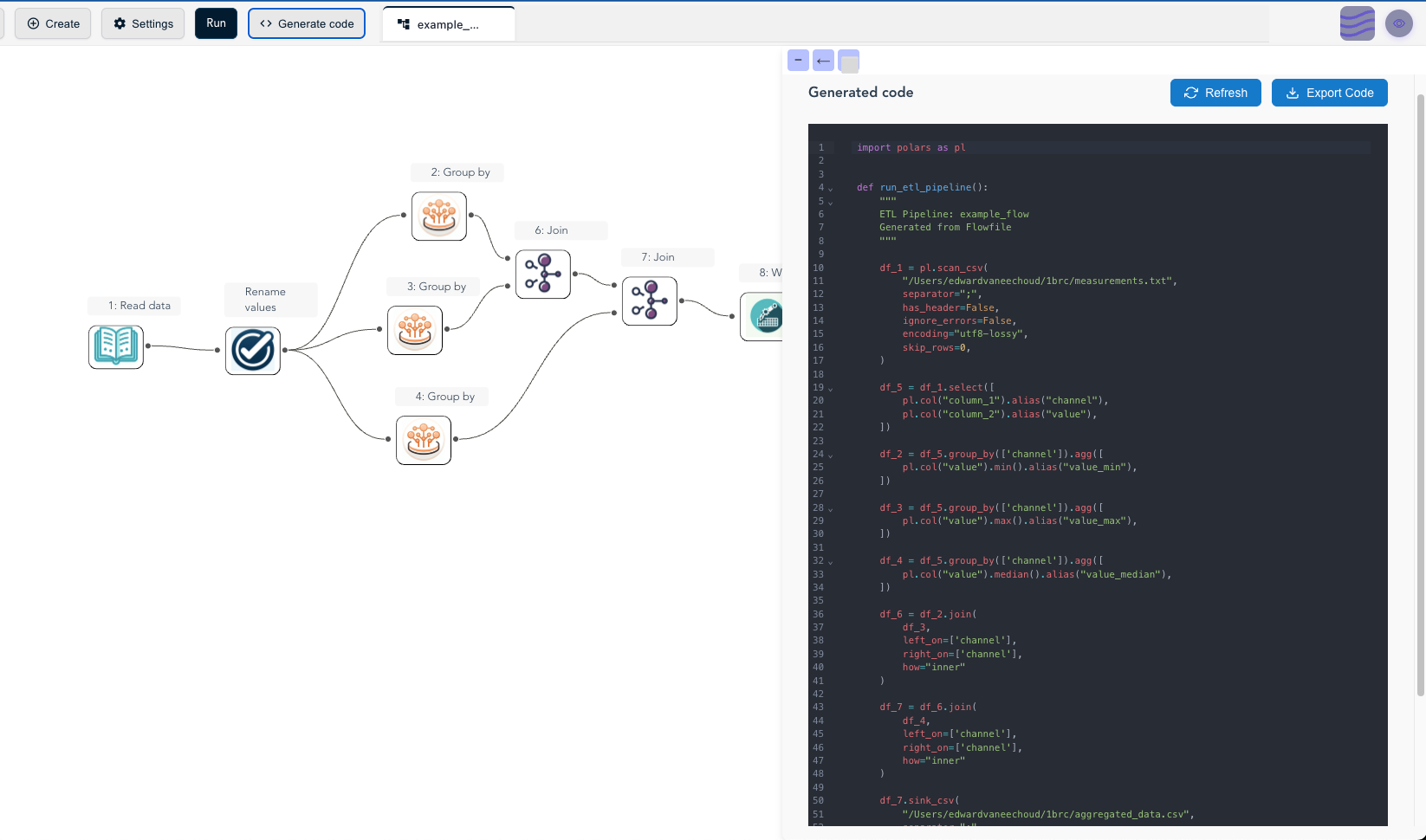
The practical implication for users: if you build a flow out of transform and file-I/O nodes and click Generate Code, what comes out is a standalone Polars script with no Flowfile dependency. You can read it, modify it, version it, and ship it to production as plain Python. (Steps that talk to a database or REST API export too, but their generated code still imports the flowfile package; catalog, cloud-storage, Kafka, and ML nodes export as FlowFrame code rather than plain Polars.) That’s the dual-interface story — visual on the way in, Polars on the way out.
If you’ve never tried Polars and want to feel the speed difference without setting anything up, the Flowfile browser demo runs a stripped-down Polars build in your browser. Load a CSV, build a pipeline, watch how fast a group-by completes. The benchmarks above stop being abstract pretty quickly.
Further reading
- Polars User Guide — official documentation, currently the best Polars resource on the web.
- What Is a Data Pipeline? — for readers who came in through “Polars vs Pandas” but are earlier in the journey.
- Demystifying Delta Lake — natural next step if you’ve decided on Polars and now want a real table format underneath it.
- The author’s architectural deep dive on dev.to — why Flowfile picked Polars over Pandas in the first place, and the trade-offs that came with that choice.
Frequently asked questions
- Is Polars faster than Pandas?
- Yes, usually by a lot — but the gap depends on the workload. On group-by, joins, and column-wise expressions over millions of rows, Polars is commonly 5–30× faster. On tiny DataFrames where the work is dominated by Python overhead, the gap collapses. On Pandas 2.2 with the PyArrow backend, the gap narrows further but Polars still wins on most analytics queries.
- Should I switch from Pandas to Polars in 2026?
- If you're starting a new project that processes more than ~100k rows or runs on a schedule, default to Polars. If you're maintaining a Pandas codebase that works, don't migrate just to migrate — the integration cost can be real. Hybrid (Polars for the heavy lifting, Pandas for the matplotlib-friendly tail) is often the right answer.
- What is lazy evaluation and why does Polars use it?
- Lazy evaluation means Polars builds a query plan from your operations and optimises it before executing. It can push filters down past joins, prune unused columns, combine projections, and stream data through in chunks. The result: less memory, less CPU, the same answer. Pandas is eager — every line runs immediately, no plan.
- Does Flowfile use Polars or Pandas?
- Polars only. The engine runs on Polars — datasets are Polars LazyFrames or DataFrames, and the transform and file-I/O nodes compile to Polars expressions. The code generator can export that core as a standalone, dependency-free Polars script (database, REST, catalog, cloud, and ML nodes export too, but as FlowFrame code or with the flowfile package still required).
- Can Polars handle data bigger than RAM?
- Yes — using its streaming engine. Polars can scan Parquet, CSV, and other sources in chunks, applying transformations as it goes, without ever loading the whole dataset into memory. This is one of the biggest practical wins over default-mode Pandas.
- What about NumPy and the rest of the scientific Python stack?
- Polars has a
to_numpy()method and good interop with PyArrow, so handing data off to NumPy, scikit-learn, or PyTorch is straightforward. Where Pandas still wins is the long tail of small libraries that consume DataFrames directly — though that gap is closing fast.