
Why Your Data Should Stay on Your Laptop
Local compute plus a built-in data catalog gives you the speed of a desktop tool and the structure of a warehouse — without sending a single row to the cloud.
TL;DR. For a long time, the trade-off in analytics was speed and convenience on your laptop versus governance and scale in the cloud. Modern local-first tools have collapsed that trade-off. With Flowfile, you get a proper data catalog — versioned tables, lineage, scheduling, time travel — running on your own laptop, against your own files, on your own terms. No data leaves your machine. No cloud bill arrives at the end of the month. And it’s faster than most people expect.
The trade-off that doesn’t have to exist
Until recently, you picked a side.
You could work fast and unstructured on your laptop with Excel, a Jupyter notebook, or a folder full of CSVs. Everything was instant. Nothing was governed. Six months later, nobody knew which file was the source of truth.
Or you could work structured but slow with a cloud warehouse — Snowflake, BigQuery, Databricks. Tables had owners. Schemas were tracked. But every query cost money, every change went through review, and your laptop’s analyst tools became a thin client to somebody else’s compute.
The trade-off was real. It is no longer real. The reason is that two things got dramatically better at the same time: laptops got powerful enough to handle real data volumes, and open table formats made governance portable.
What “local compute” actually means in 2026
When people say local-first or local compute, they mean: the application runs on your machine, the data stays on your machine, and the work happens on your CPU and RAM — not in someone else’s data centre.
Concretely, for Flowfile:
- You install it with
pip install flowfileor download a desktop app. No account, no signup. - Your files stay where they are. The tool reads
~/Documents/sales.xlsx, not a copy of it stored somewhere remote. - The Polars engine runs on your laptop. A modern MacBook Pro with 32 GB of RAM will happily process tens of millions of rows; a Linux workstation will do hundreds of millions.
- The data catalog lives in
~/.flowfile/, on your disk, encrypted at rest if you set a master key. - If you want to talk to S3, ADLS, GCS, Postgres, MySQL, SQL Server, SQLite, or DuckDB, you can — those connectors are built in. You just don’t have to.
That last point is the one that changes everything. Local-first does not mean local-only. It means local by default, with the choice to reach out when you have a reason to.
The privacy story, in concrete terms
For a lot of analysts, privacy is not a philosophical position. It is a constraint:
- HR data cannot leave the corporate VPN.
- Healthcare data cannot pass through a third-party processor.
- Internal financials are not allowed to land in a vendor’s cloud.
- Customer PII triggers contractual obligations that take a week of legal review to clear.
A local-first tool is the only way to do meaningful work on this kind of data without negotiating a six-month procurement cycle. The data already lives on the machine. The transformation happens on the machine. The output is written back to the machine. There is no upload step to audit, no vendor processor to add to the data-flow diagram, no privacy review to schedule.
This is why local-first tools have spread fastest in regulated industries. The procurement bar isn’t “is this faster than X?” — it’s “is there anywhere I am allowed to run my analysis?” Local-first answers yes.
What a data catalog does and why a folder of files is not one
If you have ever inherited a “data folder” — a shared drive full of final_v3_USE_THIS.csv and final_v3_USE_THIS_FOR_REAL.csv — you understand the problem a catalog solves.
A data catalog is a structured registry on top of your tables. For each table it tracks:
- Where it lives. Path, format, namespace.
- What’s in it. Columns, types, row count, statistics.
- Where it came from. Which flow produced it, on what schedule, from what sources (this is lineage).
- What versions exist. Every write is a new snapshot. Old snapshots are kept until you explicitly clean them up.
- Who owns it. Optional, but useful the moment more than one person touches it.
The catalog turns a folder into an asset. Instead of final_v3_USE_THIS.csv, you have analytics.sales.monthly_orders — a named table with a schema, a history, and a producer.
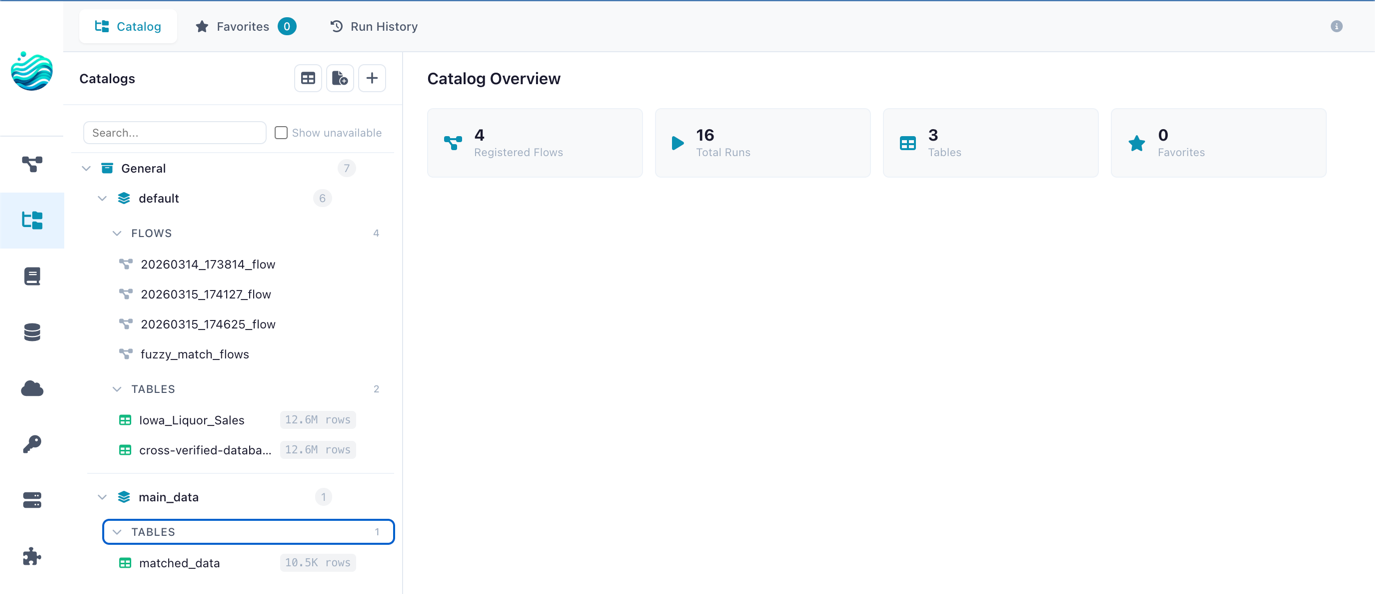
Flowfile organises tables in a two-level hierarchy borrowed from Unity Catalog: catalog → schema → table. So analytics.sales.monthly_orders means the monthly_orders table, in the sales schema, in the analytics catalog. You can have as many catalogs as you like for different projects, environments, or teams.
Why Delta Lake under the hood matters
Flowfile’s catalog is backed by Delta Lake. For most users, that’s an implementation detail — but it’s the implementation detail that makes the catalog useful.
Without Delta Lake, a “table” is just a Parquet file (or a folder of them). When you write to it, you’ve overwritten the previous version. There is no concept of a transaction. If a write half-completes, you have a corrupt table. If you want yesterday’s data, hope you have a backup.
With Delta Lake:
- Every write is atomic. A write either fully succeeds or leaves the previous version untouched. No half-written tables, ever.
- Every write is versioned. Each commit gets a version number. The full history is kept by default until you
VACUUMit. - Time travel works. You can preview exactly what the table looked like three runs ago — useful when a downstream report breaks and you need to find which write introduced the problem.
- Schema evolves safely. Adding a column doesn’t break existing readers. Dropping one is enforced as a deliberate change, not a mistake.
- Merges are transactional. Upserts (
MERGE INTOstyle) work correctly under concurrent writes.
You don’t have to think about any of this. You write to the catalog from a Flowfile run; Delta handles the rest. It is the difference between files in a folder and a table you can trust.
If you want the deeper Delta Lake explanation in plain English, read Demystifying Delta Lake.
What this combination changes for an analyst
Here is the practical effect of running a real catalog on a local machine:
- You build a flow once. Load the source files, transform them, write the output as a catalog table.
- The output is named, typed, and versioned automatically. No file-naming gymnastics. No “which one is the latest?”.
- Downstream flows reference the table by name.
analytics.sales.monthly_orders— not a path. If you move the underlying file, references don’t break. - You can schedule the flow. Hourly, daily, on a trigger when an upstream table updates. The scheduler is part of the catalog.
- When something looks wrong, you time-travel. Compare today’s snapshot to yesterday’s. Find the row count delta. Roll back if needed.
- Lineage is automatic. Looking at a table, you can see which flow produces it, and which other tables that flow consumes. No more “where did this number come from?”.
- Nothing left your laptop. All of the above happens against local storage.
That is the local-first data platform pitch in one sentence: the structure and governance of a warehouse, on your own machine, against your own data, for free.
When you should still pick the cloud
Local-first is not a religion. There are workloads that genuinely belong in the cloud:
- Multi-terabyte data. A laptop will give up before the data does. (Though “multi-terabyte” is a much higher bar than people remember — a tuned Polars query on a workstation will eat hundreds of millions of rows for breakfast.)
- Multiple concurrent writers across a team. Local-first stays local. The moment you need real concurrent access from many machines, you want a managed service.
- Always-on serving. Pipelines that need to run 24/7 with high availability live better on a server than on the laptop you close at 6pm.
For everything else — exploratory analysis, weekly reports, data cleaning, building production scripts before they get deployed elsewhere, working with sensitive data, prototyping — local-first wins on every dimension that matters.
Try it
Install Flowfile on your laptop and create your first catalog table. Or use the browser demo for a quick feel. The setup is one command. There is no account to create.
Related reads: Demystifying Delta Lake for the table-format deep dive, or Alteryx alternatives in 2026: a field guide if you’re evaluating local-first tools alongside the commercial options.
Frequently asked questions
- What does 'local-first' mean for a data tool?
- It means the application runs on your machine and your data stays on your machine. No mandatory cloud account, no upload step, no per-row pricing. You can still connect to cloud storage when you choose to — but the default is your own disk.
- What is a data catalog?
- A data catalog is a structured registry of your tables: where they live, what columns they have, who owns them, what version is current, what flow produced them. It turns a folder of Parquet files into a searchable, governed asset.
- Why does Flowfile use Delta Lake under the catalog?
- Delta Lake gives you ACID transactions, version history, time travel, and schema evolution on top of plain Parquet files. That means catalog tables are versioned automatically — you can preview yesterday's snapshot or roll back a bad write without any extra setup.
- Can I still use cloud storage if I want to?
- Yes. Flowfile has built-in connectors for S3, Azure Data Lake Storage, and Google Cloud Storage. Local-first means local by default, not local only.
- Is local compute slower than the cloud?
- For most analytics workloads, no. Modern laptops have 8–16 cores and tens of GB of RAM. Polars (Flowfile's engine) is built to use all of them. You'll be surprised how often the answer to 'do I need a cluster?' is 'no, your laptop is fine.'