
Connections, Secrets, and the Catalog in Flowfile's Python API
How Flowfile registers database and cloud-storage connections once — in Python or the UI — and references them everywhere by name, with encryption handled for you.
TL;DR. Every Python data project starts the same way: a .env file, python-dotenv, boto3 profiles, one SDK per cloud provider, passwords sprinkled through the code. Flowfile is a different shape. Connections, secrets, and catalog tables are registered once — in Python or the UI, same encrypted store — and referenced everywhere by name. Your code has no credentials. Your flow file has no credentials. Your teammate can clone the repo and run it without you DM-ing them anything.
What goes wrong with .env files
Open any Python data project and the first ten minutes of onboarding look identical:
pip install python-dotenv
cp .env.example .env
# now go find someone on Slack who has the real DB password
Then in code, somewhere near the top:
from dotenv import load_dotenv
import os

load_dotenv()
DB_HOST = os.environ["POSTGRES_HOST"]
DB_USER = os.environ["POSTGRES_USER"]
DB_PASS = os.environ["POSTGRES_PASSWORD"]
AWS_KEY = os.environ["AWS_ACCESS_KEY_ID"]
AWS_SECRET = os.environ["AWS_SECRET_ACCESS_KEY"]
SNOWFLAKE_ACCOUNT = os.environ["SNOWFLAKE_ACCOUNT"]
# ... and so on
This pattern isn’t wrong. It’s just tired. The failure modes are well-known:
- Drift. Your
.envand your teammate’s.envgradually diverge. The bug only happens on staging. - Accidental commits. You’ve seen the tweet. It happens to good engineers.
- Logs. Somebody adds a debug print statement.
POSTGRES_PASSWORDends up in CloudWatch. - Per-provider stories. AWS wants
~/.aws/credentialsor env vars. Azure wants its own SDK config. Snowflake has a separate.toml. GCS wants a service account JSON. Every provider invents its own “standard.” - Sharing. Onboarding a new teammate is a 20-minute conversation about which secrets you need and where to put them.
The .env file was an improvement over committing passwords to Git in 2010. In 2026 it’s become the floor, and most data tools have no opinion about how to raise it.
Register once, reference by name
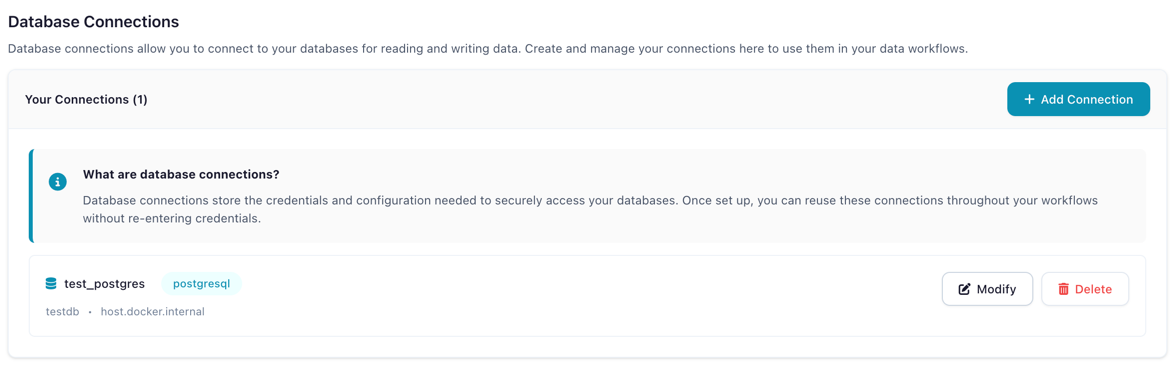
Here’s the first half of what Flowfile’s Python API looks like. We’ll register a PostgreSQL connection:
from pydantic import SecretStr
import flowfile as ff

ff.create_database_connection(
    connection_name="prod_db",
    database_type="postgresql",
    host="db.example.com",
    port=5432,
    database="analytics",
    username="analyst",
    password=SecretStr("secure_password"),
    ssl_enabled=True,
)
Three things happen here:
- The password is wrapped in Pydantic’s
SecretStr, so it never appears in logs,repr()output, or tracebacks. - Flowfile encrypts the password with Fernet and stores it in a local SQLite database — not in a file you can accidentally commit.
- The connection is registered under the name
prod_db. That name is the only thing you’ll ever reference again.
You run this once — either in a one-off setup script, or (more commonly) by clicking through the visual Database view on first install. From then on, your actual data code looks like this:
orders = ff.read_database(
    "prod_db",
    table_name="orders",
    schema_name="public",
)

# Or with a query
active_users = ff.read_database(
    "prod_db",
    query="SELECT id, email FROM users WHERE active = true",
)
Notice what’s missing: no host, no port, no credentials. The only configuration travelling through your pipeline is a string — "prod_db". That string can land in Git, in a shared flow file, in a Slack paste, in a screenshot — none of them leak anything.
Writing back to the database looks identical:
transformed.write_database(
    connection_name="prod_db",
    table_name="processed_orders",
    schema_name="public",
    if_exists="append",
)
Cloud storage takes the same shape
The surprise is that this isn’t just a database thing. The same pattern applies to S3, Azure Data Lake Storage, and Google Cloud Storage:
ff.create_cloud_storage_connection(
    ff.FullCloudStorageConnection(
        connection_name="data-lake",
        storage_type="s3",
        auth_method="access_key",
        aws_region="us-east-1",
        aws_access_key_id="AKIA...",
        aws_secret_access_key=SecretStr("wJal..."),
    )
)

df = ff.scan_parquet_from_cloud_storage(
    "s3://bucket/data.parquet",
    connection_name="data-lake",
)

df.write_parquet_to_cloud_storage(
    "s3://bucket/output.parquet",
    connection_name="data-lake",
)
No boto3.client("s3"). No AWS_ACCESS_KEY_ID environment variable. No ~/.aws/credentials file to manage. No separate code path for Azure or GCS — you swap storage_type="s3" for "azure" or "gcs" and the rest of your pipeline doesn’t care.
This is the “hides the complexity” part. Under the hood there’s still s3fs, azure-storage-blob, and google-cloud-storage. You just don’t have to choose between them at the call site.
The catalog writes Delta Lake for you
The same shape again, this time for the data catalog:
transformed.write_catalog_table(
    table_name="analytics.sales.processed_orders",
    write_mode="overwrite",    # or "append", "upsert", "update", "delete"
    merge_keys=["order_id"],   # required for upsert/update/delete
)

# Later, in the same or a different flow:
df = ff.read_catalog_table("analytics.sales.processed_orders")
What you’re not thinking about: the table is stored as Delta Lake. Every write is a versioned commit. Schema enforcement is automatic. Time travel is there if you want to preview yesterday’s snapshot. MERGE-style upserts are one keyword. Lineage between the producer flow and this table is tracked automatically and surfaces in the catalog UI.
You didn’t write a Delta commit. You didn’t import deltalake. You didn’t pick a partition strategy. You wrote write_catalog_table(...) and everything else happened.
This is what “hides the complexity” looks like when it’s done right: you still get the power of the modern open format, you just don’t have to know the format’s API.
Python and the visual canvas share the same store
Here’s the bit that makes this genuinely useful rather than just cute:
- Create a connection in the visual UI (Database view → New Connection → fill in the form) → it’s available to
ff.read_database("...")in Python the next time you importflowfile. - Create a connection in Python with
ff.create_database_connection(...)→ it shows up in the visual Database view on the next refresh. - Same for cloud storage connections, same for catalog tables.
There is no “Python store” and “UI store.” There is one encrypted SQLite store on disk, and both surfaces read and write it. An analyst on your team can click through the UI to set up their credentials; a developer on the same team can use ff.read_database(...) in a Jupyter notebook; they’re both referencing the same connection named prod_db with no duplication and no drift.
Code that documents itself
One more detail that earns this post’s “eloquent” framing: every transformation in Flowfile’s Python API accepts a description= keyword argument, and that description appears as the node label in the visual graph.
result = (
    ff.from_dict({
        "id": [1, 2, 3, 4, 5],
        "category": ["A", "B", "A", "C", "B"],
        "value": [100, 200, 150, 300, 250],
    })
    .filter(ff.col("value") > 120, description="Drop low-value rows")
    .with_columns(
        [
            (ff.col("value") * 1.1).alias("adjusted_value"),
            ff.when(ff.col("category") == "A").then(ff.lit("Premium"))
              .when(ff.col("category") == "B").then(ff.lit("Standard"))
              .otherwise(ff.lit("Basic"))
              .alias("tier"),
        ],
        description="Compute adjusted value and pricing tier",
    )
    .group_by("tier")
    .agg(
        [
            ff.col("adjusted_value").sum().alias("total_value"),
            ff.col("id").count().alias("count"),
        ]
    )
)

df_result = result.collect()
ff.open_graph_in_editor(result.flow_graph)
Two things to notice.
First, the chain reads like English. filter, with_columns, group_by, agg — each verb takes an expression and returns a frame. That last .collect() is the Polars idiom for “actually run this”; everything before it is a lazy description of the work. Polars users will find this entirely familiar.
Second, those description= strings aren’t just comments. ff.open_graph_in_editor(result.flow_graph) opens this pipeline in the visual canvas, with each node labeled by the description you wrote. Your Python code becomes your visual graph becomes your documentation. One source of truth, three presentations.
End-to-end in fifteen lines
Put the whole developer experience together:
import flowfile as ff

# Connect (once, possibly months ago in the UI)
orders = ff.read_database("prod_db", table_name="orders")
customers = ff.scan_parquet_from_cloud_storage(
    "s3://analytics-lake/customers.parquet",
    connection_name="data-lake",
)

# Transform
enriched = (
    orders
    .join(customers, on="customer_id", how="left", description="Attach customer region")
    .filter(ff.col("order_date") >= "2026-01-01", description="Current year only")
    .group_by("region")
    .agg(
        [
            ff.col("amount").sum().alias("total_spend"),
            ff.col("order_id").count().alias("num_orders"),
        ]
    )
    .sort("total_spend", descending=True)
)

# Land
enriched.write_catalog_table("analytics.sales.regional_summary", write_mode="overwrite")
Count the credentials in that snippet. Zero. Count the provider-specific imports. Zero. Count the comments explaining what each step does. Zero — the description= strings already did it.
Under the hood (the honest version)
None of this is magic. Here’s what’s actually happening:
- Encryption. Passwords are encrypted with Fernet, which is AES-128-CBC with an HMAC-SHA256 tag. The master key is auto-generated on first use and stored in your OS keyring on the desktop, or provided via the
FLOWFILE_MASTER_KEYenvironment variable inside Docker. - Storage. The encrypted connections and the catalog metadata live in a local SQLite database under
~/.config/flowfile/(or the OS equivalent). On Docker deployments, this lives in a mounted volume. - Connection references. Flow files (YAML/JSON on disk) contain only connection names — never encrypted blobs, never plaintext credentials. That’s what makes them safe to commit and share.
The honest caveat: there isn’t a dedicated ff.secrets.set(...) Python API yet for arbitrary key/value secrets. For database and cloud-storage credentials — the cases most users actually run into — the create_*_connection functions encrypt for you automatically. For other secrets, today, you use the Secrets screen in the UI. A programmatic secrets API is on the roadmap.
Code generation completes the loop
If you build a pipeline visually and then click “Generate Code”, what comes out is a standalone Python script that uses the same ff.* API shown above. No hidden framework. No proprietary DSL. No magic runtime. You get plain Python you could drop into a Kubernetes CronJob or a Lambda, and it references your connections by the same name it did in the UI.
This is the part that makes the whole design honest: the Python API and the visual canvas aren’t two separate products. They’re two views on the same code.
When .env still makes sense
Be fair to the old ways. There are still good reasons to reach for os.environ:
- Secrets that live outside Flowfile — an API key for a monitoring tool, a Slack webhook, a PagerDuty token.
- CI/CD variables that your pipeline reads alongside Flowfile-managed credentials.
- Legacy scripts that predate your adoption of Flowfile and aren’t worth migrating.
The argument in this post isn’t “never use .env.” It’s “you probably don’t need it for your database, your cloud storage, and your catalog tables.” That’s most of the credentials a typical data pipeline accumulates. What’s left is small, and os.environ is fine for it.
Try it
pip install flowfileCreate a connection once in Python or in the UI. Use it everywhere. Stop committing .env.example files that drift from reality.
- Browser demo — no install, a 20+ node subset, see the canvas.
- Install locally — full API, all 30+ nodes, catalog, scheduling.
- GitHub — source, issues, releases.
Related reads: Schema as a Contract for the other half of making a flow safe to hand over, Why Your Data Should Stay on Your Laptop for the local-first argument in depth, Demystifying Delta Lake for the format powering the catalog, and Polars vs Pandas in 2026 for the engine that makes the Python API fast.
Frequently asked questions
- How are secrets actually encrypted in Flowfile?
- Connection passwords are encrypted with Fernet (AES-128-CBC with an HMAC-SHA256 authenticity tag, per the Fernet spec). A master key is generated on first use and stored either in the OS keyring, at ~/.config/flowfile/.secret_key on the desktop, or injected via the FLOWFILE_MASTER_KEY environment variable inside Docker. The encrypted secrets themselves live in the local SQLite store that powers the catalog.
- Where are connections stored on disk?
- On the desktop, in the Flowfile config directory under your home folder (typically ~/.config/flowfile/ on Linux, ~/Library/Application Support/flowfile/ on macOS, %APPDATA%\flowfile\ on Windows). In Docker deployments, the same SQLite store lives in a mounted volume and the master key comes from a Docker secret. Your flow files and Python scripts contain only connection names — never the credentials themselves.
- Can I still use .env files if I want to?
- Yes. Python is Python — nothing in Flowfile blocks you from loading .env with python-dotenv, reading os.environ, or using your own secret manager. The point isn't that .env is bad; it's that for the common cases (databases, cloud storage, catalog tables) you don't need it anymore.
- How do I share a flow with a teammate without sharing credentials?
- Send them the flow file. It references connections by name (e.g. 'prod_db', 'data-lake'), not by credentials. On their machine, they run create_database_connection once — in Python or in the UI — with their own credentials, using the same connection_name. The flow opens and runs. No Slack DMs with passwords, no committed .env by mistake.
- Does this work identically in Python and the visual canvas?
- Yes — they share the same encrypted store. A connection created in the DatabaseView UI is visible to ff.read_database() in Python, and vice versa. The same is true for cloud storage connections and catalog tables. One state, two surfaces.
- Can I manage arbitrary secrets from Python, not just connection passwords?
- Arbitrary secrets (API tokens, custom credentials outside a connection) are currently created and managed through the visual Secrets screen. When you pass a password into create_database_connection() or create_cloud_storage_connection() in Python, Flowfile encrypts it for you automatically — that covers the common cases. A dedicated ff.secrets Python API for arbitrary key/value secrets is on the roadmap but isn't there yet.
- Is this different from connection pooling?
- Yes. Connection pooling is a query-time concern — how many database sockets your process keeps open. Flowfile's connection model is a credential-management concern — how you register a connection once and reference it by name forever after. They're complementary; Flowfile uses connectorx for the actual database I/O, which handles pooling internally.