
Big Data Is Dead — Why Your Laptop Is Probably Big Enough
The 'big data' era was real, but it ended quietly. Hardware caught up, working sets shrank, and single-node engines like Polars and DuckDB beat the cluster on most workloads.
TL;DR. “Big data” as a default architecture is dead. Hardware caught up, working sets turned out to be smaller than people assumed, and single-node engines like Polars and DuckDB now run on a laptop what used to need a 12-node Spark cluster. Real big data — the kind that actually requires a distributed system — still exists, but it’s a specialised problem, not the default. For the median analytics workload in 2026, your laptop is the right answer.
The essay that named the shift
In February 2023, Jordan Tigani — formerly a foundational engineer on Google BigQuery, now CEO of MotherDuck — published an essay called “Big Data Is Dead”. It was one of those rare pieces that names a shift the industry had been quietly experiencing but hadn’t yet articulated.
The argument, in a sentence: most organisations don’t actually have big data — they have medium data being processed by big-data tools designed for problems they don’t have.
Tigani backed this with numbers from inside BigQuery. The headline finding: the median BigQuery query scanned less than 100 MB. The 90th percentile scanned less than 1 GB. Even at the 99th percentile, the typical scan was around 10 GB. None of these are “big”.
If that’s true at one of the largest cloud warehouses on earth, the implication for everyone else is uncomfortable: a lot of teams adopted big-data architecture for problems that never needed it.
This post is about what changed, why, and what the right architecture looks like in the post-big-data world.
What “big data” used to mean
Roll back to roughly 2010–2015. The “big data” stack meant Hadoop or, slightly later, Spark. The architecture was distributed by necessity:
- A single server had maybe 64 GB of RAM if you were lucky.
- Disks were spinning rust at ~100 MB/s.
- A single CPU core was the unit of compute, and parallelism on one box was awkward.
- A “large” dataset (a few terabytes) genuinely couldn’t fit anywhere except across many machines.
So you built a cluster. You wrote MapReduce. You learned YARN. You debugged shuffle failures at 2am. The complexity was the price of being able to process data at all.
The premise of the era was: data grows faster than hardware, so distribution is the only path forward.
That premise turned out to be wrong.
What changed
Three things happened simultaneously over the last decade.
Hardware scaled past most people’s data. A typical analyst laptop in 2026 ships with 16–32 GB of RAM and an NVMe drive that reads at gigabytes per second; a high-end workstation can be specced with 128 GB or more, and a cloud VM with 512 GB of RAM rents for a few dollars an hour. A modest cloud VM today has more compute than a 10-node Hadoop cluster from 2013. Working sets grew, but not as fast as the machines that hold them.
Single-node engines got dramatically faster. Polars (Rust, columnar, vectorised, multi-core, lazy) and DuckDB (a single-binary OLAP engine that runs in your process) reset everyone’s expectations of what one machine can do. A Polars group-by over a hundred million rows on a 32 GB laptop finishes in seconds. DuckDB will stream-read a Parquet dataset many times the size of RAM and still answer your aggregation. The work distributed systems were doing because they had to, single-node engines now do because they’re fast enough.
Working sets turned out to be small. This is the surprise. People assumed they had big data because they had big storage. But the actual queries — the ones that produce reports, dashboards, and decisions — almost always touch a tiny slice. Recent data, current quarter, one customer segment, one product line. The historical archive is huge; the working set isn’t.
The combined effect: the situations where distribution is necessary shrunk fast, and the situations where it’s easier shrunk too — because single-node engines became simpler, faster, and cheaper than the alternative.
What “big” actually means now
“Big” used to mean “more than one machine can handle.” That’s still the right definition; the bar has just moved.
Here is a rough 2026 calibration. Numbers are working-set size — what your query actually touches, not the size of the archive it lives in:
| Working set | Where it lives well | Notes |
|---|---|---|
| Up to ~1 GB | Anywhere | Pandas, Polars eager, even a notebook on a phone |
| 1 GB – 10 GB | Comfortable on a 16–32 GB laptop | Polars or DuckDB in eager mode, tens to a few hundred million rows |
| 10 GB – 50 GB | Single laptop with care | Lazy/streaming engines, columnar formats (Parquet), filters and column pruning matter |
| 50 GB – 500 GB | Beefy workstation or a rented cloud VM | 64–256 GB RAM box; single-node still wins on simplicity, but it’s not click-and-go |
| 500 GB – several TB | Big cloud VM or warehouse | Genuine judgment call: vertical scaling vs warehouse depends on concurrency and cost |
| Multi-TB continuous, high concurrency | Distributed warehouse / lakehouse | This is what big-data tooling was actually built for |
Most analytics workloads — the things real analysts and data engineers do every day — sit in the first three rows. The big-data architecture was designed for the bottom row. Adopting it for the top three is the mistake the 2010s made.
The “shape” of the median workload
If you instrumented your team’s actual queries for a month, you’d almost certainly find:
- Most queries filter on a handful of recent dates.
- Most queries select a handful of columns out of dozens.
- Most queries aggregate to fewer than 10,000 output rows.
- Most queries are answered by reading less than 1% of the underlying table.
This is not a critique. It’s how analytics works. The point is that the shape of these queries — narrow, recent, aggregated — is exactly the shape single-node engines optimise for. Columnar storage means selecting a few columns is free. Predicate pushdown means filtering on dates skips most files. Lazy evaluation means the engine sees the whole query before reading a single byte.
Distributed systems give you horizontal scale. Vertical efficiency on the right shape of query gives you most of what you needed scale for, without the operational cost.
What you give up by going local
It’s not free, and it’s not always the right call. The legitimate trade-offs:
- Concurrency. A laptop runs one query at a time well. A warehouse runs hundreds. If you have many analysts hitting the same data simultaneously, that’s a server problem, not a laptop problem.
- Always-on serving. Pipelines that need to run 24/7 with five-nines availability live better on a server than on the machine you close at 6pm.
- Datasets that genuinely don’t fit. The remaining “real big data” — petabyte-scale historical archives, streaming firehoses with TB/day ingest, cross-team shared assets — still wants a distributed home.
- Multi-machine collaboration. Local-first means local. The moment data needs to move between many machines transactionally, you want a managed service.
For everything else — exploratory analysis, ETL, weekly reports, building production scripts before they get deployed elsewhere, working with sensitive data, prototyping, the work that fills the median data team’s week — local wins on cost, speed, simplicity, and ownership.
What replaces “big data” architecture
The post-big-data stack looks roughly like this:
- Storage in an open format (Parquet, or Delta Lake / Iceberg if you need versioning and ACID).
- A single-node engine for the analyst seat — Polars, DuckDB, or a tool built on them.
- The same open format readable from a warehouse — Snowflake, BigQuery, Databricks — when (and only when) you need shared concurrent access or scale beyond a node.
- Distributed compute as an exception, not a default. Reach for it for the workloads that genuinely need it; everything else stays simple.
Notice what’s missing: a permanent commitment to a particular vendor, a particular cluster topology, or a particular scale assumption. The data lives in an open format. The compute moves to wherever fits the question. Most of the time that’s a laptop.
This is the shape of “lakehouse” architectures, and the shape of local-first data platforms like Flowfile. It assumes single-node is the default and distribution is the escape hatch — the inverse of what the 2010s assumed.
How Flowfile fits
Flowfile is built on this premise.
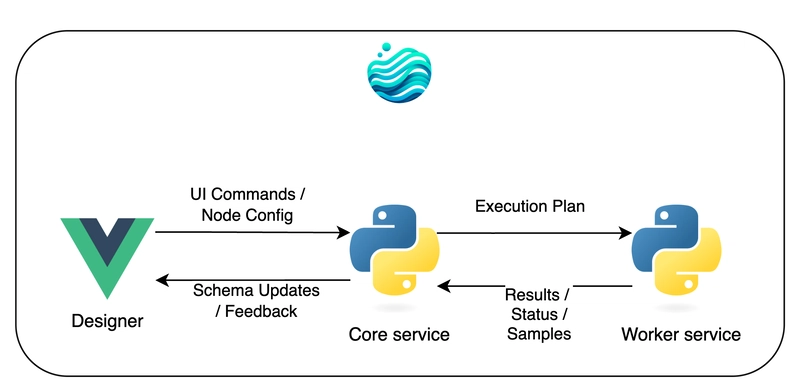
- Polars under the hood, so it’s fast on the kinds of queries analysts actually write — see the Polars vs Pandas comparison for the engine details.
- Local by default, runs on your laptop, no cluster, no account, no cloud bill.
- Delta Lake-backed catalog so your tables have versioning and time travel without a server.
- Cloud storage and database connectors built in, so when you do need to reach beyond your machine, it’s a connection, not a migration.
- Built-in scheduling so a flow can run on an interval or trigger when an upstream catalog table updates — without needing a separate orchestrator.
The product is a bet on Tigani being right: that for most teams, most of the time, the right answer is single-node, fast, and local — not distributed by default.
Further reading
- Big Data Is Dead — Jordan Tigani’s original essay, still worth reading in full.
- Why Your Data Should Stay on Your Laptop — the local-first pitch in depth.
- Polars vs Pandas in 2026 — what makes single-node engines fast enough to make this argument credible.
- Demystifying Delta Lake — the table format that ties open storage to single-node compute without giving up governance.
Frequently asked questions
- Is big data really dead?
- The hype is dead, the architecture is dead for most teams, but the term still describes a real-but-rare class of problem. The shift is that 'big data' tooling is no longer the default — it's a specialised choice for the small minority of workloads that actually exceed what a single node can handle.
- What counts as 'big data' in 2026?
- There's no fixed threshold, but a useful rule of thumb: if your working set fits in your machine's RAM — typically 16–64 GB on a modern laptop — and your queries touch low tens of GB at most, it's not big data. If you can run your query in DuckDB or Polars on a single machine, it's not big data. Real big data starts when even a beefy single node, scaled vertically, runs out of headroom.
- Why did big data become 'dead' so quickly?
- Three things happened at once: hardware scaled (mainstream laptops shipping with 16–64 GB of RAM, NVMe drives at gigabytes per second, cheap cloud VMs with hundreds of GB of RAM available by the hour), single-node engines got dramatically faster (Polars, DuckDB, Velox), and people noticed that most queries scan a tiny fraction of any 'big' table. The combination collapsed most use cases that previously needed a cluster.
- Don't I still need a cluster for analytics?
- Probably not. Analyses of real warehouse usage (most famously Jordan Tigani's BigQuery data) show that the median query scans well under 100 MB, and the 99th percentile rarely exceeds 10 GB. Both fit comfortably on a laptop. Clusters remain the right answer for very large data, very high concurrency, or always-on serving — but those are the exception, not the rule.
- What about Spark, Snowflake, and Databricks?
- They are excellent for the workloads that actually need them — large-scale transformation, multi-team concurrent access, governed enterprise data. They are usually overkill for individual analysts, small teams, and exploratory work. The mistake of the 2010s was assuming everyone needed warehouse-scale tooling. The correction of the 2020s is admitting most don't.
- How does Flowfile fit into this?
- Flowfile is built for the post-big-data world: local-first, Polars-powered, runs on your laptop, scales to tens of millions of rows without breaking a sweat. When (and only when) you genuinely need cloud storage or a distributed engine, the connectors are there. The default is your machine, not someone else's.